


Notice
Rust has released built-in drone storage as of the October 2025 Rust update. This plugin has not been updated yet. If you have ideas on how this plugin can be continued, let us know in the Help/Discussions tab.
Features
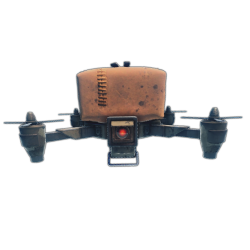
- Allows players to deploy a small stash onto RC drones
- Allows the stash to receive a lock if its owner has permission
- Allows configuring stash capacity based on permissions of the drone owner
- Allows drone controllers to remotely view the stash contents, drop them at the drone position, and lock or unlock the stash using UI buttons at the computer station
- Redirects damage from the stash to the drone
- Drops the stash contents when the drone is destroyed
- Allows removing the stash with the Remover Tool plugin
Known issues
Since the March 2023 Rust update, drones now sway in the wind, but attached entities do not sway. This causes undesirable visuals to players observing a drone that is being controlled. There is no known fix at this time.
Permissions
Deployment permissions
dronestorage.deploy-- Allows the player to deploy a stash onto a drone using thedronestashcommand.dronestorage.deploy.free-- Allows using thedronestashcommand for free (no stash item required).dronestorage.autodeploy-- Drones deployed by players with this permission will automatically have a stash, free of charge.- Not recommended if you want to allow players to deploy other attachments such as auto turrets since they are incompatible.
dronestorage.lockable-- Drone stashes deployed by players with this permission may have a code lock or key lock deployed to them.
Note: In order for manual or automatic deployment to work, the player will need permission to at least 1 storage capacity (see the Capacity permissions section below).
UI Permissions
Players with the following permissions will see UI buttons while remotely controlling a drone at a computer station.
dronestorage.viewitems-- Allows remotely viewing the stash contents.dronestorage.dropitems-- Allows remotely dropping the stash contents at the drone position.dronestorage.togglelock-- Allows remotely locking and unlocking the stash, if it has an attached lock.
Note: The drone controller is prevented from remotely interacting with the items in the stash.
Capacity permissions
The following permissions come with this plugin's default configuration. Granting one to a player determines the capacity of stash containers they deploy onto drones.
dronestorage.capacity.6-- 1 rowdronestorage.capacity.12-- 2 rowsdronestorage.capacity.18-- 3 rowsdronestorage.capacity.24-- 4 rowsdronestorage.capacity.30-- 5 rowsdronestorage.capacity.36-- 6 rowsdronestorage.capacity.42-- 7 rowsdronestorage.capacity.48-- 8 rows
You can add more capacity amounts in the plugin configuration (CapacityAmounts), and the plugin will automatically generate permissions of the format dronestorage.capacity.<amount> when reloaded. If a player has permission to multiple capacity amounts, the highest will apply.
Commands
dronestash-- Deploys a stash onto the drone the player is looking at, consuming a stash item from their inventory unless they have permission for free stashes.
Configuration
Default configuration:
{
  "TipChance": 25,
  "AssignStorageOwnership": true,
  "CapacityAmounts": [
    6,
    12,
    18,
    24,
    30,
    36,
    42,
    48
  ],
  "DisallowedItems": [],
  "DisallowedSkins": [],
  "UISettings": {
    "AnchorMin": "0.5 1",
    "AnchorMax": "0.5 1",
    "OffsetMin": "0 -75",
    "OffsetMax": "0 -75",
    "Buttons": {
      "Spacing": 25,
      "Width": 85,
      "Height": 26,
      "TextSize": 13,
      "ViewButtonColor": "0.44 0.54 0.26 1",
      "ViewButtonTextColor": "0.97 0.92 0.88 1",
      "DropButtonColor": "0.77 0.24 0.16 1",
      "DropButtonTextColor": "0.97 0.92 0.88 1",
      "LockButtonColor": "0.8 0.4 0 1",
      "LockButtonTextColor": "0.97 0.92 0.88 1",
      "UnlockButtonColor": "0.8 0.4 0 1",
      "UnlockButtonTextColor": "0.97 0.92 0.88 1"
    }
  }
}
TipChance(0-100) -- Chance that a tip message will be shown to a player when they deploy a drone, informing them that they can use the/dronestashcommand. Only applies to players with thedronestorage.deploypermission who do not have thedronestorage.autodeploypermission.AssignStorageOwnership(trueorfalse) -- Determines whether deploying a stash onto a drone will set you as the stash owner. This is relevant if you use the Prevent Looting plugin because it will prevent other players from opening the stash if ownership is set. Note: Regardless of what you set this option to, the computer station UI buttons to view and drop the stash contents are not affected by stash ownership.CapacityAmounts-- List of numbers used to generate permissions of the formatdronestorage.capacity.<amount>(see permissions section).DisallowedItems-- List of item short names (like"autoturret") to disallow in drone stashes.DisallowedSkins-- List of item skin ids (numbers) to disallow in drone stashes.UISettings-- Options to control the display of the UI.- Note: It is not possible to position the UI relative to the computer station UI consistently for all resolutions because modded UIs use scaling whereas the computer station UI uses the same fixed pixel offsets for all resolutions.
Localization
{
  "UI.Button.ViewItems": "View Items",
  "UI.Button.DropItems": "Drop Items",
  "UI.Button.LockStorage": "Lock",
  "UI.Button.UnlockStorage": "Unlock",
  "Tip.DeployCommand": "Tip: Look at the drone and run <color=yellow>/dronestash</color> to deploy a stash.",
  "Info.StashName": "Drone Stash",
  "Error.NoPermission": "You don't have permission to do that.",
  "Error.BuildingBlocked": "Error: Cannot do that while building blocked.",
  "Error.NoDroneFound": "Error: No drone found.",
  "Error.NoStashItem": "Error: You need a stash to do that.",
  "Error.AlreadyHasStorage": "Error: That drone already has a stash.",
  "Error.IncompatibleAttachment": "Error: That drone has an incompatible attachment.",
  "Error.DeployFailed": "Error: Failed to deploy stash.",
  "Error.CannotPickupDroneWithItems": "Cannot pick up that drone while its stash contains items."
}
FAQ
How do I click the UI buttons for viewing or dropping the stash contents?
While controlling a drone, press the Esc key to make the cursor appear. When you want to control the drone again, simply click anywhere on the screen.
Recommended compatible plugins
Drone balance:
- Drone Settings -- Allows changing speed, toughness and other properties of RC drones.
- Targetable Drones -- Allows RC drones to be targeted by Auto Turrets and SAM Sites.
- Limited Drone Range -- Limits how far RC drones can be controlled from computer stations.
Drone fixes and improvements:
- Better Drone Collision -- Overhauls RC drone collision damage so it's more intuitive.
- Auto Flip Drones -- Auto flips upside-down RC drones when a player takes control.
- Drone Hover -- Allows RC drones to hover in place while not being controlled.
Drone attachments:
- Drone Lights -- Adds controllable search lights to RC drones.
- Drone Turrets -- Allows players to deploy auto turrets to RC drones.
- Drone Storage (This plugin) -- Allows players to deploy a small stash to RC drones.
- Ridable Drones -- Allows players to ride RC drones by standing on them or mounting a chair.
Developer Hooks
OnDroneStorageDeploy
object OnDroneStorageDeploy(Drone drone, BasePlayer optionalDeployer)
- Called when a stash container is about to be deployed onto a drone
- Returning
falsewill prevent the stash container from being deployed - Returning
nullwill result in the default behavior
Note: The BasePlayer argument will be null if the container is being deployed automatically (not via the dronestash command).
OnDroneStorageDeployed
void OnDroneStorageDeployed(Drone drone, StorageContainer stash, BasePlayer optionalDeployer)
- Called after a stash container has been deployed onto a drone
- No return behavior
Note: The BasePlayer argument will be null if the container was deployed automatically (not via the dronestash command).
OnDroneStorageDrop
object OnDroneStorageDrop(Drone drone, StorageContainer stash, BasePlayer optionalPilot)
- Called when a drone's stash contents are about to be dropped
- Returning
falsewill prevent the stash contents from being dropped - Returning
nullwill result in the default behavior
Note: The BasePlayer argument will be null if the stash contents are being dropped because the drone was destroyed (not via the pilot intentionally dropping it).
OnDroneStorageDropped
void OnDroneStorageDropped(Drone drone, StorageContainer stash, DroppedItemContainer dropContainer, BasePlayer optionalPilot)
- Called after a drone's stash contents have been dropped
- No return behavior
Note: The BasePlayer argument will be null if the stash contents were dropped because the drone was destroyed (not via the pilot intentionally dropping it).
Permission is hereby granted, free of charge, to any person obtaining a copy
of this software and associated documentation files (the "Software"), to deal
in the Software without restriction, including without limitation the rights
to use, copy, modify, merge, publish, distribute, sublicense, and/or sell
copies of the Software, and to permit persons to whom the Software is
furnished to do so, subject to the following conditions:
The above copyright notice and this permission notice shall be included in all
copies or substantial portions of the Software.
THE SOFTWARE IS PROVIDED "AS IS", WITHOUT WARRANTY OF ANY KIND, EXPRESS OR
IMPLIED, INCLUDING BUT NOT LIMITED TO THE WARRANTIES OF MERCHANTABILITY,
FITNESS FOR A PARTICULAR PURPOSE AND NONINFRINGEMENT. IN NO EVENT SHALL THE
AUTHORS OR COPYRIGHT HOLDERS BE LIABLE FOR ANY CLAIM, DAMAGES OR OTHER
LIABILITY, WHETHER IN AN ACTION OF CONTRACT, TORT OR OTHERWISE, ARISING FROM,
OUT OF OR IN CONNECTION WITH THE SOFTWARE OR THE USE OR OTHER DEALINGS IN THE
SOFTWARE.