I've seen Servers with multiple lines in their loading messages. Does anyone know how to accomplish this? 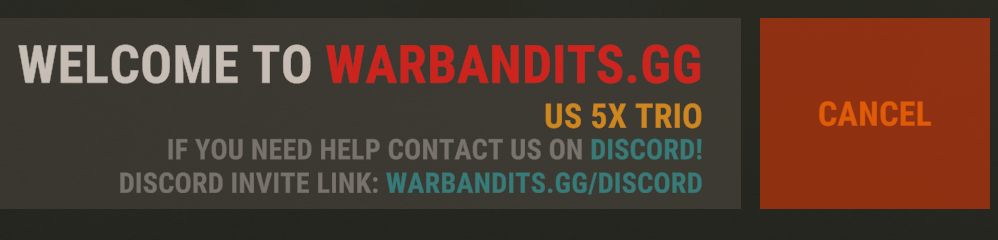
How to add more lines?
did you work this out ? i will like to know how todo that
Nope, wasnt able to get this to work :(
Use <br> to make a new line. Seems to a have limit though.
thank you give this go
Thank you, this worked!
i have not worked it out lol can someone give me a example please
Here is an example of the formatting (This will give you 4 lines);
"TopStatus":"<size=30>Test Server<br><size=16>PVP",
"Bottom Status": Join our Discord! LinkHere/< br><color=#ffb300>Purchase VIP</color> LinkHere/"
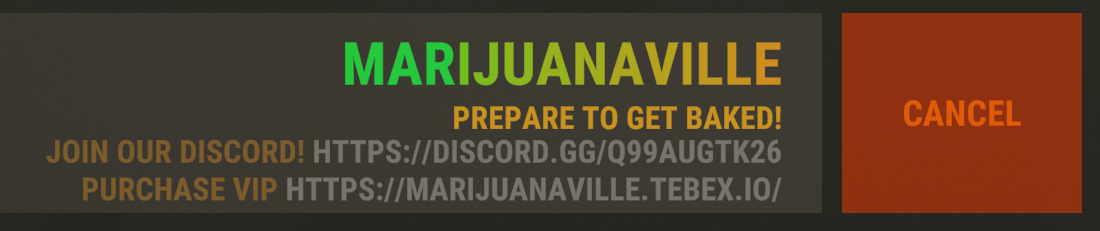
thank you so much
Why did no one tag me on this i could have replied and helped, but yes that is correct and how we do it as well as shown in the example at the start of the thread.
its not working for me :(
DM me your config and I'll see if i can get it working for you.Warkingz
its not working for me :(
Anyone managed to get it to 4 lines? I tried but can only get 3 lines.
And also how do they get the colourful gradient in the server name? tried alot different color codes just can't manage to get it.
thx
my loadingmessages.json
{
"Text Display Frequency (Seconds)": 0.3,
"Enable Messages Cyclicity": false,
"Use Random Cyclicity (Instead of sequential)": false,
"Cycle Messages Every ~N Seconds": 3.0,
"Messages": [
{
"Top Status": "<color=#0099ff>RUPTURE GAMING!</color><br>HIIII",
"Bottom Status": <color=white>USE</color><color=red> /info</color><color=white> in-game for commands!</color><br>
<color=white><br>Discord.gg/QhcdDTsTqX</color>"
},
{
"Top Status": "<color=#0099ff>RUPTURE GAMING!</color><br>BYEEE",
"Bottom Status": <color=white>X2 GATHER/SMELTING/CRAFTING!<br>
</color><color=white><br>PLEASE BE PATIENT...</color>"
}
],
"Enable Queue Messages": true,
"Queue Messages": [
{
"Top Status": "<color=#ff0>You're in queue...</color>",
"Bottom Status": "<color=#9cf>{AHEAD} players ahead of you.</color>"
},
{
"Top Status": "<color=#ff0>You're in queue...</color>",
"Bottom Status": "<color=#ff0>{BEHIND} players behind you.</color>"
}
],
"Last Message (When entering game)": {
"Top Status": "<color=#ff0>Welcome to our server!</color>",
"Bottom Status": "<color=#060>Entering game...</color>"
}
}
@kianleroux I just sent you a DM. Let me know if that config works for you.
For the gradient, you need to set a color per letter.
For the gradient, you need to set a color per letter.