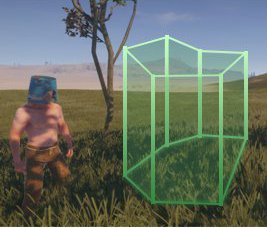



Note that the [B]polygon should be a convex![/B] Not concave!
To add a point press "[I]USE[/I]" button (default is "[I]E[/I]")
[B]Chat commands:[/B][LIST][][QUOTE]/rect [B]add [/B]<number> [fixed] [name][/QUOTE] — Add a zone with a specified height. [I]fixed[/I] means that a zone will be with a fixed height[][QUOTE]/rect [B]options[/B][/QUOTE] — Get a list of available options[][QUOTE]/rect options list[/QUOTE] — Get list of options when editing a zone[][QUOTE]/rect options <zone id>[/QUOTE] — Get a list of options for a specific zone[][QUOTE]/rect options <option name>[=value][/QUOTE] — Add an option to a zone when editing the zone[][QUOTE]/rect [B]finish[/B][/QUOTE] — Finish editing a zone[][QUOTE]/rect [B]undo[/B][/QUOTE] — Remove last point[][QUOTE]/rect [B]list[/B][/QUOTE] — List of zones[][QUOTE]/rect [B]remove [/B]<zone id>[/QUOTE] — Remove a zone[][QUOTE]/rect [B]show [/B][zone id or name][/QUOTE] — Show all or specified zone[][QUOTE]/rect show current[/QUOTE] — Show a zone where the player is[][QUOTE]/rect [B]current[/B][/QUOTE] — Display Id of a zone where the player is[*][QUOTE]/rect [B]clear[/B][/QUOTE] — Delete all zones[/LIST]Example of options addition:[CODE]/rect options entermsg="Hello there!" nostability[/CODE]
[B]Permissions:[/B][LIST][]rectzones.use[/LIST][B]Built-in options:[/B][LIST][]entermsg — Show message when a player enters a zone[]exitmsg — Show message when a player exits a zone[]nobuild — Players can't build in zone (you can specify a message that will be shown when a player try to place building)[][COLOR=#bfbfbf]nobuildex — Players can't build in zone. All buildings in a zone will be demolished (use carefully) (you can specify a message in this one too)[/COLOR][]nostability — Removes stability from buildings in a zone[]nodestroy — Players will be unable to destroy buildings [COLOR=#bfbfbf]and deployables (not yet)[/COLOR][]nopvp — Players won't get hurt by another player[/LIST][ATTACH=full]25406[/ATTACH]
[B]Developer section:
Hooks:[/B][CODE=csharp]void OnEnterZone(string id, BasePlayer player)[/CODE]Called when a player enters a zoneCompatible with Zones Manager[CODE=csharp]void OnExitZone(string id, BasePlayer player)[/CODE]Called when a player leaves a zoneCompatible with Zones Manager[CODE=csharp]void OnEnterZoneWithOptions(string id, BasePlayer player, Dictionary<string, string> options)[/CODE]Called when a player enters a zone. Additional argument for an options (name, value (can be null))[CODE=csharp]void OnExitZoneWithOptions(string id, BasePlayer player, Dictionary<string, string> options)[/CODE]Called when a player leaves a zone. Additional argument for an options (name, value (can be null))
[B]Calls:[/B][CODE=csharp][PluginReference]Plugin RectZones;
RectZones?.Call<bool>("RegisterOption", "name");[/CODE]Call this to add an options. Returns true if was registered successfully.Also you can add a small description for an option:[CODE=csharp]RectZones?.Call<bool>("RegisterOption", "name", "description");[/CODE]And if you want to remove option then use[CODE=csharp]RectZones?.Call("UnregisterOption", "name");[/CODE]
The original author may request that this plugin be removed and there is a risk that the plugin may be unavailable in the future.
Note that the current maintainer may not have permission to assign a license to the plugin if they are not the original author, so explicit permission would need to be obtained from the original author in order for the plugin to remain openly available and guarantee that it will be around for all to enjoy going forward.