Server lag when using plugin


Hi,

I have no idea how to deal with it. It started during the Halloween event and doesn't end anymore.
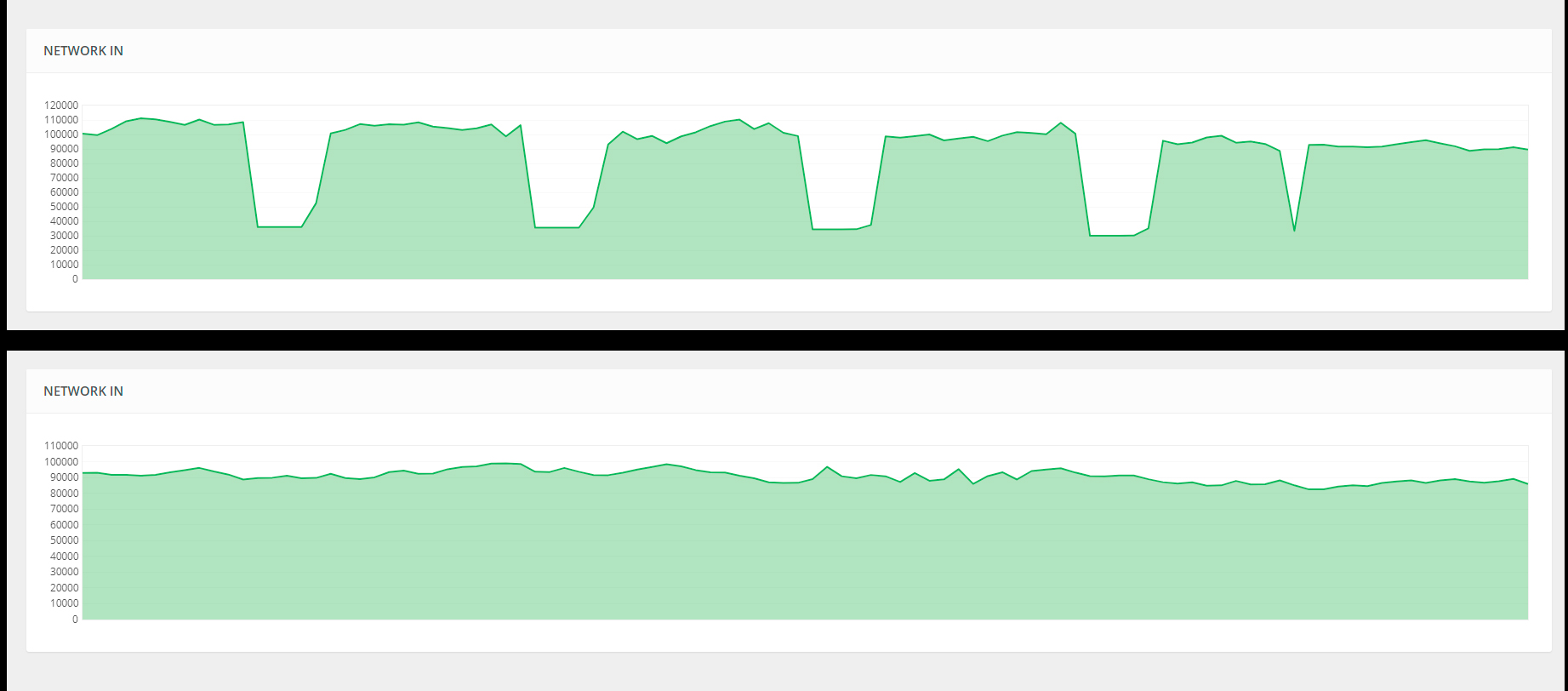
The first chart shows the drawdowns created by the bases. They are not loading at this point. They just create a periodic lag with an interval of about 10 seconds. In the second graph, I unloaded the bases. They are not created immediately. Probably at some point they clog the cache and start to spend traffic. We have a 1GB Internet channel on a dedicated physical server, only we are located on it. Drawdowns create exactly the bases.
version 1.5.1 is used

Merged post

With the latest version, the dips are even bigger

Merged post

It was during the Halloween event that these problems began. A familiar programmer says: "during Halloween, some update was introduced that conflicts with the plagin, after a while it loads the game swap cache and the problem leaks out of here." 
1.5.1 is the most stable version to date. so it's really odd that you have any performance issue with it... hmm...

post your config from pastebin. hopefully it's something simple and easy to fix for you

also no idea what `game swap cache and the problem leaks out of here.` means :p

so you're telling me that 1.5.0 works fine? try it and let me know. a backup was made of your config before converting to the new system. it looks like this: RaidableBases.backup.2020-11-25 07-36-21.json

This problem does not arise immediately, but at some point. Dips in traffic begin, and this is treated by unloading the plugin.

The problem started during the Halloween event. At this time, the plugin version was not updated, version 1.4.8 was installed on the server. After the Halloween event ended, the problem began to appear much less often, but it remained. We tried all versions, version 1.5.0 was on the server until yesterday. After reloading the plugin did not help and with every plugin loading there were more drops in traffic, we installed the latest version. It didn't help either. The plugin was unloaded for about on 30 min, after which it was launched with two bases respawning instead of six.

old config before new version https://cdn.discordapp.com/attachments/734491917123059835/779989451103272990/RaidableBases.json


Merged post

old config before new version

https://cdn.discordapp.com/attachments/734491917123059835/782973339500937236/RaidableBases.backup_old_system.2020-11-29_06-49-24.json

Ok, sadly my server is getting lag from the Raidable Bases plugin as well.

Started lagging with v1.5.2, we spoke about the lag issues from v1.5.13 and it was running well for a few days, but the lag has returned quite badly.

I upgraded to v1.5.4 and the lag is still there.

I'm going to go back to v1.5.1 and see if that resolves the latency issues again.

- Same thing as before, lag, rubber banding for all players

1.5.1 is the most stable and lag free version there is. if you're having the same issue with it then i don't know what to tell you

unload plugin

delete the oxide/data/RaidableBases.json

go through config and disable anything you don't need. enabling settings can cause more load on the server and hurt performance. it just depends on what the setting is, most settings don't impact performance at all. hopefully it is just one setting that's causing this, if so it can be fixed. so keep note of anything you disable and if the lag goes away then tell me the difference

check for large datafiles in the oxide/data/ folder. Any json over 1 MB is considered large

how many plugins are on the server? problems can definitely arise when a large plugin like Raidable Bases is demanding resources and other plugins, combined or not, are just as heavy on the resources. this is likely why its so apparent when the plugin is installed

I've gone back to v1.4.9.... and rebooted the server.

I may recreeate the cfg file if this keeps lagging and see if that helps

alright, keep me updated
I can tell you now it's your server, not the plugin. if you run any host like Gameservers, GTX, SurvivalServers. and few others this plugin will kill your server as they limit your hardware unless you purchase the beefy upgrades.

I'm on GTX but I purchased  40USD in upgrades NVME, 16GB Ram, 4.4K CPU CS, and turbo boost. and my issues poofed a lot of host I hate to tell people give you the bare minimum for rust and that's to run a 3k-4k map and with a small community, if you see servers with this that have no issues  they are either running on there own extra machine that's more recent or a dedicated server or they are doing what I and others do and that buy all the upgrades. 

The plugin demands a lot just as Botspawn did and powerless auto's. note I'm running 30 bases at a time with 20-25 players. and I'm running one base that is about 50x50 with over 80 auto's and mine runs smooth. that's with also spawning 8k items in the base.
very true, Kitty

shared machines are the worst. your server might run well for a while, but eventually additional servers on the same machine or higher loads will cause it to perform badly. you will have to remove plugins to meet the demand of this one, or upgrade

while I've done everything I can to make this plugin perform better on lower end machines it is still a hog that requires a lot of resources, and always will. it's incredible that it runs as smooth as it does. if only people understood what that means
nivex
very true, Kitty

shared machines are the worst. your server might run well for a while, but eventually additional servers on the same machine or higher loads will cause it to perform badly. you will have to remove plugins to meet the demand of this one, or upgrade

while I've done everything I can to make this plugin perform better on lower end machines it is still a hog that requires a lot of resources, and always will. it's incredible that it runs as smooth as it does. if only people understood what that means

Yeah i completely know how plugins are sadly it's personally why I wasted the $ to upgrade a couple of plugins require it if you plan to use it longterm


This is our dedicated physical server. Internet channel 1 gigabit. The problem with traffic sagging started in the middle of the Halloween event from the developer. At that time, we did not install new plugins and did not update the raid base, this problem just appeared. It does not happen all the time, it starts at some point and is treated by unloading the plugin. It does not depend on the number of players - this morning it started with 5 players online, but one of them started a raid.
nivex
https://umod.org/community/raidable-bases/27622-server-lags?page=1#post-6

check that out

there's no way that machine is going to lag with 6 bases on the map. it's something from post #6 or an issue with your host

Yeah i know a server i was prior playing had this issue but turned out to be their host after a month of looking into it. their host ended up lowering there ram usage as they were not using much and it completely lagged the server unless they unloaded the plugin but that was with an older update too about 2-3 month ago.

OP may need to do a fresh plugin wipe for data files. i know overtime they do clutter. and can even corrupt partly

Experience of using our server for about half a year. All this time we have installed RaidBases. Problems with traffic sagging began on Halloween. They are not permanent, but can be treated by unloading the plugin. If the problem was in the Internet channel, it would not have been cured by unloading the plugin.