Hello,
a user reported a missing update entry for the build plugin, then i saw, that the version is between last versions.
// Edit (klick into the picture, otherwise size is broken xD
best regards and stay healthy
Gonzi
Plugin update out of order
- 1
- 2
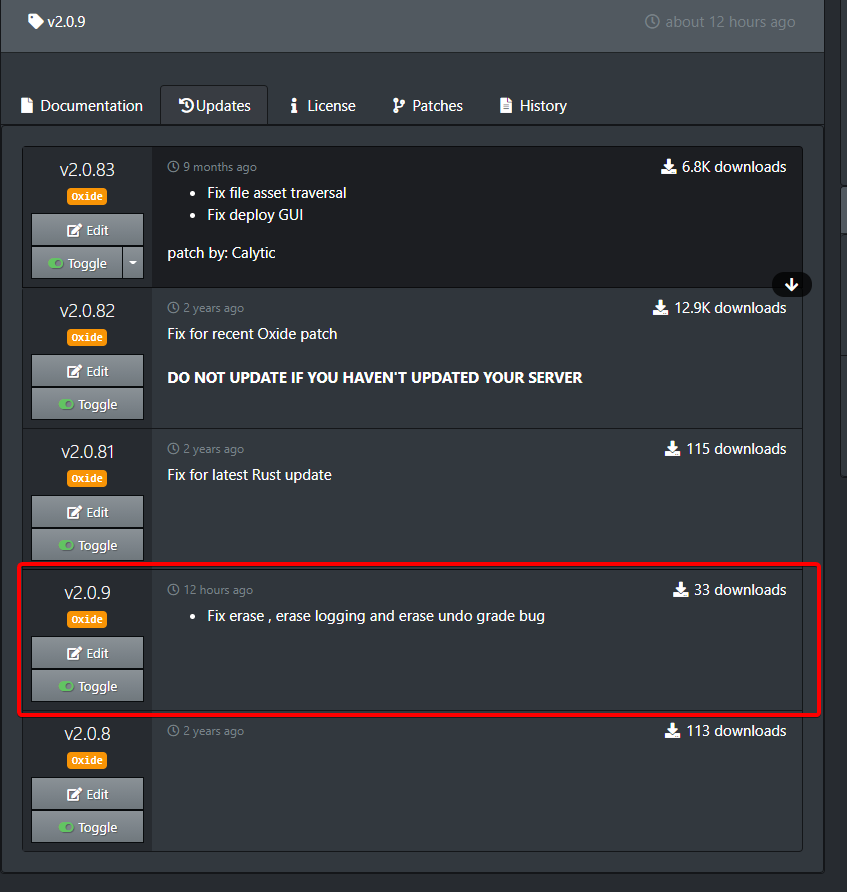
Authors are not supposed to use versioning this way since 83 > 9.
There was a discussion on this before. I thought the date was taken into account rather than version though.
misticos
Authors are not supposed to use versioning this way since 83 > 9.
I use 1.0.0
next update then 1.0.1
noway why maintianer bevore did this
Version numbers are more important than the date. There seems to be little agreement in the community about how to order patch versions. Many developers are inclined to order updates by numeric value. As misticos said 83 > 9. I tried to change this by padding the minor versions internally so 830 < 900, because I personally don't think minor versions should necessarily be ordered strictly by numeric value. That said, it created too many complaints so I reverted it back.
Okay, thanks for your reply!
IMO plugins should use Semantic Versioning, and I think that should be considered the standard for this website. I do not understand why someone would order their versions 0.81, 0.82, 0.83, 0.9. Any versioning scheme should follow a spec, and I'm not sure what spec that is. If people want alternative version specs, then potentially the website could support that, allowing authors to declare it per plugin, but I don't see it being worth the effort.
The problem is that we have to support it in the actual plugins and framework too, not just the site. I agree with SemVer.WhiteThunder
IMO plugins should use Semantic Versioning, and I think that should be considered the standard for this website. I do not understand why someone would order their versions 0.81, 0.82, 0.83, 0.9. Any versioning scheme should follow a spec, and I'm not sure what spec that is. If people want alternative version specs, then potentially the website could support that, allowing authors to declare it per plugin, but I don't see it being worth the effort.
It's fairly simple. The "patch" version is the least important version increment (given no BC breaks) and people tend to look at the first number first.WhiteThunder
I do not understand why someone would order their versions 0.81, 0.82, 0.83, 0.9.
It's a "better idiot" problem. One person might see "81" as greater than "9", another sees "81" as an extension of "8" before "9". Very rarely will a patch increment so far from "9" to "81" because that's quite a lot of versions to have no minor or major update.
In any case, SEMVER states: "Each element MUST increase numerically. For instance: 1.9.0 -> 1.10.0 -> 1.11.0."
So technically treating the patch element differently would be a violation of semver. That said, I'm glad to see I'm not the only person who had this issue when sorting strictly according to SEMVER standards.
Calytic
It's fairly simple. The "patch" version is the least important version increment (given no BC breaks) and people tend to look at the first number first.
It's a "better idiot" problem. One person might see "81" as greater than "9", another sees "81" as an extension of "8" before "9". Very rarely will a patch increment so far from "9" to "81" because that's quite a lot of versions to have no minor or major update.
In any case, SEMVER states: "Each element MUST increase numerically. For instance: 1.9.0 -> 1.10.0 -> 1.11.0."
So technically treating the patch element differently would be a violation of semver. That said, I'm glad to see I'm not the only person who had this issue when sorting strictly according to SEMVER standards.
I was the person who pointed out the "missing" information (i always check for update info before updating) , i would have thought to minimise any confusion it could have been made a "whole" number , so instead of v2.0.9 it could have been v2.1.0 which should place it above v2.0.83 ? , just a thought.
I suggest giving a read over https://semver.org. There are technically three whole numbers, just separated by periods. It's a highly utilized standard that also seems to be an appropriate fit for plugins. The purpose is to indicate to users how the software has changed.pookins
I was the person who pointed out the "missing" information (i always check for update info before updating) , i would have thought to minimise any confusion it could have been made a "whole" number , so instead of v2.0.9 it could have been v2.1.0 which should place it above v2.0.83 ? , just a thought.
Here's a short summary of how it would apply to plugins.
- Any release that removes functionality or requires the user (you) to make a configuration change should increment the major version (first number). For example, if the patch notes are going to say any of the following, then it would justify a major version update.
- "Command X now requires permission"
- "Now requires plugin Y to be installed"
- "Added new config option with default value that changes the plugin behavior" (you have to turn the config option off to make the plugin behave like it used to)
- "Delete your config and data files"
- Any release that is fully backwards compatible, but introduces new functionality should increment the minor version (second number). For example, if the patch notes are going to say "added new config option with default value that does not change the plugin behavior" would justify a minor version update.
- Any release that only makes bug fixes should increment just the patch version (third number).
Thats nice to know , so i wonder why you posted :)
IMO plugins should use Semantic Versioning, and I think that should be considered the standard for this website. I do not understand why someone would order their versions 0.81, 0.82, 0.83, 0.9. Any versioning scheme should follow a spec, and I'm not sure what spec that is. If people want alternative version specs, then potentially the website could support that, allowing authors to declare it per plugin, but I don't see it being worth the effort.
pookins
I do not understand why someone would order their versions 0.81, 0.82, 0.83, 0.9.
After further contemplation, it's not just what I mentioned before, but also the lack of automation when updating a plugin multiple times in quick succession, leading developers to simply append a number when it probably ought to be incremented. Your average server owner wouldn't make a distinction assuming the versions were sorted by date, because people don't really know or care about semver in general.
To that end, instead of giving developers different sorting options, it would be a better idea to simply allow them to configure their plugin listing to automatically increment the PATCH element if an update already exists with that same version number.
The question is then, should that be the default? or should uploading the same version number kick back a validation error (as it does now)?
Making it default would essentially mean developers no longer need worry about PATCH versioning when uploading plugins, only MINOR and MAJOR versioning.
For that matter, if the plugin does not have a PATCH element "1.2" (not "1.2.3") then should one be added automatically in the same scenario?
That quote is actually from Whitethunders post not mine . i quoted it because although Whitethunder went into great detail referring me to what i could read to give me a better understanding of the way plugin updates were numbered he still posted the quoted text with the opinion that " plugins should use Semantic Versioning" whatever that is.
My original query was
There is no information on what this update has fixed or implemented, only available update info is for the last version which i want to update from ?
I just wanted a better way of making sure that the latest update information was at the top of the list not three down, So that i and anyone else did not miss out on a warning to backup anything before updating,
My original query was
There is no information on what this update has fixed or implemented, only available update info is for the last version which i want to update from ?
I just wanted a better way of making sure that the latest update information was at the top of the list not three down, So that i and anyone else did not miss out on a warning to backup anything before updating,
I originally stated that plugins should use SemVer because the versions being ordered 0.83 then 0.9, as they were shown in this thread, does not follow SemVer. That means, IMO, the plugin developer did it wrong.
There are several different problems here to solve.
- Many server owners insist on auto updating plugins. Current implementations in the wild simply update without any logic related to the version number besides "download if higher version". One way to reduce the risk of bad updates here, is to get developers to use SemVer so that auto updates can actually be reasoned about.
- Developers don't know or care about SemVer. This is not a completely solvable problem because we can't force people to understand things or follow them, and many plugin submitters are not experienced software developers. However, we can take steps to improve awareness, such as having a guide on it, and linking to it on the page where developers upload plugin updates. As for auto updating, we can also assume that a plugin has no particular version scheme unless indicated by the plugin maintainer, and therefore only auto update plugins via the uMod Agent if the developer opted in to follow SemVer. Of course, they could do that and still not follow SemVer.
- Developers who know or care little about versioning may do non standard things like go from 083 to 09. This presents a sorting issue on the website, and perhaps other places in the uMod toolchain. Options here include: a) Disallow uploads where the version number is equal to or below the current version. b) Sort plugin updates by date uploaded.
Based on the user selection, we can display the version number that will be generated, essentially educating them about SemVer in the process. We can also state what the consequences of their selection are, such as whether standard auto updaters will generally download it (depending on whether the user has opted into auto downloads of minor or patch updates, and if they have other rules such as an allow list or deny list of plugins or authors).
If the developer does not select backwards compatible, when they click submit, we can display an additional prompt asking them to confirm their intention, again stating the consequences. This wizard is also a good place to link to guides on how to make changes more backwards compatible.
Once plugin updates start more reliably following SemVer, we can even provide hint information on update listings that explain the version number, letting users know whether the developer intended for the change to be backwards compatible and such, simply based on the version number, since developers do not always go to the trouble of stating whether an update is backwards compatible or not, and users don't understand the version number so they can't easily infer that, leaving them to wonder and be overly defensive by backing everything up (which auto updaters could also do for them by the way).
- 1
- 2