Timed restart no longer working
I cant get the plugin to work at all.
{
  "Checks": {
    "autoRebootCountDown": 3,
    "checkIntervalMinutes": 5,
    "currentDevblog": 0,
    "currentOxideBuild": 4677,
    "enableAutoChecks": false,
    "enableAutoReboot": true,
    "notifyOnlineAdmins": false
  },
  "Settings": {
    "ShowMinutes": [
      60,
      45,
      30,
      15,
      10,
      5,
      4,
      3,
      2,
      1
    ],
    "ShowSeconds": [
      50,
      40,
      30,
      20,
      10,
      5,
      4,
      3,
      2,
      1
    ]
  },
  "SimpleUI": {
    "SimpleUI_Enable": false,
    "SimpleUI_FontSize": 30,
    "SimpleUI_HideTimer": 10,
    "SimpleUI_Left": 0.1,
    "SimpleUI_MaxHeight": 0.05,
    "SimpleUI_MaxWidth": 0.8,
    "SimpleUI_Top": 0.1
  },
  "Timers": {
    "RebootTimes": {
      "6:00": "30"
    },
    "useTimers": true
  }
}​

This plugin doesn't actually restart, it only shuts down. The Rust server isn't capable (nor plugins) of actually starting the server when offline, you'd need a tool or external script to handale that.
No no no, the timer never initiates to turn off the server. Like a week ago I added the plugin and the server has been on for a week. Never turned off.
Ah okay, so it didn't restart when the newer Oxide build was released?
No sir. Really all I want as well is to restart my server at 5 AM every night. In the config it is set at 6 but I plan to change it. My server is running on a script that starts it back up when it goes down.
It announce for restart, but restart or quit doesn't happen.

I guess the issue is your time format. Use HH:mm instead of H:mm. 

6:00 => 06:00

as above also .... 06:00

also if you are using a hosting service check your log files the server time may not be the same as your local time ...
I too cannot get it to quit rust.  I have my time set to 2 space HH format.  "01:30"  Any other idea other ideas?
Do I need to do something special to get it to work if I save the json and reload at 01:13?
Also can we have the ability to run a few console commands added....

Some plugins have to be unloaded in order, particularly the ones related to mysql datbases.
The  sql database connection has to be unloaded LAST or the other dependent plugins using it "abend" the server.

can confirm that it wil not restart with a timer irrelevent of the time being "05:00: "10"  or "5:00: "10"

Merged post

Ok.. this is solved......

For 95% of cases..... it is critical to understand that the plugin does NOT always return the  "locale" time of the server
the plugin is using  C# "DateTime.Now"  , which  is returning    GMT TIME (maybe a function of oxide/RUST?)

I tried it in 3 separate timezones on different servers (LINUX!!)all returned GMT in the code.

1. so to correctly set the time you have to think like your server is running in the UK, to get the correct trigger time you have to add/subtract your time zone.
2. the correct format matches  "DateTime.Now"   or "hh:mm" with leading zeros,

This is then shoved in a hashmap & used as a key......
always a risky business.. becasue in some countries they don't use "western" numbers or might use different system separators.

3. for the other  5%, there are potentially "race" conditions , and the  "OnTick" seems to have been written for  "OnTick" two years ago, some of the code does nothing becasue  the assumptions have changed.
Which is maybe why the author had some problems with having to make the minutes line up  & then the seconds fail,
maybe something in the system changed...

it is possible for a race condition to cause the time to be missed if there is "jitter" when "OnTick" is called, since the time is continually re-loaded in the routine, this may be caused by server loading..., but if the check for "0" seconds in an edge case, then the check can fail.. and after that the time is missed  for that entry.

So for my case "05:00": "10"  was completely correct.... just  GMT is not my time zone... so actully it would occur 8 hours later for me (but when it is 05:00 in the UK)

Merged post

... JEZ....
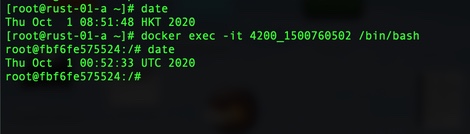
Further to this.......  it also depends on  if the server is  virtulised or a real server.....
if it is a real server, with NTP..... then it returns the correct time., but if it is a contanerised instance, if the instance does not have NTP tied to the physical SERVERS timezone.. then it is just another layer......
The time would depend on what your time zone is set to on the server, which sounds like it is GMT. The host would need to change that to be accurate, else the plugin allow for customizing that.
Sorry no it does not wolf... depending on the definition of the word "server" ...... I think that is what is so confusing.
"instance" is perhaps a better word.

https://i.ibb.co/m5qnMpV/time.jpg

Every instance maintains its own version of time.....
Containers, since they don't normally run systemd & deamons, they have no time other than default time.

so if the provider is running hardware that is virtulised, each instance needs the time set individually, but more importantly if it is containerised
it needs special treatment. 10 docker containers would all need thier own time set.
5e7c5648be6ee.jpg razorfishsl
Sorry no it does not wolf... depending on the definition of the word "server" ...... I think that is what is so confusing.
"instance" is perhaps a better word.

https://i.ibb.co/m5qnMpV/time.jpg

Every instance maintains its own version of time.....
Containers, since they don't normally run systemd & deamons, they have no time other than default time.

so if the provider is running hardware that is virtulised, each instance needs the time set individually, but more importantly if it is containerised
it needs special treatment. 10 docker containers would all need thier own time set.

Server as in machine that actually manages that time, not the game server. Whether instanced or not, the OS would control that time.

Good Day,

Ive been trying to hours and hours to try and make these times restarts working.. Updated Oxide and Server.
Please help!

Below is my config.
It does not shut the server down at that set time.

{
  "Checks": {
    "autoRebootCountDown": 3,
    "checkIntervalMinutes": 5,
    "currentDevblog": 0,
    "currentOxideBuild": 4887,
    "enableAutoChecks": false,
    "enableAutoReboot": false,
    "notifyOnlineAdmins": true
  },
  "Settings": {
    "ShowMinutes": [
      60,
      45,
      30,
      15,
      10,
      5,
      4,
      3,
      2,
      1
    ],
    "ShowSeconds": [
      50,
      40,
      30,
      20,
      10,
      5,
      4,
      3,
      2,
      1
    ]
  },
  "SimpleUI": {
    "SimpleUI_Enable": false,
    "SimpleUI_FontSize": 30,
    "SimpleUI_HideTimer": 10,
    "SimpleUI_Left": 0.1,
    "SimpleUI_MaxHeight": 0.05,
    "SimpleUI_MaxWidth": 0.8,
    "SimpleUI_Top": 0.1
  },
  "Timers": {
    "RebootTimes": {
      "02:05": "30"
    },
    "useTimers": true
  }
}
"Timers": {
  "RebootTimes": {
    "11:15": "45",  //would restart at 12:00 with a countdown of 45 minutes
    "23:30": "30"  // would restart at 00:00 with a countdown of 30 minutes
  },
  "useTimers": false  // needs to be enabled to use the automated timers
}​
I think you need to edit these settings