So Im having an issue where no matter how many times I delete, re-upload the .cs file and configure the .json file I end up with the default images and text. I am now running the script through a validator, I have fixed some issues but am having issues with alot of "Multiple JSON root elements", TBH I'm not sure what that even means, any and all help would be greatly appreciated as this is a very valuable Plugin for my server.
Help with JSON Formatter errors
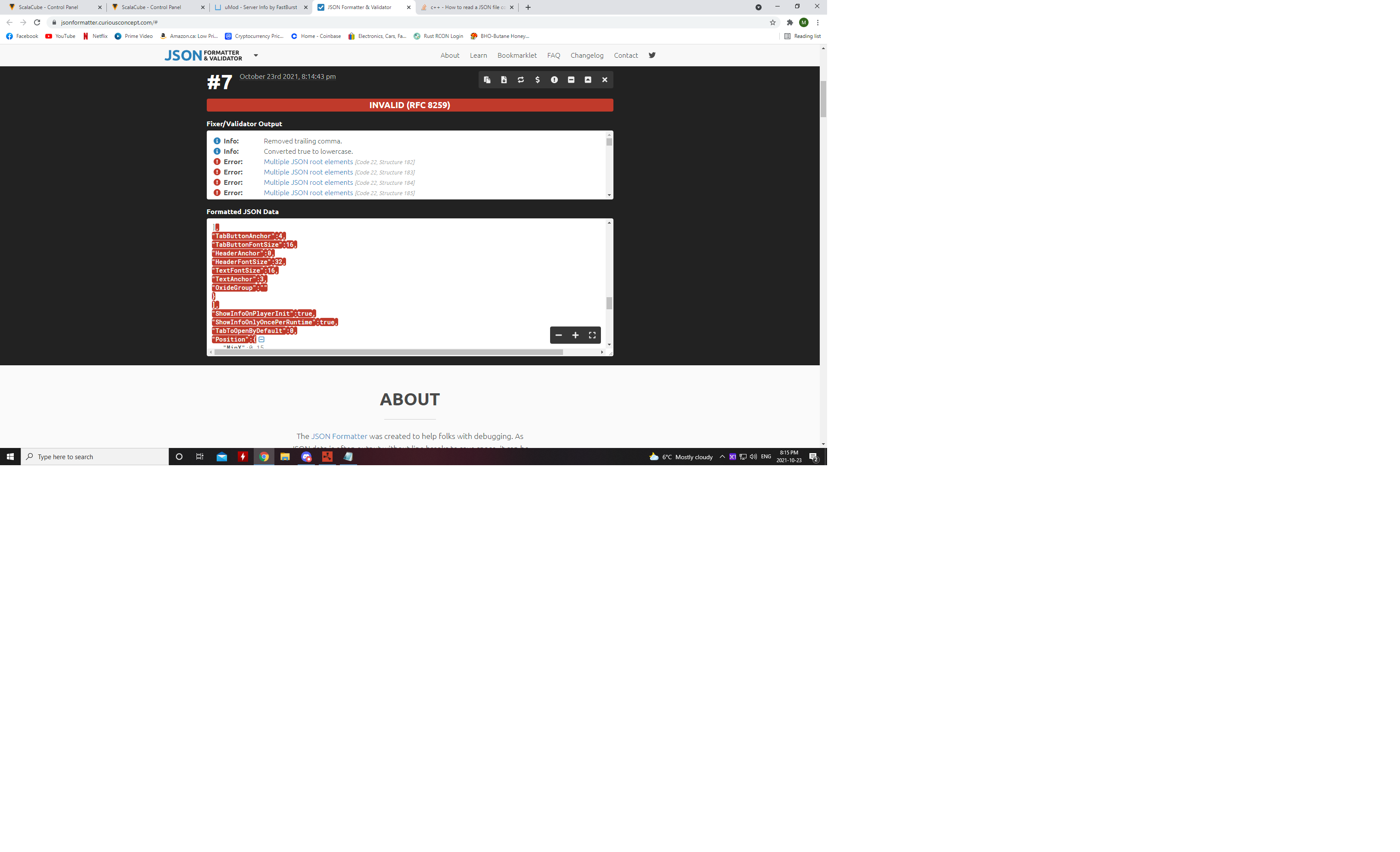

*edit , removed post
Hi there, I have my code about where I want it I think after just editing the main image file to make it stretch to the whole screen as apposed to four small images, my question is, how would I add an image specifically on another page only? I'm trying to add a Map Image to the "PVP/RAIDS" Tab.
Any and all help is greatly appreciated!
{
"settings": {
"Tabs": [
{
"ButtonText": "Welcome",
"HeaderText": "Welcome",
"Pages": [
{
"TextLines": [
"Welcome to <color=Green> The Purge </color> PVE/RP",
"Weekly Purge night with dedicated PVP Zones.",
"Please read all rules before playing, thank you.",
"Type <color=red> /info </color> to open this window"
],
"ImageSettings": [
{
"Position": {
"MinX": 1.0,
"MaxX": 1.0,
"MinY": 1.0,
"MaxY": 1.0
},
"Url": "https://i.imgur.com/GyL6RUJ.png",
"TransparencyInPercent": 100
},
{
"Position": {
"MinX": 1.0,
"MaxX": 1.0,
"MinY": 1.0,
"MaxY": 1.0
},
"Url": "",
"TransparencyInPercent": 100
},
{
"Position": {
"MinX": 0.0,
"MaxX": 0.5,
"MinY": 0.5,
"MaxY": 1.0
},
"Url": "",
"TransparencyInPercent": 100
},
{
"Position": {
"MinX": 0.5,
"MaxX": 1.0,
"MinY": 0.5,
"MaxY": 1.0
},
"Url": "",
"TransparencyInPercent": 100
}
]
},
{
"TextLines": [
],
"ImageSettings": []
},
{
"TextLines": [
],
"ImageSettings": []
}
],
"TabButtonAnchor": 4,
"TabButtonFontSize": 16,
"HeaderAnchor": 0,
"HeaderFontSize": 32,
"TextFontSize": 16,
"TextAnchor": 3,
"OxideGroup": ""
},
{
"ButtonText": "Rules",
"HeaderText": "Rules",
"Pages": [
{
"TextLines": [
"Please read and follow all rules before playing!",
"No Cheating - No Bans Less 100 Days",
"No killing or raiding in Non-PVP Zones.",
"Door rushing or trespassing in a compound without permission is NOT allowed.",
"Unwanted Trespassers MAY be shot on sight.",
"Sleeping players MAY be looted and killed,",
"UNLESS directly following a crash or wipe.",
"Exploitable or decaying bases MAY be looted, BUT",
"Locked T.C.'s, Boxes, Etc. MAY NOT be looted.",
"Boxes, Furnaces, etc. OUTSIDE of a compound MAY be looted.",
"Type <color=red> /info </color> to open this window",
],
"ImageSettings": []
}
],
"TabButtonAnchor": 4,
"TabButtonFontSize": 16,
"HeaderAnchor": 0,
"HeaderFontSize": 32,
"TextFontSize": 16,
"TextAnchor": 3,
"OxideGroup": ""
},
{
"ButtonText": "PVP/RAIDS",
"HeaderText": "PVP/RAIDS",
"Pages": [
{
"TextLines": [
"PVP and Raiding outside of a PVP/Raid zone is NOT allowed,",
"unless arranged and agreed upon by both parties.",
"PVP/Raid Zones are anywhere <color=red> East of Z or </color>",
"<color=red> Any Large Monuments (Underwater Labs and Oil Rigs Included) </color>",
"<color=red> Attack Heli, Chinook, and Air Drops are PVP Zones AS SOON as they touch the ground.</color>",
"Small monuments, Gas stations, Supermarkets are NON-PVP Zones.",
"Type <color=red> /info </color> to open this window",
],
"ImageSettings": []
}
],
"TabButtonAnchor": 4,
"TabButtonFontSize": 16,
"HeaderAnchor": 0,
"HeaderFontSize": 32,
"TextFontSize": 16,
"TextAnchor": 3,
"OxideGroup": ""
}
],
"ShowInfoOnPlayerInit": true,
"ShowInfoOnlyOncePerRuntime": true,
"TabToOpenByDefault": 0,
"Position": {
"MinX": 0.15,
"MaxX": 0.9,
"MinY": 0.2,
"MaxY": 0.9
},
"BackgroundImage": {
"Enabled": true,
"Position": {
"MinX": 0.0,
"MaxX": 1.0,
"MinY": 0.0,
"MaxY": 1.0
},
"Url": "https://i.imgur.com/GyL6RUJ.png",
"TransparencyInPercent": 100
},
"ActiveButtonColor": "#0255255255",
"InactiveButtonColor": "#128128128255",
"CloseButtonColor": "#128128128255",
"CloseButtonText": "Close",
"NextPageButtonColor": "#128128128255",
"NextPageText": "Next Page",
"PrevPageButtonColor": "#128128128255",
"PrevPageText": "Prev Page",
"BackgroundColor": "#000255",
"HelpButton": {
"IsEnabled": false,
"Text": "Help",
"Position": {
"MinX": 0.0,
"MaxX": 0.05,
"MinY": 0.1,
"MaxY": 0.14
},
"Color": "#128128128255",
"FontSize": 18
},
"UpgradedConfig": false
}
}