Hello, I am not able to connect to my server, it also does not appear in the list.
I already tried to install the server again and run it without the oxide, it also does not appear and does not connect
Can someone help me?
start.bat ↓
@echo off
cls
echo Starting Server...
RustDedicated.exe -batchmode -nographics -silent-crashes ^
+server.ip *.*.*.* ^
+server.port 28015 ^
+server.queryport 28017 ^
+rcon.ip *.*.*.* ^
+rcon.port 28016 ^
+rcon.password "123456" ^
+app.port 28082 ^
+server.identity "rst" ^
+server.gamemode Vanilla ^
+server.level "Procedural Map" ^
+server.seed 249666136 ^
+server.worldsize 2000 ^
-LogFile "server\rst\server.log"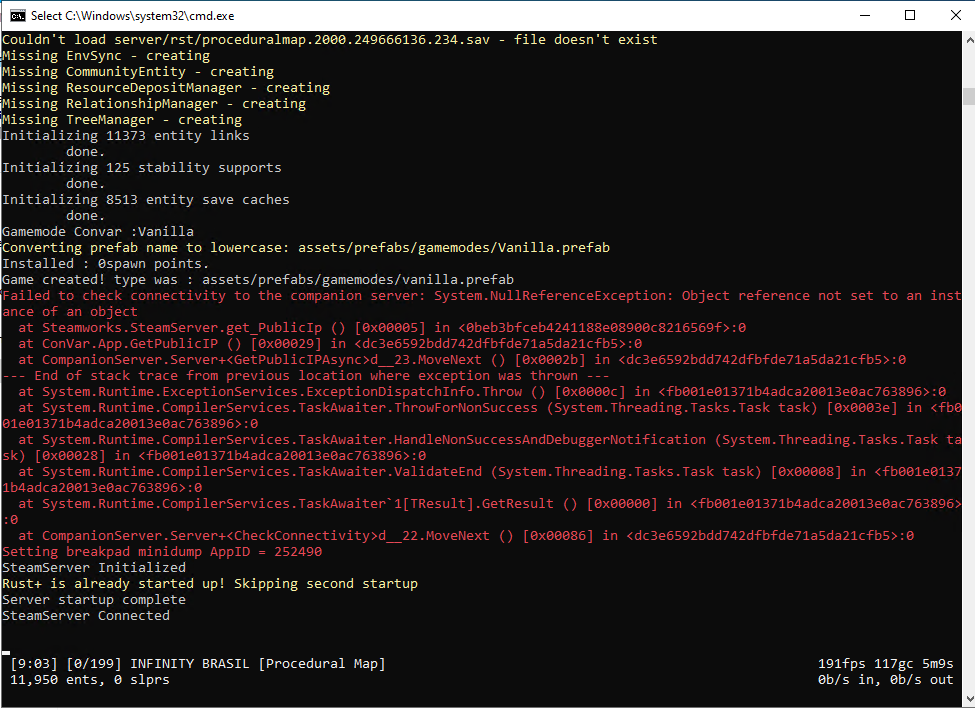
Cant connect to my server
I assume you're hosting the server yourself? By the looks of it, your server can't communicate with the Rust+ Server meaning the service will be disabled. You need to check port forwarding on your server/router and make sure all the necessary ports are opened and forwarded for the server to function properly.
I'm hosting on a VPS. But there it says Rust+ is alrdy started up...
I already opened the doors,
28015, 28016, 28017 and 28083.
TCP: 27015-27030, 27036-27037, 28015-28016
UDP: 4380, 27000-27031, 27036, 28015-28016
a simple way to test is load game and open console and type to connect
client.connect X.X.X.X:28015 if your server is running on another local networked machine you need the local ip
or
client.connect localhost:28015 if the server is on the same machine
to see if you can connect locally .. then type into google "whats my IP"
try again using
client.connect XX.XX.XX.XX:28015 change the X's for your IP
if you cant connect then its your router setup
If he's hosting on a VPS then I wouldn't think there's a router or local IP involved.
server.ip should be 0 0 0 0
I would also try disabling the firewall entirely to see if it has any effect.
working now, thx
bynaryworking now, thx
What was the solution ?
I hate when they do that, it's so selfish 😞