Button commands not working

hello on my server dropdown menu
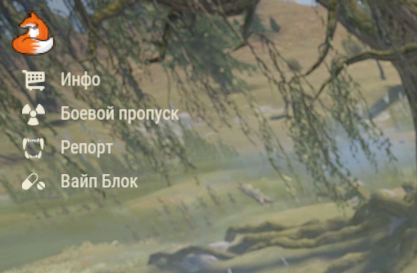
When you click on the server logo, the buttons that execute the necessary commands fall out, but they do not work, I attached a notification to the console for them when you click, if you click on the button, then a message comes to the console, I click, a message comes to the console that I pressed the desired button ,
but the command is not executed


<code>

                    Gui.Add(new CuiButton
                        {
                            Button =
                            {
                                Command = button.command,
                                Color = "0 0 0 0",
                            },
                            Text =
                            {
                                Align = TextAnchor.MiddleLeft,
                                Color = HexToRustFormat(button.color),
                                FontSize = 15,
                                Text = $"{button.text}",
                                Font = "robotocondensed-regular.ttf",
                                FadeIn = 0.1f + (num * 0.1f)
                            },
                            RectTransform =
                            {
                                AnchorMin = $"{0.2012334} {-0.412 - (y * 0.5)}",
                                AnchorMax = $"{1} {0.05 - (y * 0.5)}"
                            }
                        }, Layer, "but" + num);
                        Puts(button.command);
                    y++;
                    num++;
                }
 
 
 ButtonElements =
                    {
                        new ButtonElement
                        {
                            text = "Инфо",
                            color = "#F0EAD6",
                            command = "info",
                            Image = "assets/icons/store.png"
                        },
                        new ButtonElement
                        {
                            text = "Боевой пропуск",
                            color = "#F0EAD6",
                            command = "pass",
                            Image = "assets/icons/radiation.png"
                        },
                        new ButtonElement
                        {
                            text = "Репорт",
                            color = "#F0EAD6",
                            command = "report",
                            Image = "assets/icons/bite.png"
                        },
                        new ButtonElement
                        {
                            text = "Вайп Блок",
                            color = "#F0EAD6",
                            command = "block",
                            Image = "assets/icons/pills.png"
                        }
                    }
                }
</code>
FFFH6iAMNUrdmxv.png

What is button.command?

Command need to be in quotes, like here.

Command = "button.command"


Merged post

Unless button.command is a string variable
3S2FlBeW6TD7XyG.png Wulf

What is button.command?


A For loop follows it, each element iterates and inserts commands in order
(in the ButtonElements code above)
oESHrLEd4Ji1r5d.jpg ArtiIOMI

Command need to be in quotes, like here.

Command = "button.command"


Merged post

Unless button.command is a string variable

Is a string :(

And what do you have your actual command definited as?

s6yuJDI4Etebg7Y.png Wulf

And what do you have your actual command definited as?

I have plugins that are called by the necessary commands

I start by creating a config, the value of the command is stored here

 public string command;

Here I form a menu that will move

 public ConfigData GetDefaultConfig()
        {
            return new ConfigData
            {
                ZealMicroMenu = new ConfigData.MicroMenu
                {
                    MenuTXT = "",
                    MenuIC = "",
                    ColorMenuIC = "#F07427",
                    MPosXMin = "0.003653084",
                    MPosXMax = "0.1718864",
                    MPosYMin = "0.925",
                    MPosYMax = "0.999",
                    ButtonElements =
                    {
                        new ButtonElement
                        {
                            text = "Инфо",
                            color = "#F0EAD6",
                            command = "info",
                            Image = "assets/icons/store.png"
                        },
                        new ButtonElement
                        {
                            text = "Боевой пропуск",
                            color = "#F0EAD6",
                            command = "pass",
                            Image = "assets/icons/radiation.png"
                        },
                        new ButtonElement
                        {
                            text = "Репорт",
                            color = "#F0EAD6",
                            command = "report",
                            Image = "assets/icons/bite.png"
                        },
                        new ButtonElement
                        {
                            text = "Вайп Блок",
                            color = "#F0EAD6",
                            command = "block",
                            Image = "assets/icons/pills.png"
                        }
                    }
                }
            };
        }

By this cycle I create buttons

                    Gui.Add(new CuiButton
                        {
                            Button =
                            {
                                Command = button.command,
                                Color = "0 0 0 0",
                            },
                            Text =
                            {
                                Align = TextAnchor.MiddleLeft,
                                Color = HexToRustFormat(button.color),
                                FontSize = 15,
                                Text = $"{button.text}",
                                Font = "robotocondensed-regular.ttf",
                                FadeIn = 0.1f + (num * 0.1f)
                            },
                            RectTransform =
                            {
                                AnchorMin = $"{0.2012334} {-0.412 - (y * 0.5)}",
                                AnchorMax = $"{1} {0.05 - (y * 0.5)}"
                            }
                        }, Layer, "but" + num);
                        
                    y++;
                    num++;
                }

                hide_open = true;
            }


Okay, but where is the method for the button.command defined at?

This is where the menu building cycle begins.

 foreach (var button in config.ZealMicroMenu.ButtonElements)
   public string command;

Okay, but the command has to exist as a method somewhere where the actual command handling is done. If the command doesn't exist, it won't work.

rvOP0EFNin72ufG.png Wulf

Okay, but the command has to exist as a method somewhere where the actual command handling is done. If the command doesn't exist, it won't work.

So how then to implement such a menu to call commands from other plugins?

Is the command definied in another plugin? The issue here isn't the menu or your handling, it's that the command needs to exist somewhere and I don't see it as being registered or defined anywhere.

I can’t actually determine the “info” command in other plugins at the same time, how to do it more precisely in order to use it from another plugin

I'm not sure what you mean, but I'd check to make sure the command actually exists somewhere otherwise it won't work.

W6h5b5yzhKdN9zE.png Wulf

I'm not sure what you mean, but I'd check to make sure the command actually exists somewhere otherwise it won't work.

Command defined in another plugin

        [ChatCommand("info")]
        private void CmdChatInfo(BasePlayer player, string command, string[] args) => UI_DrawInterface(player, false);