So like many others having the same issue, I have trawled through countless threads to find a solution with no success, maybe some of you more experienced troubleshooters can help me.
So I have a server hosted via Citadel (Control Panel access via TCAdmin) and while I am having a relatively good and trouble-free time I notice that naturally after a few days the memory and entities build-up and the server FPS runs low and therefore I normally initiate a server restart to clear out the weeds and refresh, this is where the trouble begins. Below is the list of events leading to the error of 'Bootstrap'.
I don't have specific access to the .bat batchfile as my server is initiated from the custom command line manager and within this, I populate the data within the given text boxes so for the purpose of this post I have a server identity set-up, for example, "12345" image below. 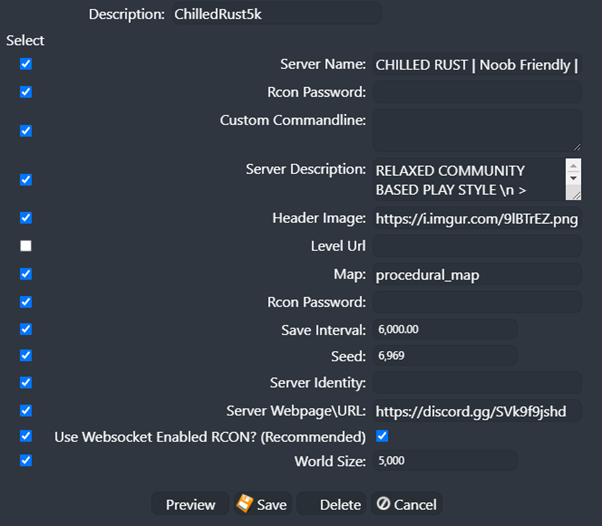
Once the server is started up to generate the identity server files /server/12345/cfg (folders) at this point there is no server.cfg (file) within the folder and the game appears to run completely fine without (I can manually add the server.cfg file, which then populates itself with the game data but not all of the correct information).
I can load up RCON to set the variables such as decay delays and decay upkeep to the console but it doesn't store it anywhere on the .cfg files, even with the server.writecfg command, it seems to hold the command fine in the game unless a server restart is initiated and I will have to set the variables myself. I can manually add the detail to the server.cfg file.
So now that I want to restart the server, it has an issue with the server.cfg file and loads into 'bootstrap', I can only get past this section by removing the server.cfg file (or to save the file I rename it so it can't find it) and restarting the server again without the file, it's not too much of a headache for me to manually add the variables in every time I start the server but I shouldn't need to.
How is this happening and why does the server.cfg file not register / or not compatible.
Server.cfg error and Bootstrap - Hosted Server
Open a ticket with the server host and state your concerns, that is what they are there for,
I edit the "customcommandline" when starting a new map after a wipe so that i can change the map seed and edit the wipe date, but after that i dont touch it again till the next wipe,
I use the server dashboard for access to file manager for uploading/editing/removing plugins, and the access to updating steam/oxide when required and stopping/starting the server, but i dont remove any files to do so.
Hi Pookins,
I tried opening a support ticket a couple of weeks back with the same query of the server.cfg file not being 'compatible' as the server falls into the bootstrap mode when the cfg file is placed within its folder, the response I got was less than helpful, quite simply responding to the query about adding variables stating that I need to add them to the cfg file, which I already have done.
To be clear I use the same and what appears to be the correct process as you have stated, I only use the customcommandline manager at the start and no longer change anything moving forwards but what I am saying is that once the new seed is set and the server is started, I then make the server.cfg file but it populates with other information and the server then does not load after a restart. I have to remove the server.cfg file for the server to load correctly.
L7Harman
Hi Pookins,
I tried opening a support ticket a couple of weeks back with the same query of the server.cfg file not being 'compatible' as the server falls into the bootstrap mode when the cfg file is placed within its folder, the response I got was less than helpful, quite simply responding to the query about adding variables stating that I need to add them to the cfg file, which I already have done.
To be clear I use the same and what appears to be the correct process as you have stated, I only use the customcommandline manager at the start and no longer change anything moving forwards but what I am saying is that once the new seed is set and the server is started, I then make the server.cfg file but it populates with other information and the server then does not load after a restart. I have to remove the server.cfg file for the server to load correctly.
For some reason that does not make any sense to me, the procedure i follow is to shut down the server, update oxide and steam then edit the Custome Commanline to show when server wiped, change the map seed then restart the server ,
The server config should be created (afaik) when the server starts up, you have already set the commandline to the settings you want and it should just load up from there,
I sit and watch the server start up using webconsole to make sure that all the plugins and RustiO load with no problems and that is it, I dont do anything to the server config ever when the server is running,
There are many more server owners who run their servers off their own pc/server who have much more experience of the actual "nuts and bolts" of it who might point out a better way of doing it (?) but it works for me .