What the OP is using would be the better way, the command just runs the above method.
Using UnloadPlugin would not cause the plugin to load again, so there'd be something else causing the issue.
I have created two new sample files "TestPlugin" and "TestPlugin2".
For the "TestPlugin" plugin to work, the "SomePlugin" plugin must be present, otherwise it is unloaded. It also has an api function "ApiGet", which outputs a list to the console.
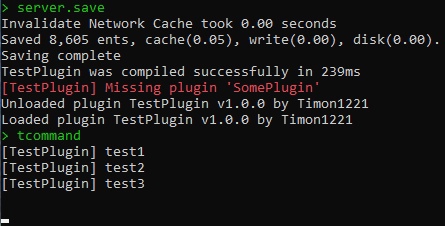
It turns out that, in theory, the "TestPlugin" plugin should not load and the "ApiGet" function should not work.
But if we call it in the plugin "TestPlugin2", then it will work, although the plugin "TestPlugin" is unloaded.
TestPlugin:
using System.Collections.Generic;
using Oxide.Core;
using Oxide.Core.Plugins;
namespace Oxide.Plugins
{
[Info("TestPlugin", "Timon1221", "1.0.0")]
class TestPlugin : RustPlugin
{
[PluginReference]
private Plugin SomePlugin;
List<string> list = new List<string>
{
"test1",
"test2",
"test3"
};
private void OnServerInitialized()
{
     if (!SomePlugin)
     {
          PrintError("Missing plugin 'SomePlugin'");
          Interface.Oxide.UnloadPlugin(Title);
          return;
     }
}
void ApiGet()
{
foreach (var item in list) Puts(item);
}
}
}
TestPlugin2:
using Oxide.Core.Plugins;

namespace Oxide.Plugins
{
    [Info("TestPlugin2", "Timon1221", "1.0.0")]
    class TestPlugin2 : RustPlugin
    {
        [PluginReference]
        private Plugin TestPlugin;

        [ConsoleCommand("tcommand")]
        void GetList() => TestPlugin.Call("ApiGet");
    }
}
Console (I just load the "TestPlugin" plugin, it wrote that it was unloaded and then that it was loaded):