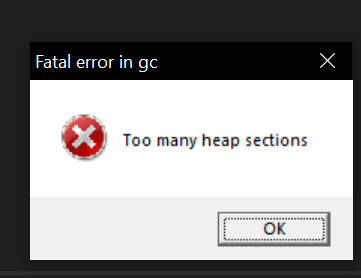
For months I'd have my server (AZ Casual) "crash" because there would be a "gc" error popup during server restart, with an "OK" button. If the OK button wasn't pressed, server wouldn't start up properly. Is also an intermittent issue, and I don't know the source.
So, if anyone else has a similar issue, I'd like to provide the following DOS batch file. Save as a .bat file, and run it. It will check for the stuck compiler.exe, and kill it (effectively, clicking OK) so your server can boot normally. It checks frequently, and provides a count of how many instances it's found:
30s pause
Runs = 61
Found = 1
I launch it as part of my overall server startup script. It also logs any time it finds/kills the issue. I've run it since the summer (2021) with no problem. Edit the path's as appropriate. I could've made it a var. I didn't. "ping -n 30" is a 30s pause. Increase/decrease n to modify the pause.
Hope it helps someone :-)
Log output:
LIST says:
Image Name PID Session Name Session# Mem Usage
========================= ======== ================ =========== ============
Compiler.exe 17300 RDP-Tcp#1 2 982,044 K
KILL says:
SUCCESS: The process with PID 17300 has been terminated.
----------------------------------------------------------------------
@echo off
set r=0
set f=0
:MAIN
cls
@echo 30s pause
:: Save Netstat Info
@netstat -aon|find "*.*.*.*:38216" >r:\RustPort.txt
set /a r = %r%+1
@echo Runs = %r%
@echo Found = %f%
@ping -n 30 *.*.*.* >NUL
tasklist /fi "WINDOWTITLE eq Fatal*" >C:\Users\<your path>\Desktop\ChkIssue.txt
::echo compiler.exe >>C:\Users\<your path>\Desktop\ChkIssue.txt
find /i "compiler.exe" C:\Users\<your path>\Desktop\ChkIssue.txt
goto %errorlevel%found
goto :end
::::::::::::::::::::::::::::::::::::::::::::::::::::::::::::::::::::::::
:0found
@echo FOUND
set /a f=%f%+1
@echo :::::::::::::::::::::::::::::::::::::::::::::::::::::::::::::::::::::: >>C:\Users\<your path>\Desktop\GCHangLog.txt
echo %date% %time% >>C:\Users\<your path>\Desktop\GCHangLog.txt
echo LIST says: >>C:\Users\<your path>\Desktop\GCHangLog.txt
tasklist /fi "WINDOWTITLE eq Fatal*" >>C:\Users\<your path>\Desktop\GCHangLog.txt
echo KILL says: >>C:\Users\<your path>\Desktop\GCHangLog.txt
taskkill /f /fi "WINDOWTITLE eq Fatal*" >>C:\Users\<your path>\Desktop\GCHangLog.txt
echo. >found.txt
@echo ---------------------------------------------------------------------- >>C:\Users\<your path>\Desktop\GCHangLog.txt
goto :end
::::::::::::::::::::::::::::::::::::::::::::::::::::::::::::::::::::::::
:1found
@echo Not Found
goto :end
::::::::::::::::::::::::::::::::::::::::::::::::::::::::::::::::::::::::
:end
@echo Go to Main
Goto :Main