Move CUI buttons/elements?
i Seem to not be doing somthing right i cant move the buttons apart the deposit 5 and the deposit 10.

                        var mainName = elements.Add(new CuiPanel
                        {
                            Image =
                {
                    Color = "0.1 0.1 0.1 1"
                },
                            RectTransform =
                {
                    AnchorMin = "0 0",
                    AnchorMax = "1 1"
                },
                            CursorEnabled = true
                        }, "Overlay", "ATM");
                        if (backroundimage == true)
                        {
                            elements.Add(new CuiElement
                            {
                                Parent = "Atm",
                                Components =
                    {
                        new CuiRawImageComponent
                        {
                            Url = backroundimageurl,
                            Sprite = "assets/content/textures/generic/fulltransparent.tga"
                        },
                        new CuiRectTransformComponent
                        {
                            AnchorMin = "0 0",
                            AnchorMax = "1 1"
                        }
                    }
                            });
                        }
                        var Agree = new CuiButton
                        {
                            Button =
                {
                    Command = $"takemoney {player.userID} 5",
                    Close = mainName,
                    Color = "0 255 0 1"
                },
                            RectTransform =
                {
                    AnchorMin = "0.2 0.16",
                    AnchorMax = "0.45 0.2"
                },
                            Text =
                {
                    Text = "Deposit 5",
                    FontSize = 22,
                    Align = TextAnchor.MiddleCenter
                }
                        };

                        var depo10 = new CuiButton
                        {
                            Button =
                {
                    Command = $"takemoney {player.userID} 10",
                    Close = mainName,
                    Color = "0 255 0 1"
                },
                            RectTransform =
                {
                    AnchorMin = "0.2 0.16",
                    AnchorMax = "0.45 0.2"
                },
                            Text =
                {
                    Text = "Deposit 10",
                    FontSize = 22,
                    Align = TextAnchor.MiddleCenter
                }
                        };


                        var Disagree = new CuiButton
                        {


                            Button =
                {

                    Close = mainName,
                    Color = "255 0 0 1"

                },
                            RectTransform =
                {
                    AnchorMin = "0.5 0.16",
                    AnchorMax = "0.75 0.2"
                },
                            Text =
                {
                    Text = "Cancel",
                    FontSize = 22,
                    Align = TextAnchor.MiddleCenter
                }
                        };
                        elements.Add(new CuiLabel
                        {
                            Text =
                {
                    Text = msg,
                    FontSize = 22,
                    Align = TextAnchor.MiddleCenter
                },
                            RectTransform =
                {
                    AnchorMin = "0 0.20",
                    AnchorMax = "1 0.9"
                }
                        }, mainName);
                        elements.Add(Agree, mainName);
                        elements.Add(depo10, mainName);
                        elements.Add(Disagree, mainName);
                        CuiHelper.AddUi(player, elements);
 
}
}
}

​
Well, we can't say what you are doing wrong since you do not tell what you are doing at all.
To move elements you can use anchors (relative to screen W/H 0.0 - 1.0) and offsets (pixel count, anchors would still take effect).
Best way to make UI's - set position with anchors (ie. Min: "0.5 0.5" Max: "0.5 0.5") and set size with offsets (ie. Min"-50 -20" Max: "50 20") <-- this will produce rectangle 100x40px in the middle of the screen.
I have tried moving the Button labled Deposit 10 Min/Max numbers but the buton is overlaping the Deposit 5 Button so i must me missing somthing.

Merged post

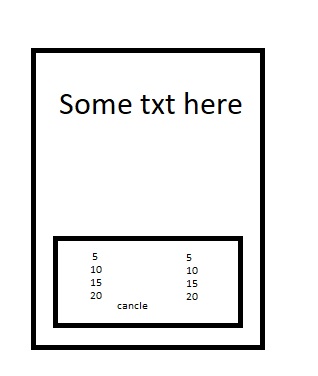
I Am trying to make a ui with mutipal buttons like this..
ui example

Merged post

ok i think i got the movment thing down how do i size the main panel  to middle of the screen but size 1/2 or less of the screen
 AnchorMin = "0 0", AnchorMax = "1 1"​

Seems to be full screen.

Merged post

Ok i got this made but when i put in the background it does not load. 
Url = "http://linktomybackground.link/file.png",​

As a non-dev, non-coder I just wish I could "drag" the different UI's each plugin uses to place them where I like, then lock them in place.  Many things  (i.e. - ZLevels and AdminRadar; player inventory and /buyraid for RaidableBases) overlap each other and I am afraid to mess around with the anchors since I don't understand what I am doing.

9Xl5NMzL3cpY24F.png WebGhost

Seems this website is down now. 
Is there any alternative?

rust-cui.surge.sh/#!/editor
heUbXwdiUc5C2jL.jpg ArtiIOMI
rust-cui.surge.sh/#!/editor
You're a Legend, Thanks!!