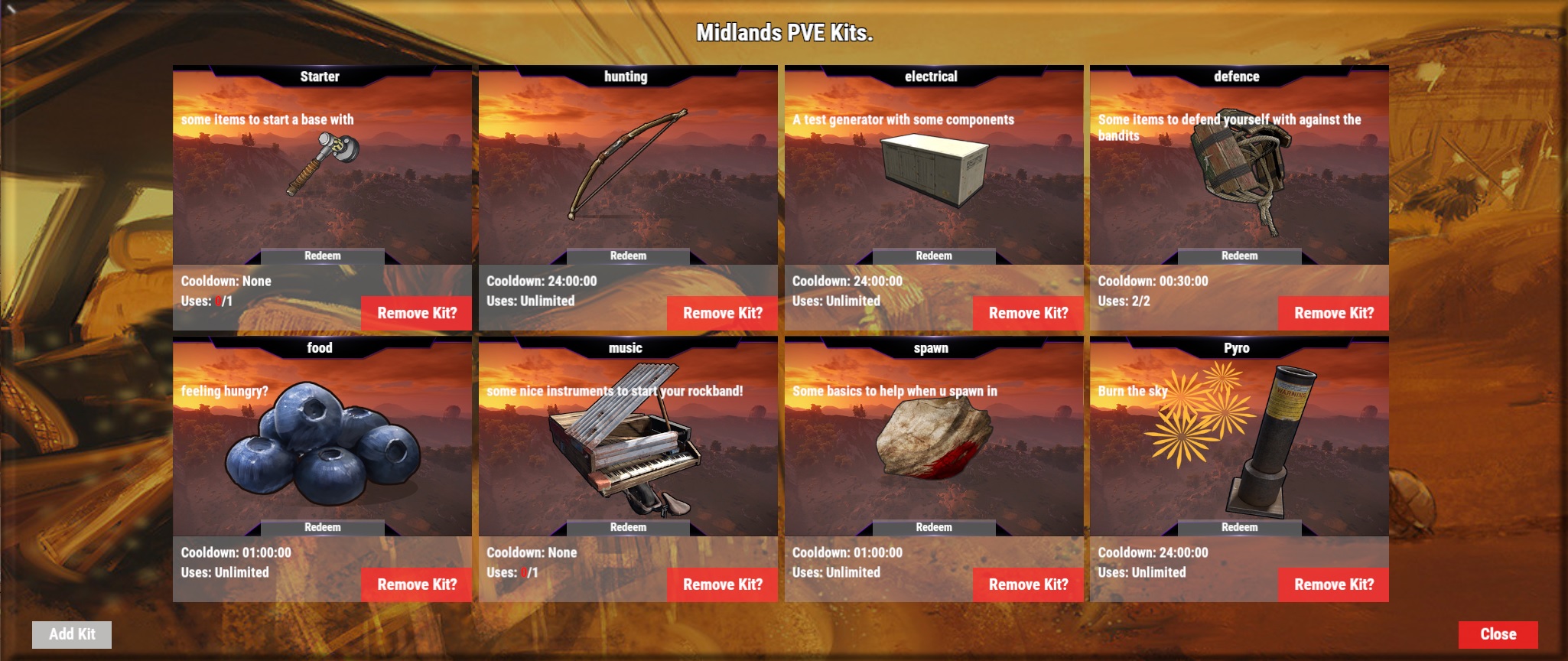
Link to my edited file
Moderator edit: Please do not post random plugin versions in threads, thanks.
Link to my edited file
Moderator edit: Please do not post random plugin versions in threads, thanks.
you bloody legend, however, your file does not make the background of the ui, where would i change in the CS file to make both the background and the "ADD KIT" button's background transparent, or atleast like 20-40% transparent. i know that there is a background for the "ADD KIT" button because i played around with the CS file trying to make it transparent and after 30 mins i made the back panel transparent but there was a big black box surrounding the "ADD KIT" button, which was rather annoying.sebastian002
Link to my edited file
Link to my edited file
Moderator edit: Please do not post random plugin versions in threads, thanks.
Okidokie .
If anyone needs the version i edited they can message me.(or if i am allowed to post a snippet of code i changed the anchors at i will do that)
background is set in the cfg and the backgrounds of the Kits are the kits images i just made a fixed kit image in photoshop and edit that to what u see in my screen.
Think for transparency search for UIColors
Okidokie .
If anyone needs the version i edited they can message me.(or if i am allowed to post a snippet of code i changed the anchors at i will do that)
Snippets with changed portions are fine, else PM please.
to add the new anchers look up the following and change the anchors
        void CreateKitEntry(BasePlayer player, ref CuiElementContainer element, string panel, float[] pos, string entry)
        {
            Kit kit = storedData.Kits[entry.ToLower()];
            var kitData = GetKitData(player.userID, entry.ToLower());
            var image = kit.image ?? "http://i.imgur.com/xxQnE1R.png";
            if (ImageLibrary)
                image = TryForImage(kit.name.Replace(" ", ""));
            UI.CreatePanel(ref element, PanelKits, UIColors["header"], $"{pos[0]} {pos[1]}", $"{pos[2]} {pos[3]}");
            UI.LoadImage(ref element, PanelKits, image, $"{pos[2] - .19f} {pos[1] + .1f}", $"{pos[2] - .0f} {pos[1] + .4f}");
            UI.CreateLabel(ref element, PanelKits, UIColors["white"], kit.name, 12, $"{pos[0] + .0f} {pos[3] - .032f}", $"{pos[2] - .003f} {pos[3] - .0f}");
            UI.CreateLabel(ref element, PanelKits, UIColors["white"], kit.description ?? string.Empty, 12, $"{pos[0] + .005f} {pos[3] - .18f}", $"{pos[2] - .005f} {pos[3] - .07f}", TextAnchor.UpperLeft);
            UI.CreateLabel(ref element, PanelKits, UIColors["white"], string.Format(GetMsg("KitCooldown", player.userID), kit.cooldown <= 0 ? GetMsg("None", player.userID) : CurrentTime() > kitData.cooldown ? MinuteFormat(kit.cooldown / 60).ToString() : "<color=red> -" + MinuteFormat((double)Math.Abs(Math.Ceiling(CurrentTime() - kitData.cooldown)) / 60) + "</color>"), 12, $"{pos[0] + .005f} {pos[3] - .34f}", $"{pos[2] - .005f} {pos[3] - .31f}", TextAnchor.MiddleLeft);
            UI.CreateLabel(ref element, PanelKits, UIColors["white"], string.Format(GetMsg("KitUses", player.userID), kit.max <= 0 ? GetMsg("Unlimited") : kit.max - kitData.max < kit.max ? $"<color=red>{kit.max - kitData.max }</color>/{kit.max}" : $"{kit.max - kitData.max }/{kit.max}"), 12, $"{pos[0] + .005f} {pos[3] - .37f}", $"{pos[2] - .005f} {pos[3] - .34f}", TextAnchor.MiddleLeft);
            if (player.net.connection.authLevel == 2 || permission.UserHasPermission(player.UserIDString, this.Title + ".admin"))
                UI.CreateButton(ref element, PanelKits, UIColors["buttonred"], GetMsg("RemoveKit", player.userID), 14, $"{pos[0] + .12f} {pos[1] + 0.0f}", $"{pos[0] + .19f} {pos[1] + .05f}", $"UI_RemoveKit {entry.ToLower()}");
            if (!ShowUnavailableKits)
                UI.CreateButton(ref element, PanelKits, UIColors["header"], GetMsg("Redeem"), 10, $"{pos[0] + .056f} {pos[1] + .10f}", $"{pos[0] + .134f} {pos[1] + .123f}", $"kit.gui {entry.ToLower()}");
            else
            {
                string reason;
                var cansee = CanSeeKit(player, entry.ToLower(), PlayerGUI[player.userID].guiid == 0 ? false : true, out reason);
                if (!cansee && string.IsNullOrEmpty(reason))
                {
                    UI.CreatePanel(ref element, PanelKits, UIColors["header"], $"{pos[0] + .005f} {pos[1] + 0.01f}", $"{pos[0] + .06f} {pos[1] + .07f}");
                    UI.CreateLabel(ref element, PanelKits, UIColors["white"],"<color=red>"+GetMsg("Unavailable", player.userID)+"</color>", 12, $"{pos[0] + .005f} {pos[1] + 0.01f}", $"{pos[0] + .06f} {pos[1] + .07f}");
                }
                else
                    UI.CreateButton(ref element, PanelKits, UIColors["dark"], GetMsg("Redeem"), 12, $"{pos[0] + .005f} {pos[1] + 0.01f}", $"{pos[0] + .06f} {pos[1] + .07f}", $"kit.gui {entry.ToLower()}");
            }
}krunghcrow
I have mine setup like this but for backgrounds on the kits u have to change anchors around line 1340 in the plugin itself
How are the code to add images like that? I dont found the documentation.
kits 3.3.1 anchor changes.
look for the hook ` CreateKitEntry ` and change the block to the following (previous code snippet was for the previous kits version)
        private void CreateKitEntry( BasePlayer player, ref CuiElementContainer element, string panel, float[] pos, string entry )
        {
            var kit = storedData.Kits[entry.ToLower()];
            var kitData = GetKitData(player.userID, entry.ToLower());
            var image = kit.image ?? "http://i.imgur.com/xxQnE1R.png";
            if ( ImageLibrary )
                {
                    image = TryForImage(kit.name.Replace(" ", ""));
                }

            UI.CreatePanel( ref element, PanelKits, _uiColors["header"], $"{pos[0]} {pos[1]}", $"{pos[2]} {pos[3]}");
            UI.LoadImage( ref element, PanelKits, image, $"{pos[2] - .19f} {pos[1] + .1f}", $"{pos[2] - .0f} {pos[1] + .4f}");
            UI.CreateLabel( ref element, PanelKits, _uiColors["white"], kit.name, 12, $"{pos[0] + .0f} {pos[3] - .032f}", $"{pos[2] - .003f} {pos[3] - .0f}");
            UI.CreateLabel( ref element, PanelKits, _uiColors["white"], kit.description ?? string.Empty, 12, $"{pos[0] + .005f} {pos[3] - .18f}", $"{pos[2] - .005f} {pos[3] - .07f}", TextAnchor.UpperLeft);
            UI.CreateLabel( ref element, PanelKits, _uiColors["white"], string.Format(GetMsg("KitCooldown", player.UserIDString), kit.cooldown <= 0 ? GetMsg("None", player.UserIDString) : CurrentTime() > kitData.cooldown ? MinuteFormat(kit.cooldown / 60).ToString() : "<color=red> -" + MinuteFormat((double)Math.Abs(Math.Ceiling(CurrentTime() - kitData.cooldown)) / 60) + "</color>"), 12, $"{pos[0] + .005f} {pos[3] - .34f}", $"{pos[2] - .005f} {pos[3] - .31f}", TextAnchor.MiddleLeft);
            UI.CreateLabel( ref element, PanelKits, _uiColors["white"], string.Format(GetMsg("KitUses", player.UserIDString), kit.max <= 0 ? GetMsg("Unlimited") : kit.max - kitData.max < kit.max ? $"<color=red>{kit.max - kitData.max }</color>/{kit.max}" : $"{kit.max - kitData.max }/{kit.max}"), 12, $"{pos[0] + .005f} {pos[3] - .37f}", $"{pos[2] - .005f} {pos[3] - .34f}", TextAnchor.MiddleLeft);
            if ( player.net.connection.authLevel == 2 || permission.UserHasPermission( player.UserIDString, this.Title + ".admin" ) )

            {
                UI.CreateButton( ref element, PanelKits, _uiColors["buttonred"], GetMsg("RemoveKit", player.UserIDString), 14, $"{pos[0] + .12f} {pos[1] + 0.0f}", $"{pos[0] + .19f} {pos[1] + .05f}", $"UI_RemoveKit {entry.ToLower()}");
            }

            if (!ShowUnavailableKits)
            {
                UI.CreateButton( ref element, PanelKits, _uiColors["header"], GetMsg("Redeem"), 10, $"{pos[0] + .056f} {pos[1] + .10f}", $"{pos[0] + .134f} {pos[1] + .123f}", $"kit.gui {entry.ToLower()}");
            }
            else
            {
                string reason;
                var cansee = CanSeeKit(player, entry.ToLower(), PlayerGUI[player.userID].guiid == 0 ? false : true, out reason);
                if (!cansee && string.IsNullOrEmpty(reason))
                {
                    UI.CreatePanel( ref element, PanelKits, _uiColors["header"], $"{pos[0] + .005f} {pos[1] + 0.01f}", $"{pos[0] + .06f} {pos[1] + .07f}");
                    UI.CreateLabel( ref element, PanelKits, _uiColors["white"],"<color=red>"+GetMsg("Unavailable", player.UserIDString)+"</color>", 12, $"{pos[0] + .005f} {pos[1] + 0.01f}", $"{pos[0] + .06f} {pos[1] + .07f}");
                }
                else
                {
                UI.CreateButton( ref element, PanelKits, _uiColors["dark"], GetMsg("Redeem"), 12, $"{pos[0] + .005f} {pos[1] + 0.01f}", $"{pos[0] + .06f} {pos[1] + .07f}", $"kit.gui {entry.ToLower()}");
                }
            }
        }
if u dont have the knowledge send me a PM
Finally got the help I needed. Krunghcrow is the man!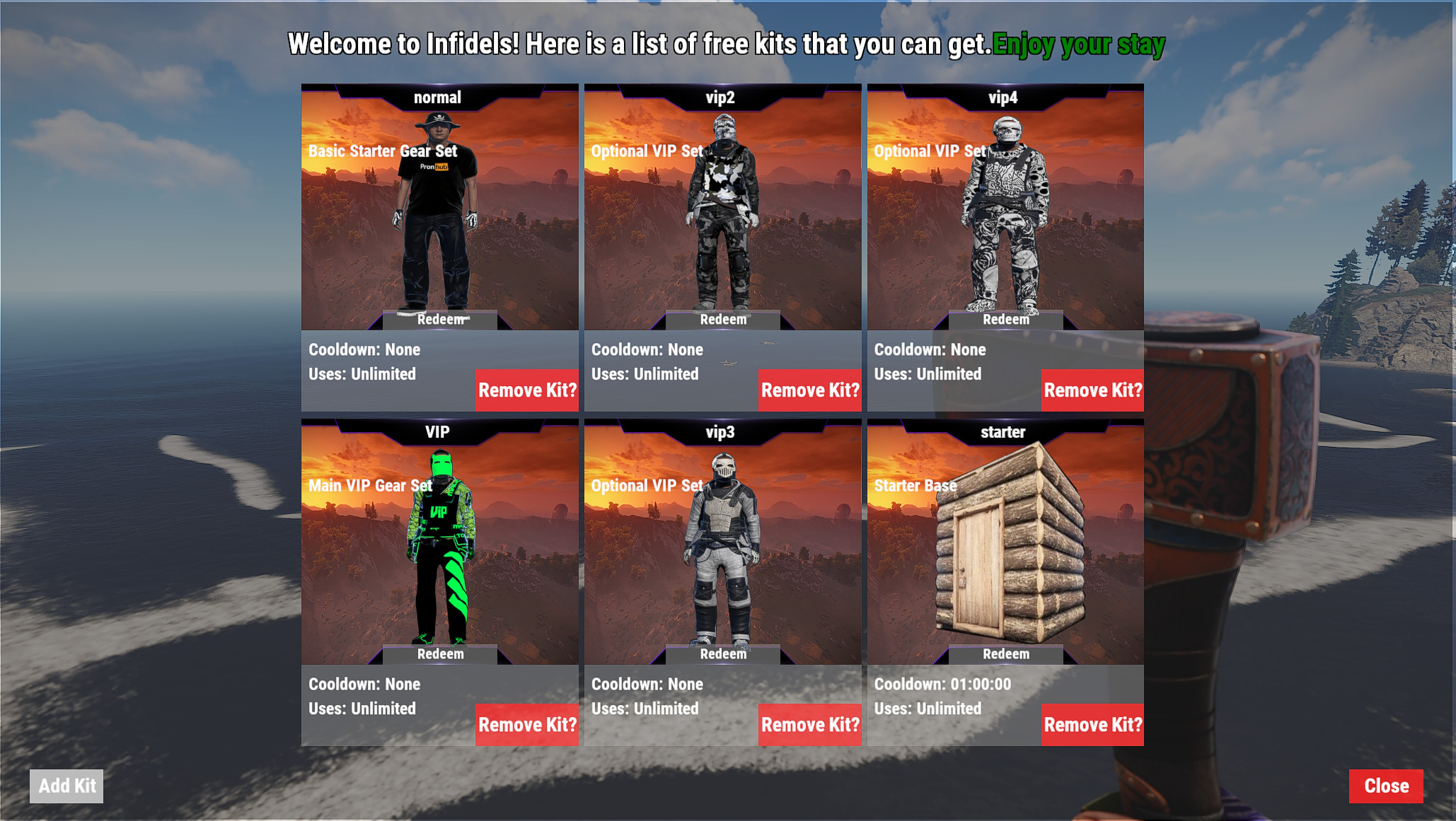
I dont understand any of that. All I want is the big background with the image I took "screen shot of my inv" and I want to put that in the background showing what each kit offers instead of a blank background. I dont even know how to get a GUI image so if someone can help me there that would be nice. I tried just putting a URL link to my screen shot image in the /kit image "URL" itself but nothing works. Google has let me down so far I really tried to find the answers on my own for this problem but cant seem to figure it out.