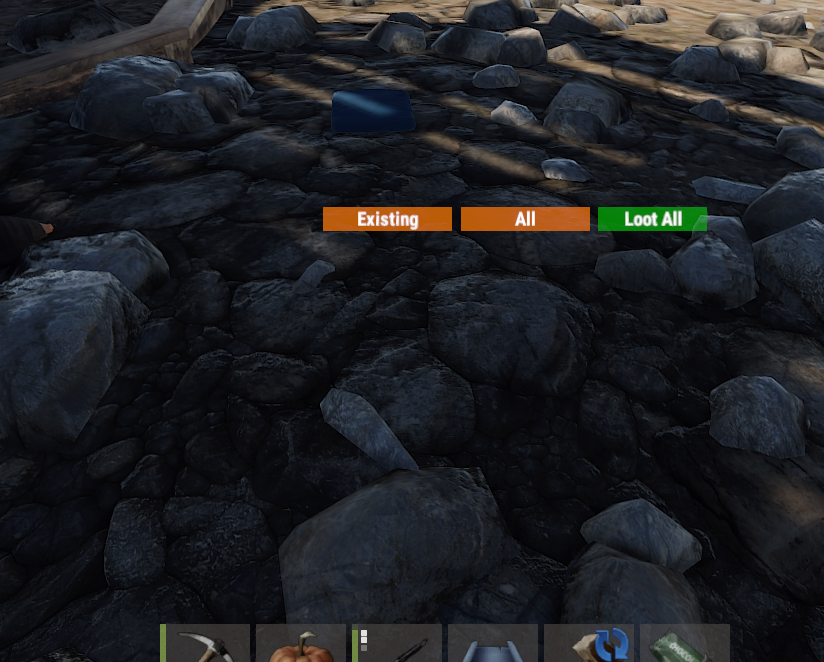
UI stays on the screen after closing tradeFixed

this is the "lite" version, both this and "right" leave it on the screen.
V1.3.3
anytime you do a trade and close the trade window the GUI stays on your screen until you open a box or tc or whatever and close that then it goes away.
Hi,

when you use the trade plugin and trade with someone, the UI for Quick Sort doesn't disappear :/

Please Fix

Merged post

or add a close button ;)
In response to Gattaca ():

this is the "lite" version, both this and "right" leave it on the screen.
V1.3.3
any...
i have the same, can you fix it? i have asked /trade developer, but i think quick sort dev must do this....
In response to PlayerKnownAsRay ():
i have the same, can you fix it? i have asked /trade developer, but i think quick sort dev must do t...
it has been bugging me, as well, since the plugin DEV doesn't care to fix it maybe I can find a quick fix.
In response to Gattaca ():
it has been bugging me, as well, since the plugin DEV doesn't care to fix it maybe I can find a quic...
@Gattaca, did you ever get a fix working?
Hi,

When you use the trade plugin the quick sort does not dissapear

Please make it so it dissapears after trading. Thanks.
Is this issue every going to get fixed??? 
5d35f1495da0a.jpg FastBurst
Is this issue every going to get fixed??? 

probably not, it has been an on-going issue for a very long time now

This would be a most needed option, Not sure why its not working properly with Trade Plugin its very annoying.

@Frenk92 Can we get support for Trade plugin please. When any one does a trade the Quick Sort stays open after trade is closed. Its pretty annouying - @Wulf had said in the Trade Support forums that this would be a Quick Sort issue.

Currently the only way to make the Quicksort in the upper right disappear is to open anothe box or furnance or whatever then close it in order for this to kill the Quick Sort GUI.


@Gattaca - I finally got it fixed for Trade Plugin. 

Merged post

@Frenk92 I got a fix that works from @Orange works for the Trade Plugin compatibility - doesn't even require a hook see code below
private void OnLootEntity(BasePlayer player, BaseEntity entity)
{
	var check = entity.GetComponent<DestroyOnGroundMissing>();
	if (check != null && check.enabled == false)
	{
		return;
	}
	
	if (permission.UserHasPermission(player.UserIDString, permUse) && !(entity is VendingMachine) && !(entity is ShopFront) && !(entity is BigWheelBettingTerminal))
	{
		UserInterface(player);
	}
}
​
Fixed in latest version
Locked automatically