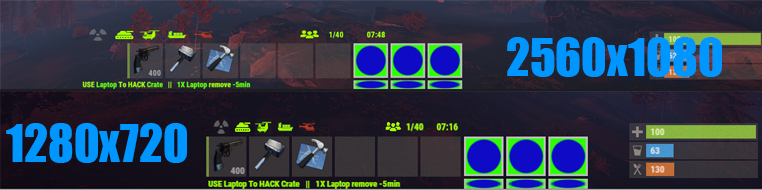
Panel on 2560 x 1080 rez Streched

1st of best UI-info plugin there is 
but small issue as all of them 

when setin up UI on 1289x720 or 1920x1080 (like on standart monitor) all is G

but when runnin on 2560 x 1080 (widescreen) width gets streched out (maybe height to)

image for example 
SgFF0jtEO8xcIRt.png
thanks

Yeah, I have the same issue with my monitor as well. In order to fix it, the plugin is going to need a full rewrite which is planned when I get time.

I was afraid you gonna say that 

i did find 2 plugins that dosent have issues with widescreen sterch 

1.Craft Car Chassis by White Thunder on UMOD
2.Custom Buttons by David on myvector.xyz (PAID tho)
witch you can see are the green buttons on that screenshot 

but other than those i see that streching around alot 

Yeah, it's possible to do. There are 2 ways of displaying UI on a screen using anchors or offsets. This plugin was designed using anchors which are percentage based and change based on height and width ratios. Offsets use pixels which is what this will need to be switched to in order to solve the issue.

Is there no quick for that until plugin in gets full rework?

sorry if qestion is stupid ... just starting to in to all of this 

MJSU

Yeah, I have the same issue with my monitor as well. In order to fix it, the plugin is going to need a full rewrite which is planned when I get time.

Hello I hope you find time to do this soon, I would be very grateful and would also make a donation. Thank you

👀👀👀👀👀 


Its not just screen res, people with different user interface scale are affected. Not everyone uses 1.0

@MJSU

Please create one that adjusts the scaling.
I am willing to pay for it. Put it up for sale I would be willing to pay ~15 euros for it.
I would really appreciate it and I think many others would too.
Thanks 🙏


ZX4Cy0fRvk4ZshW.png Kobani

@MJSU

Please create one that adjusts the scaling.
I am willing to pay for it. Put it up for sale I would be willing to pay ~15 euros for it.
I would really appreciate it and I think many others would too.
Thanks 🙏


AdvertCycler does the job, at least for the advert/info messages

Facepunch HUD elements are generally anchored to the screen corners, screen center, or screen edge midpoints, and then offsets are used from those. In my own CUI code, setting anchormin=anchormax to one of these 9 locations and then using offsets consistently allows me to align stuff with vanilla HUD elements - even when messing with the in-game UI scale slider.

Unfortunately Magic Panel uses anchors for everything, which breaks horribly if you touch the UI scale slider. Anchor-only alignment makes sense for menus but is extremely problematic for HUDs.