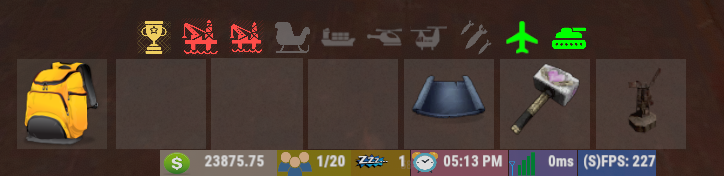
Hey
I have been searching the setting to put the panels closer to eachother.
I want the gaps between two panels smaller. but ccant find the setting in the config.
Thanks.
Aaron
Move panels closer to each other?
Each dock has a field called "Panel Padding" this controls the spacing between each panel. Default is 0.004.
thnx for fast reply.
Thats what i read but how is it then the online player panels and the sleeper panel is closer to eachother?
dont get that.
thnx!
Hmmm you do make a good point. Those should have been equally spaced. Can you add me on Discord MJSU#0814 and send me all your configs for MagicPanel so I can sort through what's going on.
hey i added you my discord is: Aaronitoo#2032 :)
I am struggling with this as well. I can't get mine to look how I want and all of my panels are spaced very far apart. I set the panel padding to 0.0001 to see if that helps but it did not. So any advise would be great.
Please also check that for each panel the width of the text and image sections add up to 1. That was what caused a lot of the spacing issues for the other person. If that doesn't solve your issues feel free to add me on discord and send me your configs.
MJSUPlease also check that for each panel the width of the text and image sections add up to 1. That was what caused a lot of the spacing issues for the other person. If that doesn't solve your issues feel free to add me on discord and send me your configs.
I think I've done that correctly now but I still have them spaced WAY out. I sent you a friend request on discord.
any solutions to this yet ?

Love your Plugin @MJSU , Much appreciated
iPanda
any solutions to this yet ?
Love your Plugin @MJSU , Much appreciated
What's the issue you're having? All widths are controlled by MagicPanel.json for padding or the respective Panel.json under width.
MJSUWhat's the issue you're having? All widths are controlled by MagicPanel.json for padding or the respective Panel.json under width.
Oh @MJSU ! That was unexpected quick response !!my issue is the spacing between the IMG and text , then spacing between Plugins... no matter what i changed in text anchor "making it left or leftcenter" or changing Paddings to smaller figure 0.01 instead of 0.04 .... doesn't achive what im looking for, i will try giving them backgrounds temporarily to visibly see their exact size maybe 😅
Spacing between icons and text would be in each panel's config JSON. There is an option under text and image called width. You can try reducing the Image width and increasing the text width. Be sure to keep the two widths when added together equal to 1.
For the spacing between panels this is controlled by both MagicPanel.json and the plugins panel JSON. MagicPanel.json will control the padding between each plugin. Each panel also specifies an overall width which can add more spacing than you're expecting.
The best way to test and figure out what needs to be adjusted is setting the color on a panel to reb, blue, or green and see if it's taking more space than you want.
If you need more of an explanation just let me know and I can include some screen shots.
@MJSU , appreciate that you are trying to simplify it to me this much and I believe I understand you very well , but most Panels render outside the dock "bottom" and the dock is not stretching when adding more panels inside it , and the main spacing between the panels remains an issue for me.
I have sent a message to SRTBull to make a video about it but I don't believe it will happen tbh.

UPDATE**: So i looked in "bottom" dock padding , i found that it was on -0.21 changed it to 0.0 and all panels went inside the "bottom" dock perfectly :D .......
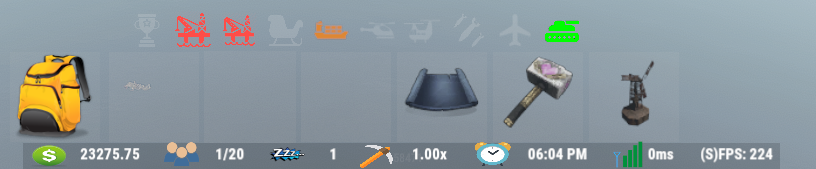
the only issue remaining is spacing between them & spacing between icon and text is still bad, will continue to fix i wont give up
I have sent a message to SRTBull to make a video about it but I don't believe it will happen tbh.
UPDATE**: So i looked in "bottom" dock padding , i found that it was on -0.21 changed it to 0.0 and all panels went inside the "bottom" dock perfectly :D .......
the only issue remaining is spacing between them & spacing between icon and text is still bad, will continue to fix i wont give up
I would suggest going to each individual panel and setting its background color to red or something so you can see how big the panel really is. You can use the picture I have attached to figure out how to adjust the panel widths.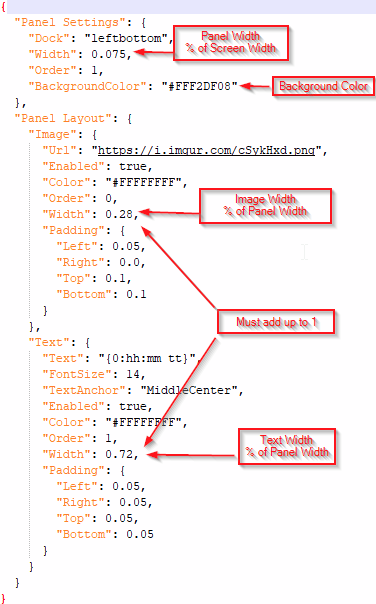
MJSUI would suggest going to each individual panel and setting its background color to red or something so you can see how big the panel really is. You can use the picture I have attached to figure out how to adjust the panel widths.
You are a Beast !!!!!!!!! THANK YOU SO MUCH MAN YOUR SUPPORT IS BEYOND REAL !