Failed to call hook 'loadoutcommand' on plugin 'Loadoutless v1.3.3' (JsonReaderException: Unexpected character encountered while parsing value: C. Path '', line 0, position 0.)
  at Newtonsoft.Json.JsonTextReader.ParseValue () [0x002b3] in <8fe7f8665ff548909c2f26d557e5093a>:0
  at Newtonsoft.Json.JsonTextReader.Read () [0x0004c] in <8fe7f8665ff548909c2f26d557e5093a>:0
  at Newtonsoft.Json.JsonReader.ReadAndMoveToContent () [0x00000] in <8fe7f8665ff548909c2f26d557e5093a>:0
  at Newtonsoft.Json.Serialization.JsonSerializerInternalReader.ReadForType (Newtonsoft.Json.JsonReader reader, Newtonsoft.Json.Serialization.JsonContract contract, System.Boolean hasConverter) [0x00043] in <8fe7f8665ff548909c2f26d557e5093a>:0
  at Newtonsoft.Json.Serialization.JsonSerializerInternalReader.Deserialize (Newtonsoft.Json.JsonReader reader, System.Type objectType, System.Boolean checkAdditionalContent) [0x000d9] in <8fe7f8665ff548909c2f26d557e5093a>:0
  at Newtonsoft.Json.JsonSerializer.DeserializeInternal (Newtonsoft.Json.JsonReader reader, System.Type objectType) [0x00053] in <8fe7f8665ff548909c2f26d557e5093a>:0
  at Newtonsoft.Json.JsonSerializer.Deserialize (Newtonsoft.Json.JsonReader reader, System.Type objectType) [0x00000] in <8fe7f8665ff548909c2f26d557e5093a>:0
  at Newtonsoft.Json.JsonConvert.DeserializeObject (System.String value, System.Type type, Newtonsoft.Json.JsonSerializerSettings settings) [0x0002d] in <8fe7f8665ff548909c2f26d557e5093a>:0
  at Newtonsoft.Json.JsonConvert.DeserializeObject[T] (System.String value, Newtonsoft.Json.JsonSerializerSettings settings) [0x00000] in <8fe7f8665ff548909c2f26d557e5093a>:0
  at Newtonsoft.Json.JsonConvert.DeserializeObject[T] (System.String value) [0x00000] in <8fe7f8665ff548909c2f26d557e5093a>:0
  at Oxide.Plugins.Loadoutless.resetPlayersLoadout () [0x0002f] in <a99f40323e5c4533865e8e020ecfbc8e>:0
  at Oxide.Plugins.Loadoutless.loadoutcommand (BasePlayer player, System.String command, System.String[] args) [0x002f3] in <a99f40323e5c4533865e8e020ecfbc8e>:0
  at Oxide.Plugins.Loadoutless.DirectCallHook (System.String name, System.Object& ret, System.Object[] args) [0x00172] in <a99f40323e5c4533865e8e020ecfbc8e>:0
  at Oxide.Plugins.CSharpPlugin.InvokeMethod (Oxide.Core.Plugins.HookMethod method, System.Object[] args) [0x00079] in <9affce1cd15c4ec183941adef8db1722>:0
  at Oxide.Core.Plugins.CSPlugin.OnCallHook (System.String name, System.Object[] args) [0x000d8] in <4452f821def6406d834e4149849fe7ea>:0
at Oxide.Core.Plugins.Plugin.CallHook (System.String hook, System.Object[] args) [0x00060] in <4452f821def6406d834e4149849fe7ea>:0JsonReaderException when using /loadout resetFixed
anyone know?
Looks like the data file for the plugin was corrupt or unreadable.
i unloaded and removed all files related to loadoutless then put the plugin back in, and i still get this error .any ideas how i can reset this somehow?Wulf
Looks like the data file for the plugin was corrupt or unreadable.
Are you sure you deleted the oxide/data for the plugin while the plugin was unloaded?
this command /loadout reset dont work please fix it
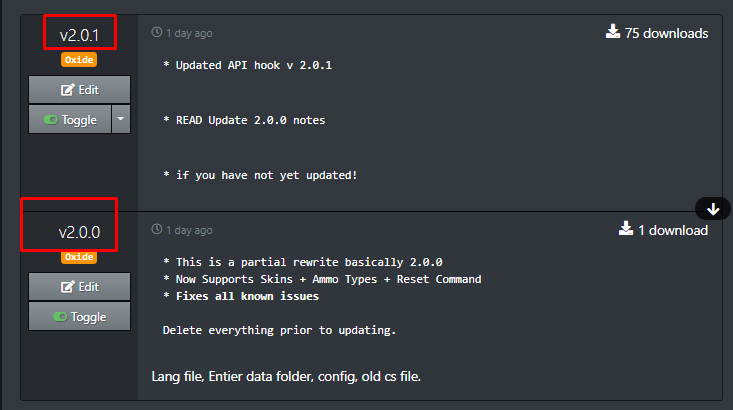
Follow update instructions for 2.0.0 fixes this.
Follow update instructions for update 2.0.0 fixes all known issues.
/loadout setdefault not working
console error
Failed to call hook 'OnPlayerRespawned' on plugin 'Loadoutless v1.3.3' (JsonReaderException: Unexpected character encountered while parsing value: {. Path '', line 1, position 1.)
  at Newtonsoft.Json.JsonTextReader.ReadStringValue (Newtonsoft.Json.ReadType readType) [0x00366] in <2ae3f091decd4989b3c4d466e6eb5985>:0
prs                                                                              929b/s in, 4kb/s out
  at Newtonsoft.Json.JsonTextReader.ReadAsString () [0x00000] in <2ae3f091decd4989b3c4d466e6eb5985>:0
  at Newtonsoft.Json.Serialization.JsonSerializerInternalReader.ReadForType (Newtonsoft.Json.JsonReader reader, Newtonsoft.Json.Serialization.JsonContract contract, System.Boolean hasConverter) [0x00077] in <2ae3f091decd4989b3c4d466e6eb5985>:0
  at Newtonsoft.Json.Serialization.JsonSerializerInternalReader.Deserialize (Newtonsoft.Json.JsonReader reader, System.Type objectType, System.Boolean checkAdditionalContent) [0x000d9] in <2ae3f091decd4989b3c4d466e6eb5985>:0
  at Newtonsoft.Json.JsonSerializer.DeserializeInternal (Newtonsoft.Json.JsonReader reader, System.Type objectType) [0x00053] in <2ae3f091decd4989b3c4d466e6eb5985>:0
  at Newtonsoft.Json.JsonSerializer.Deserialize (Newtonsoft.Json.JsonReader reader, System.Type objectType) [0x00000] in <2ae3f091decd4989b3c4d466e6eb5985>:0
  at Newtonsoft.Json.JsonConvert.DeserializeObject (System.String value, System.Type type, Newtonsoft.Json.JsonSerializerSettings settings) [0x0002d] in <2ae3f091decd4989b3c4d466e6eb5985>:0
  at Newtonsoft.Json.JsonConvert.DeserializeObject[T] (System.String value, Newtonsoft.Json.JsonSerializerSettings settings) [0x00000] in <2ae3f091decd4989b3c4d466e6eb5985>:0
  at Oxide.Core.Configuration.DynamicConfigFile.ReadObject[T] (System.String filename) [0x00028] in <c2afd8354b8b4f3ca451cf5a1aa111c3>:0
  at Oxide.Core.DataFileSystem.ReadObject[T] (System.String name) [0x00021] in <c2afd8354b8b4f3ca451cf5a1aa111c3>:0
  at Oxide.Plugins.Loadoutless.get_user (BasePlayer player) [0x00099] in <95df02be86474d2cb794b109de8121ec>:0
  at Oxide.Plugins.Loadoutless.give_loadout (BasePlayer player) [0x00000] in <95df02be86474d2cb794b109de8121ec>:0
  at Oxide.Plugins.Loadoutless.OnPlayerRespawned (BasePlayer player) [0x0001b] in <95df02be86474d2cb794b109de8121ec>:0
  at Oxide.Plugins.Loadoutless.DirectCallHook (System.String name, System.Object& ret, System.Object[] args) [0x002fd] in <95df02be86474d2cb794b109de8121ec>:0
  at Oxide.Plugins.CSharpPlugin.InvokeMethod (Oxide.Core.Plugins.HookMethod method, System.Object[] args) [0x00079] in <3606d2af539c45e4b5c61658e6a8b307>:0
  at Oxide.Core.Plugins.CSPlugin.OnCallHook (System.String name, System.Object[] args) [0x000d8] in <c2afd8354b8b4f3ca451cf5a1aa111c3>:0
at Oxide.Core.Plugins.Plugin.CallHook (System.String hook, System.Object[] args) [0x00060] in <c2afd8354b8b4f3ca451cf5a1aa111c3>:0Well maybe if you actually downloaded the latest updates and followed the update directions you'd see that this issue no longer exists.

I can clearly see that it says version 1.3.3 for you. That is not the latest release.
/loadout setdefault not working for me. version 2.0.1.
ErMonito
/loadout setdefault not working for me. version 2.0.1.
Error? Did you make sure you had permission
kan
Error? Did you make sure you had permission
If I have permissions. That is proven the first.
Okie well I highly doubt it's the same error since the plugin version is different.
So unless a new error is provided with the correct version I'll be closing this thread.
But ya looking at it now it seems 2.0.1 with the API hook is what caused the issue with the 2 commands.
For now, just delete the oxide data folder called Loadoutless_folder and go back to version 2.0.0 which does not have this issue
I get the same error in console as yapras.
Merged post
I do have version 2.0.1
Locked automatically
- 1
- 2