Player Disconnect

Some players have found a player disconnect bug that happens when a user attempts to use, drag, or sometimes open the Research Bench while using your ItemRetriever + and my SuperCrafter plugin.


ScalBox has detailed the crash here, complete with description, logging, and video.

https://codefling.com/files/sc/27131-player-error-diconnect/?tab=comments#comment-135188


They have already fixed the problem with ItemRetriever.cs. This is a request to update the code to fix this issue.


Looks like the issue stems from FacePunch's blueprint update along with some missing null checking.

Item Retriever is an open source plugin on GitHub. Community members are encouraged to use proper channels (GitHub Pull Requests) to contribute changes.

Merged post

Never mind on making a pull request. Most of the changes don't make sense. It apperas to have been generated by AI without an understanding of the game. Below is my unnecessary critique of the AI code.

  • Adding an ItemDefinition cache is not useful because the ItemManager.FindItemDefinition method already utilizes such a cache internally
  • There are a bunch of checks for item.blueprintTarget != 0 but they can never be reached because they are excluded by an item.IsBlueprint() check which internally does the exact same thing
  • The null checks don't appear to be necessary, as the plugin should not be getting a list of items that contains null entries or items that have no item definition -- A great deal of Rust game logic would break under those circumstances
The important change seems to be that blueprints should not be serialized to the network. That is a reasonable change since I can't think of a case where a blueprint would be an ingredient for anything. I've gone ahead and released an update to include that.
NKXTQs24ExGTuL8.jpg WhiteThunder

Item Retriever is an open source plugin on GitHub. Community members are encouraged to use proper channels (GitHub Pull Requests) to contribute changes.

Merged post

Never mind on making a pull request. Most of the changes don't make sense. It apperas to have been generated by AI without an understanding of the game. Below is my unnecessary critique of the AI code.

  • Adding an ItemDefinition cache is not useful because the ItemManager.FindItemDefinition method already utilizes such a cache internally
  • There are a bunch of checks for item.blueprintTarget != 0 but they can never be reached because they are excluded by an item.IsBlueprint() check which internally does the exact same thing
  • The null checks don't appear to be necessary, as the plugin should not be getting a list of items that contains null entries or items that have no item definition -- A great deal of Rust game logic would break under those circumstances
The important change seems to be that blueprints should not be serialized to the network. That is a reasonable change since I can't think of a case where a blueprint would be an ingredient for anything. I've gone ahead and released an update to include that.


The changes aren't AI changes; they're changes where the IDE flagged possible null pointers, so in some cases I added a null check.

I added the check to avoid using blueprints, and a cache for ItemDefinition, since they never change.

my cache is faster than FP, since before reaching the FP cache, several calls to methods are made, such as ItemManager.Initialize();, and a whole series of casts just to find the Item Definition

There's nothing AI here!

In any case, both my version and your version, in certain cases, still crash the player when searching for the blueprint.

The blueprint appears completely empty, without showing the item. For example, if I move it back to the research table, the item appears again, but when learning the project, it fails and player kick.


all the changes were made by me on a plugin that I don't know, so I did what I could in the little time available

rh8r9bJqstR9DML.png scalbox

The changes aren't AI changes; There's nothing AI here!

all the changes were made by me

The main reason I called this out as appearing AI generated is this comment block above the cache implementation. It looks exactly like a ChatGPT output. This makes it hard to believe that "all" the changes were made by a human.

/// <item><description>⚡ Instant results for repeated requests</description></item>
/// <item><description>💾 Memory efficient - saves only what is used</description></item>
/// <item><description>🔄 Permanent cache for the entire plugin lifetime</description></item>
/// <item><description>🎯 Zero configuration - fills automatically</description></item>
/// <item><description>⚠️ Properly handles null values (items not found)</description></item>

Look, I encourage AI use. In its current form, it's great for learning and protoyping, good at summarizing and providing coding assistance, and also good at performing some tasks. I often use AI at work, with very mixed results. AI has its problems, and uses. I encourage people to use AI to develop Rust plugins, especially if they are new to the domain, as it can help them learn and save some time. When I see changes that appear AI generated, I certainly have a bias to dismiss them, and that bias is well founded given that the vast majority of AI outputs absolutely warrant being discarded (or at least reworked by a human or another AI). My critiques of the code remain, regardless of how they were produced.

JYhrH92vx9161i0.png scalbox

my cache is faster than FP, since before reaching the FP cache, several calls to methods are made, such as ItemManager.Initialize();, and a whole series of casts just to find the Item Definition

Technically, yes, it is faster. However, the performance increase is negligible and probably not worth the time to make/use the custom cache. Performance improvements often (but not always) require an increase in lines of code and complexity, contributing to an increase in development and maintenance cost. Sometimes it's worth it, sometimes it's not. In this case, I don't think it's worth it. If you look at plugins I maintain, you will find I often take the complexity hit for minor performance gains, to the detriment of the codebase.

There is no "series of casts" to find an ItemDefinition. The ItemManager.Initialize() method runs a simple null check (it's not a Unity object, so no managed->native call) then returns, which is incredibly fast. The GetValueOrDefault extension method has a simple null check as well. There's a possible cast when using the return value, since ItemDefinition is a Unity object, so itemDefinition == null will do a managed->native call (which is expensive), but that can easily be avoided by forcing a plain null check with (object)itemDefinition == null (this cast is basically free, by the way) or itemDefinition is null. If you are concerned about these additional operations, I encourage you to do an actual performance benchmark to see the difference (and share the results if you think they warrant optimization). It's hard to determine whether a performance optimization is necessary without actual measurement.

jcONuDLKxnxUjxE.png scalbox

In any case, both my version and your version, in certain cases, still crash the player when searching for the blueprint.

The blueprint appears completely empty, without showing the item. For example, if I move it back to the research table, the item appears again, but when learning the project, it fails and player kick.

I'm happy to help troubleshoot the issue, and to make more changes to Item Retriever if it turns out to be the correct place to do them, but I haven't been able to reproduce the issue so far. I tried reproducing using Item Retriever + Backpacks, by placing a blueprint into the Backpack, turning on Retrieve for that page, and learning the blueprint, but I couldn't reproduce the issue. At this point, I can't rule out that SuperCrafter could be doing something wrong.

If you would like, you can try reproducing with this ItemPuller 2.0 prototype I created around a year ago, which functions similar to SuperCrafter in concept. I don't know which APIs SuperCrafter is using, but this one uses the AddContainer and RemoveContainer APIs to register nearby containers in your base, spiritually succeeding ItemPuller 1.x from uMod.
https://github.com/WheteThunger/ItemPuller

If you can reproduce the issue with Backpacks or ItemPuller 2.0, that will make a more compelling case for me looking deeper into this on the ItemRetriever side.

NKXTQs24ExGTuL8.jpg WhiteThunder

The main reason I called this out as appearing AI generated is this comment block above the cache implementation. It looks exactly like a ChatGPT output. This makes it hard to believe that "all" the changes were made by a human.

/// <item><description>⚡ Instant results for repeated requests</description></item>
/// <item><description>💾 Memory efficient - saves only what is used</description></item>
/// <item><description>🔄 Permanent cache for the entire plugin lifetime</description></item>
/// <item><description>🎯 Zero configuration - fills automatically</description></item>
/// <item><description>⚠️ Properly handles null values (items not found)</description></item>

Look, I encourage AI use. In its current form, it's great for learning and protoyping, good at summarizing and providing coding assistance, and also good at performing some tasks. I often use AI at work, with very mixed results. AI has its problems, and uses. I encourage people to use AI to develop Rust plugins, especially if they are new to the domain, as it can help them learn and save some time. When I see changes that appear AI generated, I certainly have a bias to dismiss them, and that bias is well founded given that the vast majority of AI outputs absolutely warrant being discarded (or at least reworked by a human or another AI). My critiques of the code remain, regardless of how they were produced.

Technically, yes, it is faster. However, the performance increase is negligible and probably not worth the time to make/use the custom cache. Performance improvements often (but not always) require an increase in lines of code and complexity, contributing to an increase in development and maintenance cost. Sometimes it's worth it, sometimes it's not. In this case, I don't think it's worth it. If you look at plugins I maintain, you will find I often take the complexity hit for minor performance gains, to the detriment of the codebase.

There is no "series of casts" to find an ItemDefinition. The ItemManager.Initialize() method runs a simple null check (it's not a Unity object, so no managed->native call) then returns, which is incredibly fast. The GetValueOrDefault extension method has a simple null check as well. There's a possible cast when using the return value, since ItemDefinition is a Unity object, so itemDefinition == null will do a managed->native call (which is expensive), but that can easily be avoided by forcing a plain null check with (object)itemDefinition == null (this cast is basically free, by the way) or itemDefinition is null. If you are concerned about these additional operations, I encourage you to do an actual performance benchmark to see the difference (and share the results if you think they warrant optimization). It's hard to determine whether a performance optimization is necessary without actual measurement.

I'm happy to help troubleshoot the issue, and to make more changes to Item Retriever if it turns out to be the correct place to do them, but I haven't been able to reproduce the issue so far. I tried reproducing using Item Retriever + Backpacks, by placing a blueprint into the Backpack, turning on Retrieve for that page, and learning the blueprint, but I couldn't reproduce the issue. At this point, I can't rule out that SuperCrafter could be doing something wrong.

If you would like, you can try reproducing with this ItemPuller 2.0 prototype I created around a year ago, which functions similar to SuperCrafter in concept. I don't know which APIs SuperCrafter is using, but this one uses the AddContainer and RemoveContainer APIs to register nearby containers in your base, spiritually succeeding ItemPuller 1.x from uMod.
https://github.com/WheteThunger/ItemPuller

If you can reproduce the issue with Backpacks or ItemPuller 2.0, that will make a more compelling case for me looking deeper into this on the ItemRetriever side.

That cache code snippet is a system I've always used in my plugins, and I often have AI do it for method documentation.

I thought about adding a cache because ItemRetriver gets called a lot on the server when used with SuperCrafter, and from my perspective, even a small performance improvement helps when a plugin/code is called frequently.

I use AI, if that's what I use—Chat GPT, Claude, Github Copilot, Gemini, Ollama Cloud (all paid subscriptions), including Jetbrain AI Assistant. I use AI confidently in my work and in plugins, but I use it mainly to understand the context of code I'm unfamiliar with. I don't do VIBE CODING!

I get help if there's refactoring to do, to document code without wasting time, but I don't use AI to write code from scratch. I don't do VIBE CODING, and I don't need it.

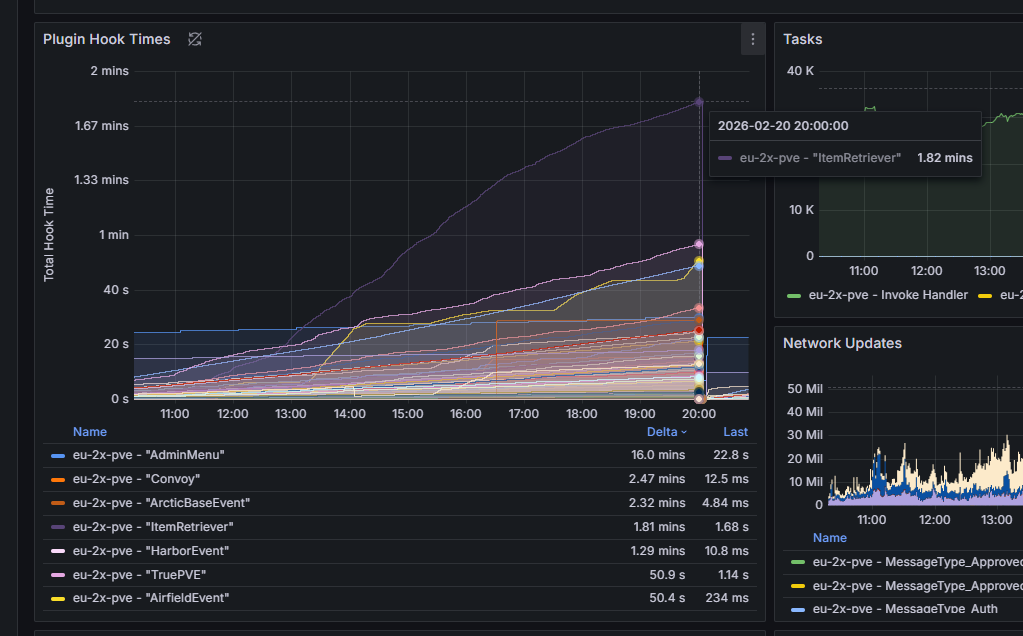
In any case, I thought the cache was necessary because I saw the number of calls made to the plugin per second. It consumed up to 2GB, and it's currently the plugin with the highest hook time, according to RustMetrics.


I don't like people who write "all this stuff is done with AI," without knowing whether it's true or not, or those who dismiss AI, given that everyone uses it these days.

That said, I don't want to argue any longer; I made the changes I thought were appropriate: null checks, skip blueprint and the use of a cache.

In any case, the player kicking issue remains; it happens less often now, but it still happens.


In any case: If you want to reproduce the problem, I have a test server where the problem is present, I give you access to the server, with my Pterodactyl Panel

tbmatzScvDJ70kz.png scalbox

That said, I don't want to argue any longer

Personally, I see this as a discussion, not an argument.

f1Gcnk471Fpnt6d.png scalbox

I don't like people who write "all this stuff is done with AI," without knowing whether it's true or not, or those who dismiss AI, given that everyone uses it these days.

You can dislike me for my statements if you want, but I will try to explain why I think it's unwarranted. The reality you should accept is that most people have a similar bias, or will develop one. Everyone with sufficient experience using AI understands that most AI outputs need to be discarded, so it's both natural and inevitable that nearly everyone will develop pattern recognition to identify whether content is possibly non-human. Content generation increases with AI, so humans need to optimize their consumption of it, and sometimes that will lead to dismissal of AI content that may be even better than human content. This is not something to get upset about, but rather something to be aware of so that you can present your work in a way that minimizes unfavorable outcomes.

If you analyze my earlier responses carefully, you will find I reviewed all the changes carefully, evaluated them for their merit, applied the ones I agreed with, and even shared my analysis in case any human (or AI) wanted to receive the feedback, opening the door for continued discussion. Objectively, that means I did not dismiss the changes.

nmnvqPUPNM3NFEW.png scalbox

Thanks for providing these metrics. This really helps anchor the discussion.

An important thing to keep in mind is that ItemRetriever is effectively replacing multiple vanilla functions, which means that some game logic would have run in its place (if the plugin was unloaded), and the run-time of that game logic was not factored into the hook time measurement. For example, the game could have taken 1ms to find player items, whereas the plugin took 1.1ms (due to additional logic and framework overhead), which would mean the plugin contributed only 0.1ms, but from the framework perspective, the plugin spent 1.1ms. The more game functions a plugin replaces, the more the plugin takes the performance blame for vanilla game logic. It's important to be mindful of this when triaging performance metrics because this phenomenon often leads to server owners removing plugins and/or prioritizing optimization in the wrong places.

Additionally, depending on how SuperCrafter integrates with ItemRetriever, particularly with the "Item Suppliers" use case, SuperCrafter delegate functions may be directly invoked by ItemRetriever, for which ItemRetriever would get the blame, whereas the true culprit could be SuperCrafter logic.

aBbaye75Lyvq9PP.png scalbox

In any case, I thought the cache was necessary because I saw the number of calls made to the plugin per second. It consumed up to 2GB, and it's currently the plugin with the highest hook time, according to RustMetrics.

The memory consumption metric provided by frameworks is often misunderstood. People tend to think it means that the plugin is currently consuming the amount seen (e.g., 2 GB), but it actually means that the plugin has allocated that much memory of the course of its lifetime (since it was loaded). The reality is that the vast majority of the memory allocations were reclaimed by the garbage collector within seconds or minutes of the allocation. Such allocations are often referred to as a "garbage allocation". Gargabe allocations are ideally minimized as they create GC pressure which increases CPU usage, but some cannot be avoided.

Some allocations are totally irrelevant (not even garbage allocations), such as the plugin getting an object from a pool which is currently empty (due to current demand from other plugins or game functions), resulting in an object creation, but that object will be released back to the pool and reused by other plugins or game functions, meaning the plugin got blamed for essentially nothing (just unlucky: right place, wrong time).

Another example of a low-relevance allocation is a vehicle spawner plugin. If a player repeatedly spawns and despawns a vehicle via a plugin, the memory consumption metric reported by the framework will be the sum of the memory of all those vehicles.

One of the sources of garbage allocations in ItemRetriever is the OnIngredientsCollect hook, which creates a new temporary List<Item> during every invocation. If you look at the vanilla game logic that is being replaced, the vanilla game is doing the exact same thing, so this is another case of the plugin getting blamed for vanilla game logic.

1Qtg6wbTvX9tQ5a.png scalbox

In any case, the player kicking issue remains; it happens less often now, but it still happens.

In any case: If you want to reproduce the problem, I have a test server where the problem is present, I give you access to the server, with my Pterodactyl Panel

Ideally, I would like to see more engagement from the SuperCrafter developer here. That plugin builds largely upon work I have released for free, and they are charging money. They should be doing more by reproducing and investigating this issue. Glancing at your support thread with them, it seems they are undergoing some [hopfully temporary] personal issues, so I'm happy to proceed with this route. You can message me on Discord.


I've updated SuperCrafter to ignore blueprints during network serialization. I popped in game and I'm unable to reproduce the issue as shown in scalbox's original video.

Thank you both for the deep dive into addressing the core issue.

@WhiteThunder - Please let me know if you'd like a 100% off coupon to "purchase" SuperCrafter to make your life easier if this kind of thing happens in the future.

@scalbox - Let me know if any of my other plugins interest you? I don't want your hard work to be ignored. Also, feel free to post on SuperCrafter support if the issue is not fixed and you've found another way to reproduce the bug.

NKXTQs24ExGTuL8.jpg WhiteThunder

Personally, I see this as a discussion, not an argument.

You can dislike me for my statements if you want, but I will try to explain why I think it's unwarranted. The reality you should accept is that most people have a similar bias, or will develop one. Everyone with sufficient experience using AI understands that most AI outputs need to be discarded, so it's both natural and inevitable that nearly everyone will develop pattern recognition to identify whether content is possibly non-human. Content generation increases with AI, so humans need to optimize their consumption of it, and sometimes that will lead to dismissal of AI content that may be even better than human content. This is not something to get upset about, but rather something to be aware of so that you can present your work in a way that minimizes unfavorable outcomes.

If you analyze my earlier responses carefully, you will find I reviewed all the changes carefully, evaluated them for their merit, applied the ones I agreed with, and even shared my analysis in case any human (or AI) wanted to receive the feedback, opening the door for continued discussion. Objectively, that means I did not dismiss the changes.

Thanks for providing these metrics. This really helps anchor the discussion.

An important thing to keep in mind is that ItemRetriever is effectively replacing multiple vanilla functions, which means that some game logic would have run in its place (if the plugin was unloaded), and the run-time of that game logic was not factored into the hook time measurement. For example, the game could have taken 1ms to find player items, whereas the plugin took 1.1ms (due to additional logic and framework overhead), which would mean the plugin contributed only 0.1ms, but from the framework perspective, the plugin spent 1.1ms. The more game functions a plugin replaces, the more the plugin takes the performance blame for vanilla game logic. It's important to be mindful of this when triaging performance metrics because this phenomenon often leads to server owners removing plugins and/or prioritizing optimization in the wrong places.

Additionally, depending on how SuperCrafter integrates with ItemRetriever, particularly with the "Item Suppliers" use case, SuperCrafter delegate functions may be directly invoked by ItemRetriever, for which ItemRetriever would get the blame, whereas the true culprit could be SuperCrafter logic.

The memory consumption metric provided by frameworks is often misunderstood. People tend to think it means that the plugin is currently consuming the amount seen (e.g., 2 GB), but it actually means that the plugin has allocated that much memory of the course of its lifetime (since it was loaded). The reality is that the vast majority of the memory allocations were reclaimed by the garbage collector within seconds or minutes of the allocation. Such allocations are often referred to as a "garbage allocation". Gargabe allocations are ideally minimized as they create GC pressure which increases CPU usage, but some cannot be avoided.

Some allocations are totally irrelevant (not even garbage allocations), such as the plugin getting an object from a pool which is currently empty (due to current demand from other plugins or game functions), resulting in an object creation, but that object will be released back to the pool and reused by other plugins or game functions, meaning the plugin got blamed for essentially nothing (just unlucky: right place, wrong time).

Another example of a low-relevance allocation is a vehicle spawner plugin. If a player repeatedly spawns and despawns a vehicle via a plugin, the memory consumption metric reported by the framework will be the sum of the memory of all those vehicles.

One of the sources of garbage allocations in ItemRetriever is the OnIngredientsCollect hook, which creates a new temporary List<Item> during every invocation. If you look at the vanilla game logic that is being replaced, the vanilla game is doing the exact same thing, so this is another case of the plugin getting blamed for vanilla game logic.

Ideally, I would like to see more engagement from the SuperCrafter developer here. That plugin builds largely upon work I have released for free, and they are charging money. They should be doing more by reproducing and investigating this issue. Glancing at your support thread with them, it seems they are undergoing some [hopfully temporary] personal issues, so I'm happy to proceed with this route. You can message me on Discord.

Thanks for the explanation, this is very helpful.

OmicronVega

I've updated SuperCrafter to ignore blueprints during network serialization. I popped in game and I'm unable to reproduce the issue as shown in scalbox's original video.

Thank you both for the deep dive into addressing the core issue.

@WhiteThunder - Please let me know if you'd like a 100% off coupon to "purchase" SuperCrafter to make your life easier if this kind of thing happens in the future.

@scalbox - Let me know if any of my other plugins interest you? I don't want your hard work to be ignored. Also, feel free to post on SuperCrafter support if the issue is not fixed and you've found another way to reproduce the bug.


The problem now occurs much less than before, and I believe the rest of the problems are caused by other plugins, which are somehow conflicting.

For example, if I test it on a server with only ItemRetriver and SuperCrafter, this problem never occurs. If I test it on one of my servers, then the problem occurs, so it's likely that there's a third party (or more) contributing to the problem.

As I mentioned before, I created a test server that's a replica of the server where the problem occurs.
I don't want to force anyone to run the tests for free or anything else, so if anyone is interested in running the tests, I'll give them access to my test server.

Otherwise, I'll continue to look for the cause, in my free moments when I can do some debugging.

-----

PS: I haven't tried your latest update (SuperCrafter) yet, I'll try it now


Merged post

As you can see in the video, the latest version of the SuperCraft plugin still causes the problem.

At one point in the video (minute 4:26), I reinstalled the old version of the plugin, and it works fine, except in a few random cases.


OmicronVega

I've updated SuperCrafter to ignore blueprints during network serialization. I popped in game and I'm unable to reproduce the issue as shown in scalbox's original video.

Thank you both for the deep dive into addressing the core issue.

@WhiteThunder - Please let me know if you'd like a 100% off coupon to "purchase" SuperCrafter to make your life easier if this kind of thing happens in the future.

@scalbox - Let me know if any of my other plugins interest you? I don't want your hard work to be ignored. Also, feel free to post on SuperCrafter support if the issue is not fixed and you've found another way to reproduce the bug.

I'm marking this issue as resolved, as it occurs randomly and under specific circumstances.

The only thing is, the latest SuperCrafter update has caused the issue to recur for every blueprint learned.