"This Shop is not working- See Admin"Solved
Rush

Vortox, Thank You so Very much for helping on this. It is operational now. I will still have to go in and edit each vendor but half the battle was getting it up and running.
So, please correct me here if I am wrong but essentially what I got from this was that by me deleting the actual Medical (or renaming it) I should have just kept it and created a new "category" in which I willbe mindful of next time. Much appreciated Vortex,Thanks again

Correct.

All Shop names Must match the DisplayNames. 

You can do

"Medical": {
"DisplayName": "MedTender",

But the displayName and shop name must match.

"MedTender": {
"DisplayName": "MedTender",

Rush

Vortox, Thank You so Very much for helping on this. It is operational now. I will still have to go in and edit each vendor but half the battle was getting it up and running.
So, please correct me here if I am wrong but essentially what I got from this was that by me deleting the actual Medical (or renaming it) I should have just kept it and created a new "category" in which I willbe mindful of next time. Much appreciated Vortex,Thanks again

Also your first post you had Commands Selected as the default shop to open. Yet you had that shop disabled.

So you would have to change the default shop to open inside the config to one that is enabled. 
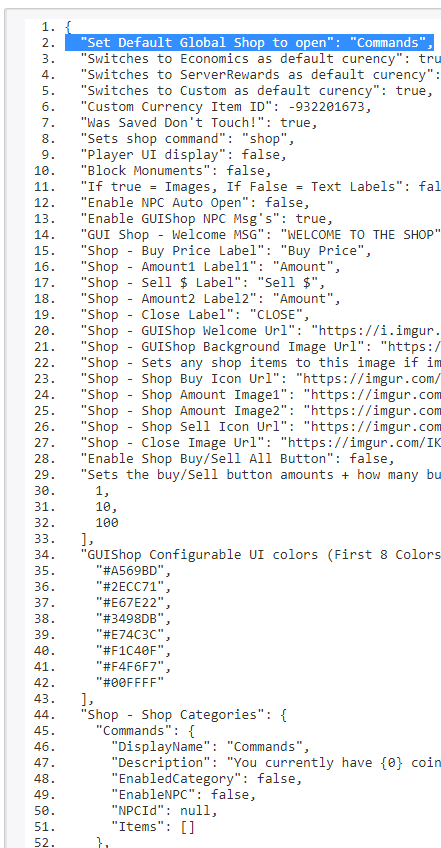
criwnbC3hhhhfCR.png

On an Unrelated Note:

In the next GUIShop update, if you have all NPCs setup and no global shops you will have to have that string^ Blank ""

"Set Default Global Shop to open": "",

In order to disable the global shop and respond to the players with a new msg that will say global shops are disabled go find the npc vendors for when a player does /shop

Vortox14

Correct.

Thanks for that Khan, yea...essentially what I was using this for was really for only two NPC. So, I did a lot of deleting as well in order to not have the player using the GUI have to go through endless menu selections and only the options at that specific NPC were available. Live and learn. Thanks for the tips and info! Appreciate ya

EnabledCategory allows global use /shop (away from npc) to disable it set false. If enabled and is NPC it will show for both away and near the npcs.

So you would Set all False. and just set true on the 2 npc shops you want. 

DhV01GUW45kojAd.png khan

EnabledCategory allows global use /shop (away from npc) to disable it set false. If enabled and is NPC it will show for both away and near the npcs.

So you would Set all False. and just set true on the 2 npc shops you want. 

Figured that out as well late late last night..lol  Thanks man!

Locked automatically