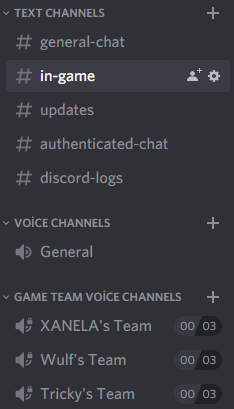
Option to create voice channel under categorySuggestion

Trying to write from mobile but my point is simple.

With new config instead of

{
  "Discord Bot Token": "",
  "Change channel when user create the team": false,
  "Discord users can see other team's private vocal channel": true,
  "Max players in a voice channel": 3,
  "Name of the player's role on discord (not @everyone)": "Player",
  "Using roles": false
}

Its gonna be

{
  "Discord Bot Token": "",
  "Using category": true,
  "DiscordCategory": "",
  "Change channel when user create the team": false,
  "Discord users can see other team's private vocal channel": true,
  "Max players in a voice channel": 3,
  "Name of the player's role on discord (not @everyone)": "Player",
  "Using roles": false
}



Did you get this working with that config and if so please share the cs file so we can have it work on our servers

yeah that would be awesome its kinda annoying to have the voice channels all the way on top

Can we PLEASE get this feature, MrBlue?!

You really want to have this too

Turns out then player can turn down the volume in settings. 

@BetterDeadThanZed
What do you mean?
h8xVDWvyO802xdL.png bjarkeh
@BetterDeadThanZed
What do you mean?
Sorry, my response was supposed to go into a different thread. Somehow I responded here by mistake. 

is it possible to put it under categories? @MrBlue

Max62

is it possible to put it under categories? @MrBlue

I love to have that too, to be frank I think that's what all what. So you can put all the team in the button of your discord and not before all your important info on discord

Like you all, not having this feature was a deal breaker for me. I finally updated to Discord extension v2.x and was really bummed that this plugin wasn't working in regards to putting the voice channels in a subcategory as before. Managed to figure it out by reading the extension documentation a bit and some trial and error with a text editor. It was a PITA to figure out, but I was determined. I really wish I knew how to set up an IDE for Rust development so I could contribute more.

Here's the fix, and all seems to be working as expected in regards to permissions, though your mileage may vary, so please test cautiously:

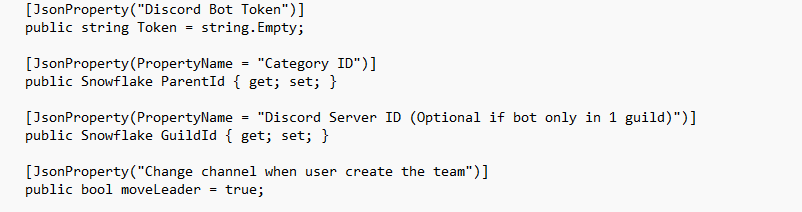
1. Add to your config

  "Category ID": "XXXXXXXXXXXXXXXXXX",


2. Insert the corresponding config reference at line 56 (below the GuildId configuration):

        [JsonProperty(PropertyName = "Category ID")]
        public Snowflake ParentId { get; set; }


3. Insert at line 367 `ParentId = config.ParentId` (adding a comma after permissionList), so your category ID is sent as the ParentId with the CreateGuildChannel call. Starting at line 362 it should look like this (with the channelCreated lambda on the next line):

          {
            Name = string.Format(GetMessage("channelName", playerId), player.displayName),
            Type = ChannelType.GuildVoice,
            UserLimit = config.maxPlayersChannel,
            PermissionOverwrites = permissionList,
            ParentId = config.ParentId
          },


Hope that works for you all and helps you out. Cheers.

Thank you undertow!!

undertow

Like you all, not having this feature was a deal breaker for me. I finally updated to Discord extension v2.x and was really bummed that this plugin wasn't working in regards to putting the voice channels in a subcategory as before. Managed to figure it out by reading the extension documentation a bit and some trial and error with a text editor. It was a PITA to figure out, but I was determined. I really wish I knew how to set up an IDE for Rust development so I could contribute more.

Here's the fix, and all seems to be working as expected in regards to permissions, though your mileage may vary, so please test cautiously:

1. Add to your config

  "Category ID": "XXXXXXXXXXXXXXXXXX",

2. Insert the corresponding config reference at line 56 (below the GuildId configuration):

        [JsonProperty(PropertyName = "Category ID")]
        public Snowflake ParentId { get; set; }

3. Insert at line 367 `ParentId = config.ParentId` (adding a comma after permissionList), so your category ID is sent as the ParentId with the CreateGuildChannel call. Starting at line 362 it should look like this (with the channelCreated lambda on the next line):

          {
            Name = string.Format(GetMessage("channelName", playerId), player.displayName),
            Type = ChannelType.GuildVoice,
            UserLimit = config.maxPlayersChannel,
            PermissionOverwrites = permissionList,
            ParentId = config.ParentId
          },

Hope that works for you all and helps you out. Cheers.

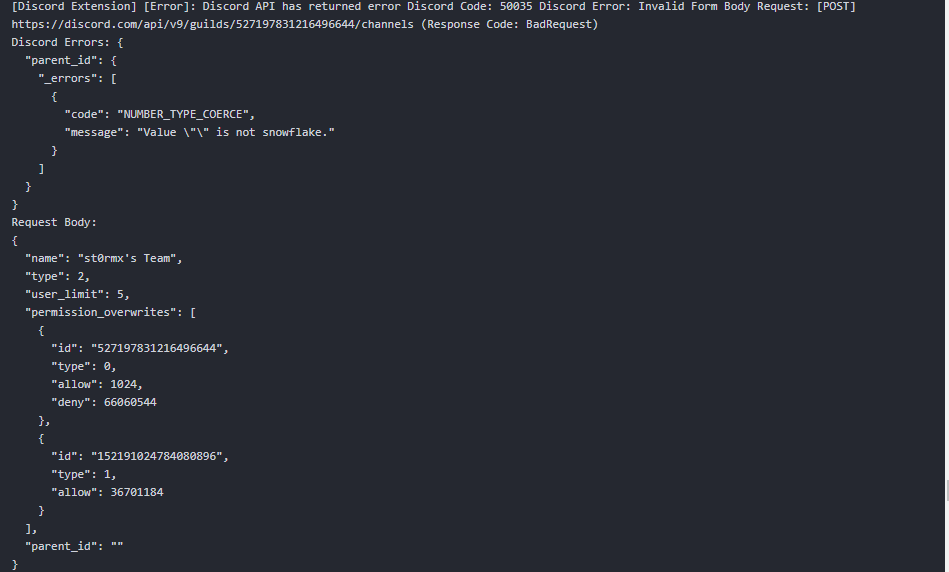
[Discord Extension] [Error]: Discord API has returned error Discord Code: 50035 Discord Error: Invalid Form Body Request: [POST] https://discord.com/api/v9/guilds/527197831216496644/channels (Response Code: BadRequest)

Im sure ive done this correctly as the mod does load

w95j6NkX2a4UJBC.png
VM3N8PKodQQdUNt.png

Merged post

This is from the consolejpsAy8fSt3O9xlh.png

@st0rmx The code in step 3 needs to be changed (1 line added) at line ~367 - not where you put it. I posted the entire section as an example, but you're only adding a comma at the end of the existing

PermissionOverwrites = permissionList

line. Then you insert below that as a new line:

ParentId = config.ParentId

im so confused. , i shall mark as solved