If I put it on mouse 4 as described, I can turn it on with mouse 4 but not off again and the middle mouse button remains active, this bothers with other plugins.
I would like to disable the middle mouse button for the tool. Or that the tool deactivates when I use the hammer. is that possible?
Help to deactivate the middle mouse button.
Unfortunately, this is not possible. I can only advise to change the plugin code a bit to add a chat command.
Find this line in the plugin code: void OnPlayerInput(BasePlayer player, InputState state)
Add the following code before it, where "build" is the chat command:
        [ChatCommand("build")]
        void ChatBuild(BasePlayer player)
        {
            if (hasAuth(player))
            {
                if (!buildToggled.ContainsKey(player.userID))
                {
                    if (!playerBuild.ContainsKey(player.userID))
                    {
                        playerBuild.Add(player.userID, new PlayerBuild(player));
                    }
                    BuildMenu_Toggle(player);
                    buildToggled.Add(player.userID, true);
                }
                else
                {
                    BuildMenu_UnToggle(player);
                    buildToggled.Remove(player.userID);
                }
            }
        }
Then comment out the code as shown in the screenshot (/* . . . */):
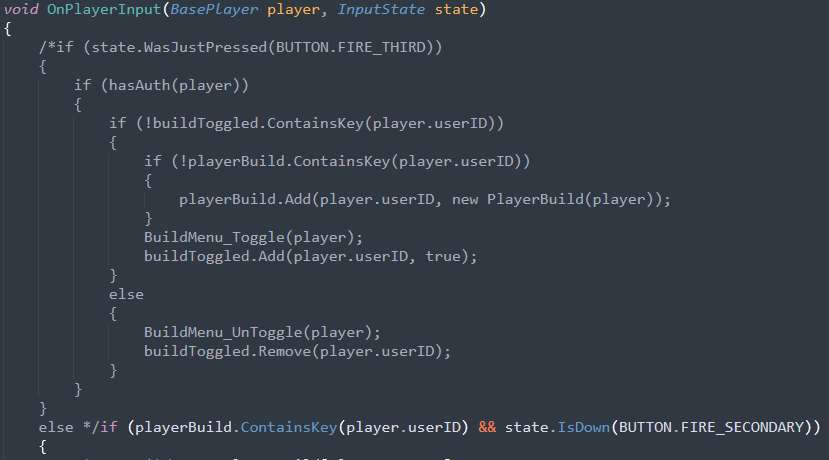
Note that after opening the panel by command you will need to close it also by this command. But you will not be able to enter it, because the plugin panel will block the chat. So I recommend either to enter it through the console F1 (chat.say /build), or put it on any other key (bind k chat.say /build).
@Timon1221
Hey great, works perfectly. I open and close it via a custom button. Perfect, thank you very much. 👍👍👍