{
    "Locomotive": 1,
    "Workcart": 0,
    "WorkcartCovered": 0,
    "WagonA": 1,
    "WagonB": 1,
    "WagonC": 1,
    "WagonD": 0,
    "WagonE": 0,
    "WagonF": 0,
    "WagonFuel": 0,
    "WagonLoot": 0,
    "WagonResource": 0,
    "caboose": 2
}
Limit native spawns and only have Automated Workcarts.Solved
https://github.com/Nogrod/OxidePlugins/blob/master/Rust/SpawnConfig.cs
https://umod.org/plugins/prefab-limit
Merged post
Merged post
also I have problem with duplicate work cart spawning with the other one. Here is my data file.
https://umod.org/plugins/prefab-limit
Merged post
using Oxide.Core;
using System.Collections.Generic;

namespace Oxide.Plugins
{
    [Info("PrefabLimiter", "HoverCatz", "1.0.0")]
    class PrefabLimiter : RustPlugin
    {

        Dictionary<string, int> spawnChances = new Dictionary<string, int>();

        void OnServerInitialized()
        {
            /* Load config */

            spawnChances = Interface.Oxide.DataFileSystem.ReadObject<Dictionary<string, int>>("PrefabLimiter") ?? spawnChances;

            if (spawnChances == null)
                spawnChances = new Dictionary<string, int>();

            if (spawnChances.Count <= 0)
                AddDefaultConfig();

            Interface.Oxide.DataFileSystem.WriteObject("PrefabLimiter", spawnChances);

            Puts($"PrefabLimiter successfully initialized. Loaded {spawnChances.Count} config values.");
        }

        private void AddDefaultConfig()
        {
            //spawnChances.Add("assets/bundled/prefabs/autospawn/resource/ores/metal-ore.prefab", 100);		// 0% chance to spawn
            //spawnChances.Add("assets/bundled/prefabs/autospawn/resource/ores/stone-ore.prefab", 100);	// 100% chance to spawn
            //spawnChances.Add("assets/bundled/prefabs/autospawn/resource/ores/sulfur-ore.prefab", 100);	// 0% chance to spawn
            //spawnChances.Add("assets/bundled/prefabs/autospawn/resource/ores_sand/metal-ore.prefab", 100);	// 0% chance to spawn
            //spawnChances.Add("assets/bundled/prefabs/autospawn/resource/ores_sand/stone-ore.prefab", 100);	// 100% chance to spawn
            //spawnChances.Add("assets/bundled/prefabs/autospawn/resource/ores_sand/sulfur-ore.prefab", 100);	// 0% chance to spawn
            //spawnChances.Add("assets/bundled/prefabs/autospawn/resource/ores_snow/metal-ore.prefab", 100);	// 0% chance to spawn
            //spawnChances.Add("assets/bundled/prefabs/autospawn/resource/ores_snow/stone-ore.prefab", 100);	// 100% chance to spawn
            //spawnChances.Add("assets/bundled/prefabs/autospawn/resource/ores_snow/sulfur-ore.prefab", 100);	// 100% chance to spawn
			//spawnChances.Add("assets/bundled/prefabs/autospawn/collectable/stone/metal-collectable.prefab", 100);	// 0% chance to spawn
			//spawnChances.Add("assets/bundled/prefabs/autospawn/collectable/stone/sulfur-collectable.prefab", 100);	// 0% chance to spawn
			spawnChances.Add("assets/content/vehicles/trains/locomotive/locomotive.entity.prefab", 0);	// 0% chance to spawn
			spawnChances.Add("assets/content/vehicles/trains/workcart/workcart_aboveground.entity.prefab", 0);	// 0% chance to spawn
			spawnChances.Add("assets/content/vehicles/trains/workcart/workcart_aboveground2.entity.prefab", 0);	// 0% chance to spawn
			spawnChances.Add("assets/content/vehicles/trains/wagons/trainwagona.entity.prefab", 0);	// 0% chance to spawn
			spawnChances.Add("assets/content/vehicles/trains/wagons/trainwagonb.entity.prefab", 0);	// 0% chance to spawn
			spawnChances.Add("assets/content/vehicles/trains/wagons/trainwagonc.entity.prefab", 0);	// 0% chance to spawn
			spawnChances.Add("assets/content/vehicles/trains/wagons/trainwagond.entity.prefab", 0);	// 0% chance to spawn
			spawnChances.Add("assets/content/vehicles/trains/wagons/trainwagone.entity.prefab", 0);	// 0% chance to spawn
			spawnChances.Add("assets/content/vehicles/trains/wagons/trainwagonunloadable.entity.prefab", 0);	// 0% chance to spawn
			spawnChances.Add("assets/content/vehicles/trains/wagons/trainwagonunloadablefuel.entity.prefab", 0);	// 0% chance to spawn
			spawnChances.Add("assets/content/vehicles/trains/wagons/trainwagonunloadableloot.entity.prefab", 0);	// 0% chance to spawn

            // Add more prefabs here if you want
            // https://www.corrosionhour.com/rust-prefab-list/
        }

        void Unload()
        {
            Interface.Oxide.DataFileSystem.WriteObject("PrefabLimiter", spawnChances);
        }

        [ConsoleCommand("prefabLimiterReload")]
        void ReloadConfig(ConsoleSystem.Arg _)
        {
            /* Reload config */

            spawnChances = Interface.Oxide.DataFileSystem.ReadObject<Dictionary<string, int>>("PrefabLimiter") ?? spawnChances;

            if (spawnChances == null)
                spawnChances = new Dictionary<string, int>();

            if (spawnChances.Count <= 0)
                AddDefaultConfig();

            Interface.Oxide.DataFileSystem.WriteObject("PrefabLimiter", spawnChances);

            Puts($"PrefabLimiter successfully reloaded {spawnChances.Count} config values.");
        }

        void OnEntitySpawned(BaseNetworkable entity)
        {

            int intChance;
            string name = entity.name;

            if (!spawnChances.TryGetValue(name, out intChance))
                return; // Doesn't exist in our list? 100% chance to spawn

            if (intChance == 100)
                return; // 100% chance, spawn.
            else
            if (intChance == 0)
            {
                entity.AdminKill(); // Destroy the Prefab! No chance check.
                return;
            }

            float fChance = intChance / 100f;
            float rnd = UnityEngine.Random.value;

            if (rnd > fChance)
                entity.AdminKill(); // Destroy the Prefab!

        }

    }
}
Merged post
also I have problem with duplicate work cart spawning with the other one. Here is my data file.
{
"MapTriggers": [
{
"Id": 1,
"Position": {
"x": -1105.62207,
"y": 17.5306168,
"z": -364.883545
},
"RotationAngle": 10.9515114,
"TrainCars": [
"Locomotive",
"WagonA",
"WagonB",
"WagonC",
"Caboose"
]
},
{
"Id": 2,
"Position": {
"x": -1105.62207,
"y": 17.5306168,
"z": -364.883545
},
"AddConductor": true,
"Direction": "Fwd",
"Speed": "Hi"
},
{
"Id": 3,
"Position": {
"x": -1106.16821,
"y": 17.587326,
"z": -367.844238
},
"Brake": true,
"Speed": "Zero",
"StopDuration": 60.0,
"DepartureSpeed": "Hi"
},
{
"Id": 4,
"Position": {
"x": 176.160324,
"y": 23.7003841,
"z": 607.6238
},
"Brake": true,
"Speed": "Zero",
"StopDuration": 60.0,
"DepartureSpeed": "Hi"
},
{
"Id": 5,
"Position": {
"x": 728.225342,
"y": 45.78914,
"z": 220.119186
},
"Brake": true,
"Speed": "Zero",
"StopDuration": 60.0,
"DepartureSpeed": "Hi"
},
{
"Id": 6,
"Position": {
"x": 677.8648,
"y": 66.25347,
"z": -729.620361
},
"Brake": true,
"Speed": "Zero",
"StopDuration": 60.0,
"DepartureSpeed": "Hi"
},
{
"Id": 7,
"Position": {
"x": -428.2281,
"y": 11.4043207,
"z": -975.9166
},
"Brake": true,
"Speed": "Zero",
"StopDuration": 60.0,
"DepartureSpeed": "Hi"
}
]
}I'm not sure why that would cause duplicate spawns, but the first two triggers can be combined, and the third one can probably be combined with them too. Something like the following command could create the combined trigger.
awt.add Conductor Brake Zero 60 Fwd Hi Locomotive WagonA WagonB WagonC CabooseThis is what I type to set it up each time. So its wrong then...
/awt.add workcart
/awt.train locomotive wagona wagonb wagonc caboose
/awt.add conductor fwd hi left
/awt.add brake zero 60 hi
You only need to do awt.add once. After that, you can do awt.update to add/edit properties of the trigger. For example:
/awt.add workcart
/awt.train locomotive wagona wagonb wagonc caboose
/awt.update conductor fwd hi left
/awt.update brake zero 60 hiThis was the one I thought you used to make more stops?
/awt.add brake zero 60 hibut now this is the one?
/awt.update brake zero 60 hiMerged post
or your saying for the starting one...
/awt.add workcart
/awt.train locomotive wagona wagonb wagonc caboose
/awt.update conductor fwd hi left
/awt.update brake zero 60 hiMerged post
I noticed that it doesn't update the numbers when you delete one. m1 m2 m3 delete m2 and it still has m1 m3
Merged post
ok I think I got that part, but how to make it so only outpost caboose and the one for automated workcarts and the trains that I selected
I don't want my players to get killed on the other trains.
Merged post
I changed the file by hand and I think I made the correct change.
{
"MapTriggers": [
{
"Id": 1,
"Position": {
"x": -1105.62207,
"y": 17.5306168,
"z": -364.883545
},
"RotationAngle": 10.9515114,
"TrainCars": [
"Locomotive",
"WagonA",
"WagonB",
"WagonC",
"Caboose"
]
"AddConductor": true,
"Direction": "Fwd",
"Speed": "Hi"
},
{
"Id": 2,
"Position": {
"x": -1106.16821,
"y": 17.587326,
"z": -367.844238
},
"Brake": true,
"Speed": "Zero",
"StopDuration": 60.0,
"DepartureSpeed": "Hi"
},
{
"Id": 3,
"Position": {
"x": 176.160324,
"y": 23.7003841,
"z": 607.6238
},
"Brake": true,
"Speed": "Zero",
"StopDuration": 60.0,
"DepartureSpeed": "Hi"
},
{
"Id": 4,
"Position": {
"x": 728.225342,
"y": 45.78914,
"z": 220.119186
},
"Brake": true,
"Speed": "Zero",
"StopDuration": 60.0,
"DepartureSpeed": "Hi"
},
{
"Id": 5,
"Position": {
"x": 677.8648,
"y": 66.25347,
"z": -729.620361
},
"Brake": true,
"Speed": "Zero",
"StopDuration": 60.0,
"DepartureSpeed": "Hi"
},
{
"Id": 6,
"Position": {
"x": -428.2281,
"y": 11.4043207,
"z": -975.9166
},
"Brake": true,
"Speed": "Zero",
"StopDuration": 60.0,
"DepartureSpeed": "Hi"
}
]
}Flechen
I noticed that it doesn't update the numbers when you delete one. m1 m2 m3 delete m2 and it still has m1 m3
Yes, that's expected.
Flechen
but how to make it so only outpost caboose and the one for automated workcarts and the trains that I selected
I don't want my players to get killed on the other trains.
I don't know what you are talking about. What is causing players to get killed?
I have the train set to blow up the other trains in path.
> find population
Variables:
 bear.population          Population active on the server, per square km (2)
 boar.population          Population active on the server, per square km (5)
 chicken.population       Population active on the server, per square km (3)
 ai.npc_max_population_military_tunnels npc_max_population_military_tunnels defines the size of the npc population at military tunnels. (default: 3) (3)
 halloween.murdererpopulation Population active on the server, per square km (0)
 halloween.scarecrowpopulation Population active on the server, per square km (0)
 spawn.respawn_populations  (True)
 spawn.tick_populations    (60)
 halloweendungeon.population Population active on the server (0)
 horse.population         Population active on the server, per square km (0)
 hotairballoon.population Population active on the server (1)
 minicopter.population    Population active on the server (0)
 modularcar.population    Population active on the server (3)
 motorrowboat.population  Population active on the server (1)
 polarbear.population     Population active on the server, per square km (1)
 rhib.rhibpopulation      Population active on the server (0)
 ridablehorse.population  Population active on the server, per square km (2)
 scraptransporthelicopter.population Population active on the server (0)
 stag.population          Population active on the server, per square km (3)
 traincar.population      Population active on the server (2.3)
 wolf.population          Population active on the server, per square km (2)
 xmasdungeon.xmaspopulation Population active on the server (0)
 zombie.population        Population active on the server, per square km (0)
For above ground trains, set traincar.population to 0.
Not sure about caboose at Outpost. Is that even connected to a rail network?
I have no clue, just wasn't sure, if I used a prefab limiter.
Merged post
server.tags monthly,NA
server.motd "Common Commands - |/mymini|/spawn|/bgrade|/AP/AL/AD|"
server.hostname "GreenZone 101 - US 5x|Max8|Kits|SkinShop|FreeFuel"
server.url "https://greenzone101.tebex.io"
server.logoimage "https://i.imgur.com/MNbs7M6.png"
server.headerimage "https://i.imgur.com/gBRLM7R.png"
server.description "Welcome to GreenZone101 5x!\n\n• 5x Gather Rate\n• Max Team: 8\n• Skip Nights\n• No Fuel\n• No Electricity\n• Faster Smelt Speeds\n• Custom Loot Tables\n• Tier 1 blueprints Unlocked\n\nVisit (https://greenzone101.tebex.io/) for VIP, Rules & Discord information."
relationshipmanager.maxteamsize 8
spawn.min_rate 0.5
spawn.max_rate 1.0
spawn.min_density 0.5
spawn.max_density 1.0
ai.npc_max_roam_multiplier 5
ai.npc_junkpile_a_spawn_chance 0.1
ai.npc_junkpile_g_spawn_chance 0.1
ai.npc_junkpilespawn_chance 0.1
ai.npc_max_junkpile_count 30
chicken.population 0
bear.population	3
boar.population	3
stag.population	3
wolf.population	3
minicopter.population 0
minicopter.insidedecayminutes 44640
minicopter.outsidedecayminutes 44640
hotairballoon.population 0
modularcar.population 7
modularcar.outsidedecayminutes 44640
motorrowboat.population	10
motorrowboat.deepwaterdecayminutes 44640
motorrowboat.outsidedecayminutes 44640
rhib.rhibpopulation	10
ridablehorse.population	10
traincar.population	0
traincar.wagons_per_engine 0
traincar.decayminutes 0
chat.historysize 2000
decay.delay_override 0
decay.delay_twig 0
decay.delay_wood 0
decay.delay_stone 0
decay.delay_metal 0
decay.delay_toptier	0
decay.duration_override	0
decay.duration_twig	1
decay.duration_wood	3
decay.duration_stone 5
decay.duration_metal 8
decay.duration_toptier 12
decay.upkeep True
mlrs.brokendownminutes 0
rcon.print true
server.radiation True
server.woundedrecoverchance	50
snowmobile.allterrain true
snowmobile.outsidedecayminutes 44640
halloween.scarecrowpopulation 10
basesubmarine.oxygenminutes 1000
scraptransporthelicopter.population 1
vehicle.trainskeeprunning false
hackablelockedcrate.requiredhackseconds 60
basesubmarine.deepwaterdecayminutes 1000
basesubmarine.outsidedecayminutes 1000
basesubmarine.oxygenminutes 1000
server.corpsedespawn 1800
antihack.flyhack_protection 1
antihack.flyhack_forgiveness_(vertical/horizontal) 0.5
global.specnet true
server.maxpacketspersecond_tick "2000"
server.maxpacketspersecond "2500"
server.maxpacketspersecond_command "500"
server.maxpacketspersecond_world "2"
server.maxpacketspersecond_rpc "600"
server.maxflood "1000"
server.maxtickspersecond "1000"
fps.limit 70
global.sprayduration 604800
Merged post
already have it
Merged post
so is there a way to limit the native ones?
Merged post
this is the new edit update you said to make
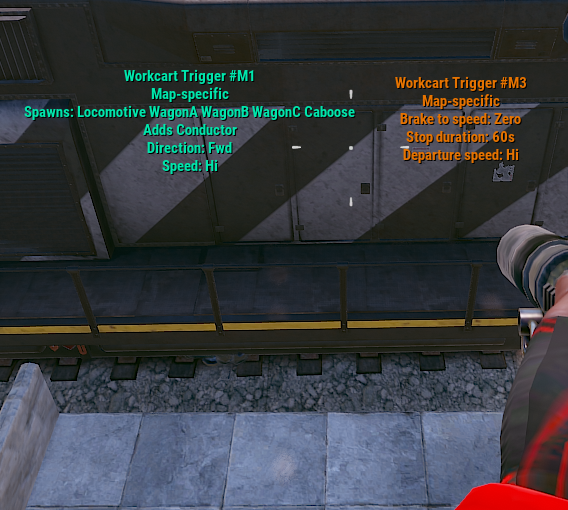
Merged post
{
  "MapTriggers": [
    {
      "Id": 1,
      "Position": {
        "x": -1105.62207,
        "y": 17.5306168,
        "z": -364.883545
      },
      "AddConductor": true,
      "Direction": "Fwd",
      "Speed": "Hi",
      "RotationAngle": 10.9515114,
      "TrainCars": [
        "Locomotive",
        "WagonA",
        "WagonB",
        "WagonC",
        "Caboose"
      ]
    },
    {
      "Id": 2,
      "Position": {
        "x": -1106.16821,
        "y": 17.587326,
        "z": -367.844238
      },
      "Brake": true,
      "Speed": "Zero",
      "StopDuration": 60.0,
      "DepartureSpeed": "Hi"
    },
    {
      "Id": 3,
      "Position": {
        "x": 176.160324,
        "y": 23.7003841,
        "z": 607.6238
      },
      "Brake": true,
      "Speed": "Zero",
      "StopDuration": 60.0,
      "DepartureSpeed": "Hi"
    },
    {
      "Id": 4,
      "Position": {
        "x": 728.225342,
        "y": 45.78914,
        "z": 220.119186
      },
      "Brake": true,
      "Speed": "Zero",
      "StopDuration": 60.0,
      "DepartureSpeed": "Hi"
    },
    {
      "Id": 5,
      "Position": {
        "x": 677.8648,
        "y": 66.25347,
        "z": -729.620361
      },
      "Brake": true,
      "Speed": "Zero",
      "StopDuration": 60.0,
      "DepartureSpeed": "Hi"
    },
    {
      "Id": 6,
      "Position": {
        "x": -428.2281,
        "y": 11.4043207,
        "z": -975.9166
      },
      "Brake": true,
      "Speed": "Zero",
      "StopDuration": 60.0,
      "DepartureSpeed": "Hi"
    }
  ]
}It should be possible to combine those two triggers.
If you've already set the convars to 0 for train population, then I'm not sure why you would still see them spawn above ground. If you are seeing them spawn underground, I don't think there's a convar for that, but you can try the following code to reduce underground spawns to 0.
void OnServerInitialized()
{
    foreach (var dungeon in TerrainMeta.Path.DungeonGridCells)
    {
        foreach (var group in dungeon.GetComponentsInChildren<SpawnGroup>())
        {
            foreach (var spawnEntry in group.prefabs)
            {
                if (spawnEntry.prefab.resourcePath.EndsWith("workcart.entity.prefab"))
                {
                    group.maxPopulation = maxSpa0wns;
                    break;
                }
            }
        }
    }
}do I add that into the automated workcarts and does that remove all trains and traincars exept for the automated ones?
oh and I have the train stop at a certain train car door. the green one.
To be honest, I'm not sure what problem you are experiencing or what you are trying to do. Posting a bunch of code like you have done doesn't help me understand your problem. Can you please precisely explain what problems you are experiencing and/or what you want to happen?
the native aboveground trains and traincars need to be removed, but keep automatedworkcarts.
As far as I know, the convars you already set should do that. Perhaps they are being set too late.
Locked automatically
- 1
- 2