
ive tried deleting it all including language fileand reinstalling it unloaded all other plugins and still i get the occupied message could use some help on this one
I have tried uninstalling reinstalling of course deleted all the things associated with it getting same message about the library being occupied and will recheck in one minute i have unloaded all other plugins that might have been interfearing with it as well. could you help me please . thank you for your time in advance. see the included screen shot.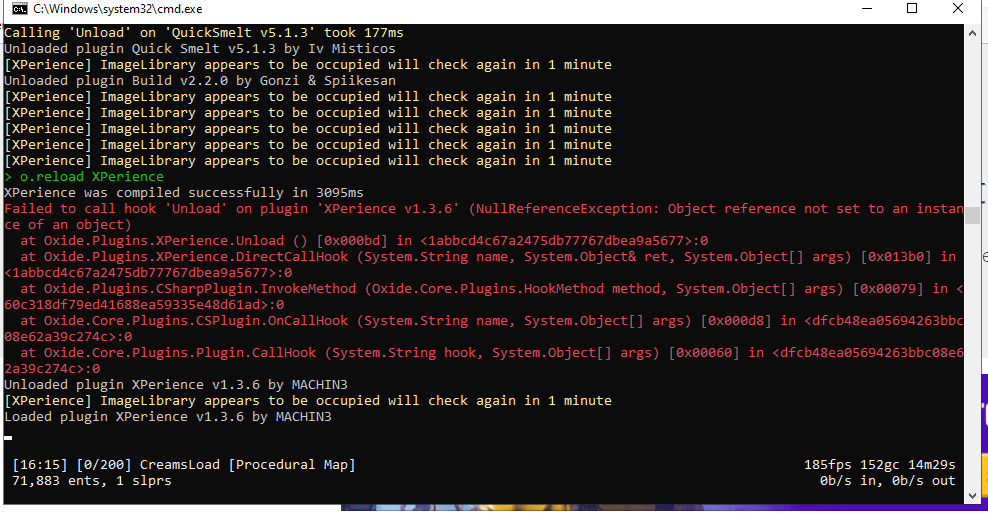
this is happening for me as well. there seems to be an issue with imagelibrary collecting all the images currently..
ok great to know i was going out of my friggin mind for hours trying to fix this error.. lol and thank you for the quick reply
Merged post
just a note i just installed https://umod.org/plugins/image-library and it starter repolling all the images again and fixed my issue
MACHIN3
this is happening for me as well. there seems to be an issue with imagelibrary collecting all the images currently..
You may want to have separate checks and messages for Image Library instead of just the one message.
Wulf
You may want to have separate checks and messages for Image Library instead of just the one message.
yeah, I never had an issue like this come up until now. Not sure if it's a problem with imgur or rust servers not being able to connect but it loaded for me finially. It was very slow this time around getting all the images:
(15:12:07) | XPerience storage process at 71% (17/24)
(15:12:57) | [Economics] Saving balances for players...
(15:12:58) | Calling 'OnServerSave' on 'Pets v0.6.4' took 156ms
(15:12:58) | Saved 28,975 ents, cache(0.03), write(0.02), disk(0.01).
(15:12:58) | Saving complete
(15:14:18) | Image failed to download! Error: Cannot connect to destination host - Image Name: XPerienceonline_0 - Image URL: https://imgur.com/0ZEDsKR.png
(15:14:18) | XPerience storage process at 92% (22/24)
(15:16:29) | Image failed to download! Error: Cannot connect to destination host - Image Name: XPeriencelogo_0 - Image URL: https://imgur.com/d16zkJk.png
(15:16:29) | Image batch (XPerience) has been stored successfully
yeah, I never had an issue like this come up until now. Not sure if it's a problem with imgur or rust servers not being able to connect but it loaded for me finially. It was very slow this time around getting all the images:
(15:12:07) | XPerience storage process at 71% (17/24)
(15:12:57) | [Economics] Saving balances for players...
(15:12:58) | Calling 'OnServerSave' on 'Pets v0.6.4' took 156ms
(15:12:58) | Saved 28,975 ents, cache(0.03), write(0.02), disk(0.01).
(15:12:58) | Saving complete
(15:14:18) | Image failed to download! Error: Cannot connect to destination host - Image Name: XPerienceonline_0 - Image URL: https://imgur.com/0ZEDsKR.png
(15:14:18) | XPerience storage process at 92% (22/24)
(15:16:29) | Image failed to download! Error: Cannot connect to destination host - Image Name: XPeriencelogo_0 - Image URL: https://imgur.com/d16zkJk.png
(15:16:29) | Image batch (XPerience) has been stored successfully
The issue the user had above was Image Library not being installed. Your plugin is putting all of the checks for Image Library under the same if statement, showing the same message regardless if it's loaded or not. My suggestion was to split the IsReady check from the null/IsLoaded checks and show a different message if the plugin isn't actually loaded instead of it not being ready or "occupied".
Not being able to connect ot a site isn't really a problem with Image Library, that could be a network issue with your server or a temporary site issue with the image host you are using.
Wulf
The issue the user had above was Image Library not being installed. Your plugin is putting all of the checks for Image Library under the same if statement, showing the same message regardless if it's loaded or not. My suggestion was to split the IsReady check from the null/IsLoaded checks and show a different message if the plugin isn't actually loaded instead of it not being ready or "occupied".
Not being able to connect ot a site isn't really a problem with Image Library, that could be a network issue with your server or a temporary site issue with the image host you are using.
ah yeah gotcha, thanks! will do that for next update :)

