When I use the console command stacksizecontroller.setstack wood 2000 how do I then make it take effect? Do I then reload the plugin via oxide.reload StackSizeController? I ask because between the plugin description and the support threads, I'm not sure how to get this working properly. I typically alter a json, FTP it to the server, and then oxide.reload the plugin. That doesn't seem to work for your plugin.
Questions not answered elsewhere...
As it says in the description for the setstack command
`Updates configuration file, adding or updating the hard limit list or the multiplier list.`
Then reload the plugin and the new stack sizes will be set. You'll need permissions if running the command in-game, those are not documented however they are the name of the command. So give yourself permission stacksizecontroller.setstack to run the command in-game, permission is not needed to run from console. If stacks still aren't being set but the config file has them, is it throwing errors at all?
Nope, no errors. But, the process I've figured it is exactly as I've noted above.
stacksizecontroller.setstack wood 2000, then oxide.reload StackSizeController
Editing the json directly (either in config or data folders) was messing things up.
And regarding the RPC on MoveItem thing, I'm guessing it had to do with stack size multipliers because it was always related to water being moved on my server. Water (and salt water) are considered resources (and I was previously trying to double that entire category). A few times I noted that the size for both had gone into the negative (-4 specifically). The specific console error noted that an expected value was <=0.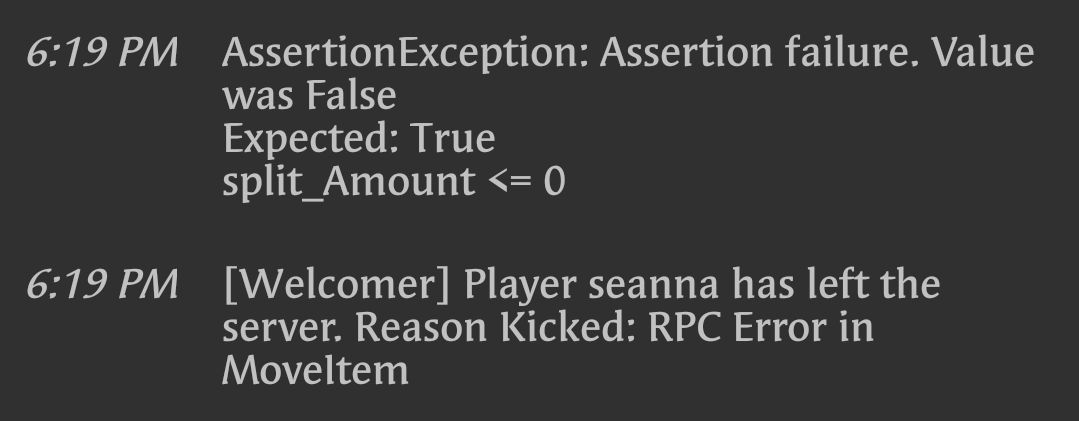
I'm going to assume that setting a multiplier on something that is already set at a wild number made it go wonky?
Anyway, after banging my head on this for nearly 24 hours, loading and unloading your plugin (and your competitor's paid plugin at Chaoscode.io), deleting and regenerating configs, I finally figured out that the only way this works is via the console commands. I've seen you note that the reported numbers via stacksizecontroller.listcategoryitems will be sorted in the next update? Please and thank you.
No, the error wasn't related to StackSizeController only ChestStacks. ChestStacks dev didn't implement all of the checks, causing that kick. He's been told how to fix it.
Are your datafile values being overwritten on plugin reload?
And yes reported numbers will be fixed next release.
I wasn't using ChestStacks, by the way. Yet, we got nutty RPC Error in MoveItem anyway? The very few Google results for the thing indicated it was stack related. idk :shrug:
I'm not sure about my datafile values except to say that my noted method above works. When I FTP the json file (from the config folder, I no longer even touch the data folder json) to look at but not alter, the numbers reflect what I want to accomplish.
"IndividualItemStackHardLimits": {
"-151838493": 2000,
"-2099697608": 2000,
"-1581843485": 2000,
"-4031221": 2000,
"69511070": 2000,
"-1982036270": 2000,
"-946369541": 1000,
"317398316": 200,
"-1157596551": 2000
},It's working now. I know how to alter it. Please tell me a server restart isn't going to screw with stuff. I finally got it sorted.
If it's not ChestStacks, another plugin you have IS using MoveItem, and the dev just didn't implement it correctly. It's a volatile hook that should be used very very carefully. StackSizeController doesn't touch MoveItem, and just incase I misunderstood how Rust's game logic works, I've clamped the value to not allow it to go 0 or less than or above Rust's hard stack limit, so that eliminates the possibility of it being StackSizeController.
Server restart doesn't touch configuration file. But if you're not sure, back it up. Altering both files while StackSizeController is unloaded resolves overwrites, unless another issue is present.
Oh hell. If it's not your plugin, then the error could still happen. Is there code I can search for in my .cs files that would indicate which one? I'm going to assume the words MoveItem, but I figured I'd ask.
Merged post
A brief search shows that I have two plugins with MoveItem in their code. Backpacks and QuickSort. I'm letting you know, incase this comes up again with someone else. Thank you!
Thanks for passing that info on, I'll give them a look later and see if they have the same issue, although I don't think they will.