seems like you need to update this. permissions no longer works. i'm getting errors
Permission not workingSolved
I'd suggest posting what errors you are getting, otherwise we can't really help.
In response to Noble1 ():seems like you need to update this. permissions no longer works. i'm getting errors
What permissions ?
{
"Messaging": {
"DisplayCountEvery": 30,
"MainColor": "<color=orange>",
"MSGColor": "<color=#939393>"
},
"Options": {
"RequiredVotePercentage": 0.4,
"TimeToOpen": "19:00:00",
"TimeToSet": "09:00:00"
},
"VoteTimers": {
"TimeBetweenVotes": 5,
"VoteOpenTimer": 4
}
}In response to pookins ():What permissions ?
{ "Messaging": { "DisplayCountEvery": 30, "MainColor": "<col...
Chat Commands
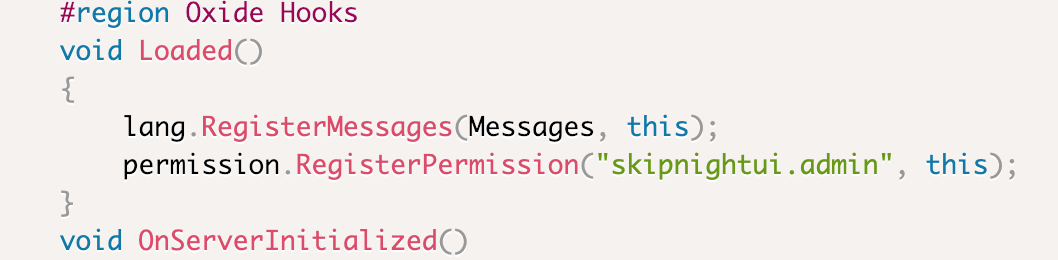
/voteday- Used to cast your vote/voteday open- Force open a vote (requires permissionskipnightui.admin)/voteday close- Close an open vote (requires permissionskipnightui.admin)
default group permissions says not found
A permission "not found" means the plugin isn't loaded generally. Make sure you have Image Library installed and check your oxide/logs for errors.
My bad, i dont use gui's since there was a big problem with them about a year ago which affected plugins like "inbound" and "crosshair",
I dont understand though why you would want multiple players to be able to force open a vote when it works very well without it ? Even if you miss being able to vote there is another vote in about 5 minutes ,
I checked with my plugin list and found Image Library (2.0.42) loaded as well as this plugin
I dont understand though why you would want multiple players to be able to force open a vote when it works very well without it ? Even if you miss being able to vote there is another vote in about 5 minutes ,
I checked with my plugin list and found Image Library (2.0.42) loaded as well as this plugin
SkipNightVote (0.1.4) are loaded and can confirm that you cannot give yourself the permission listed as it says it does not exist
you can give yourself "skipnightvote.admin" but that does not do anything at all (but thought i would try it)
I know that and stated that i thought i would try that command to see if there was a response , there was , it granted the permission even though it does not actually exist but does not recognise the actual permission that is supposed to exist,
you can give yourself "skipnightvote.admin" but that does not do anything at all (but thought i would try it)
you can give yourself "skipnightvote.admin" but that does not do anything at all (but thought i would try it)
Locked automatically