The best practice for any kind of downloader is a piece of knowledge about what's gonna be downloaded in advance.
In the current version 1.2.6, it's possible to download extremely large files via /sil. That may affect your network bandwidth, RAM, and disk storage (swap file).
How?
Line 356: UnityWebRequest www = UnityWebRequest.Get(request.Url);
Yes, it downloads the file. Does not matter, what's the size of the image. Even more, does not matter is that an image or not! Let's download that stuff right now!
So you can easily pass the link for 2Gb file, f.e from the Google Cloud. And it will be downloaded. And just after that, you will check the file size to throw that out. And what if this file is 40Gb?
1. Before doing a /sil with the link for the large file:

2. Right after:


3. A few minutes later:
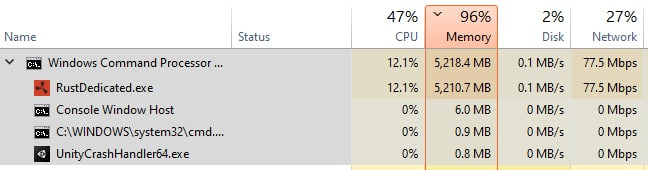
so my advice is simple as a tea:
Send HEAD request first and parse the response headers "Content-Type" and "Content-Length" and check MIME type and file size before starting downloading any kind of garbage on the Rust server.
Think before doing.
And yes, playing with "request.timeout' is a dirty way, cause:
1. what if the Rust server has a 10 Gbps bandwidth?
2. what if the image hoster has the 5kbps bandwidth?
-----------------------------------------------------------------------------------------------------------------------------------------------
In addition:
FYI jpeg and png formats are based on compression and when you are resizing the image (and converting to .net bitmap) - it's OK that the bitmap can be larger than the source jpeg or png image.
So tell me please, you have just downloaded the image, processed that on your own using server resources, and then you are checking the size of the PROCESSED image and throwing the "FileTooLarge" message:
Line 426:
if (resizedImageBytes.Length > signArtist.Settings.MaxFileSizeInBytes)
But why?
Anyway, I see, you are OK with wasting the server resources :)
But how the regular player would know what's going wrong here?
Imagine that you are the player and the known limit is 500Kb.
1. You just downloaded the image from the internet and checked that the size. It is 450kb, which's obviously under the limit. So what may go wrong?
2. So you are printing '/sil https://cdn.example.com/cat.jpeg'
3. and getting FileTooLarge message.
4. ...
5. WTF???
'Always code as if the guy who ends up maintaining your code will be a violent psychopath who knows where you live' (c) Cool Guy I'd completely agree with.

You are welcome :)
Best regards,
Octopussy