My players can't change skins, I haven't changed anything for several years, this started at the beginning of the month, with the global wipe, does anyone have this problem?
Players can't change skins
- 1
- 2
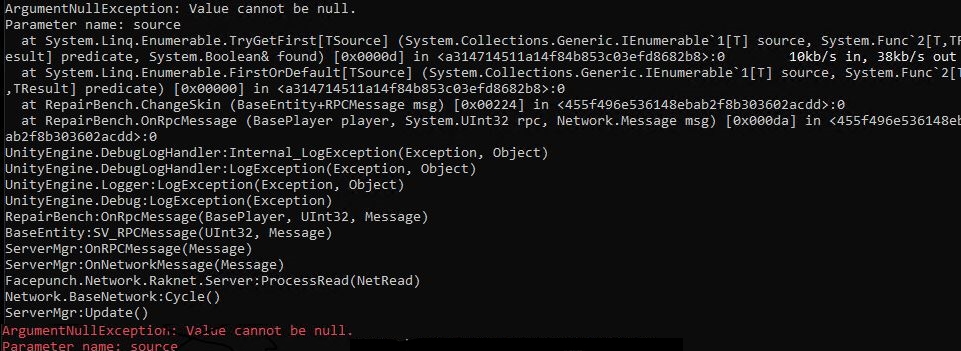
Any help? There are no plugins on the server, players are kicked when trying to change their skin
make sure server game and oxide are uptodate..
Razor
make sure server game and oxide are uptodate..
Everything is updated to the latest versions. Maybe Facepunch blocked it with new rules?
nameEverything is updated to the latest versions. Maybe Facepunch blocked it with new rules?
are you using a plugin to change the skin or the native repairbench?
Razor
are you using a plugin to change the skin or the native repairbench?
I checked even without mods and plugins, the problem persists.
Sometimes players get kicked with an error: "rpc error in changeskin" if they try to change their skin to the default one.
Thank you for trying to help)
is it all players or only a few? i would recommend makeing sure server is correct version and uptodate./verify game file on both client and server.
Razor
is it all players or only a few? i would recommend makeing sure server is correct version and uptodate./verify game file on both client and server.
The server and client are updated. I verified the integrity of the files and reinstalled the server from scratch. This happens to all players. Moreover, players can only craft DLC skins, not those purchased from the workshop. Could it be a network issue?
nameThe server and client are updated. I verified the integrity of the files and reinstalled the server from scratch. This happens to all players. Moreover, players can only craft DLC skins, not those purchased from the workshop. Could it be a network issue?
Could be was your server blacklisted? are you showing up in the serverlist?
Razor
Could be was your server blacklisted? are you showing up in the serverlist?
Of course I checked, it shows up in the search, but it's not on the blacklist.
So it seems to me that the problem is network related, the server can't fully access Steam, i think.
graphics.itemskintimeout -1 (uses local skins) , graphics.itemskintimeout 999 (sets download timeout limit for steam workshop to 999)
check your folder to make sure you have skins. C:\Program Files (x86)\Steam\steamapps\workshop\content\252490
you can download skins with my tool if you want, or fetch all skin ids, https://www.rsmt.dev
0x00A9graphics.itemskintimeout -1 (uses local skins) , graphics.itemskintimeout 999 (sets download timeout limit for steam workshop to 999)
check your folder to make sure you have skins. C:\Program Files (x86)\Steam\steamapps\workshop\content\252490
you can download skins with my tool if you want, or fetch all skin ids, https://www.rsmt.dev
If I understand correctly, these are client (game) settings and skins, but my players are only encountering this issue on my server, or rather, servers, of which there are several on different machines. Skins are stored on the client, not the server, if I'm correct, but everything works fine on other servers.
nameIf I understand correctly, these are client (game) settings and skins, but my players are only encountering this issue on my server, or rather, servers, of which there are several on different machines. Skins are stored on the client, not the server, if I'm correct, but everything works fine on other servers.
You're partially correct yes.
The game uses Steam\steamapps\workshop\content\252490
The server uses RustServerTest\steamapps\workshop\content\252490
The game uses its local files (Steam\steamapps\workshop\content\252490) , only when graphics.itemskintimeout -1 , it is default 60. And resets to 60 upon game launch. The game does not download skins at the menu, but when it connects to any server.
The server can host workshop content if content is places in the servers workshop path, the server will utilize that, and it will be sent to players connected. If the item skin is not valid, it resorts to Steam, if the item skin is still invalid it is disposed.
If you want to host workshop content simple download skins to your-rust-server-path\steamapps\workshop\content\252490 , and ensure the acf file is updated at steamapps\workshop for the game (ie , appworkshop_252490.acf).
It's a little complicated lol
Merged post
So in short;
Download content to Steam\steamapps\workshop\content\252490 , patch acf file, use graphics.itemskintimeout -1 to load cached skins
0x00A9You're partially correct yes.
The game uses Steam\steamapps\workshop\content\252490
The server uses RustServerTest\steamapps\workshop\content\252490
The game uses its local files (Steam\steamapps\workshop\content\252490) , only when graphics.itemskintimeout -1 , it is default 60. And resets to 60 upon game launch. The game does not download skins at the menu, but when it connects to any server.
The server can host workshop content if content is places in the servers workshop path, the server will utilize that, and it will be sent to players connected. If the item skin is not valid, it resorts to Steam, if the item skin is still invalid it is disposed.
If you want to host workshop content simple download skins to your-rust-server-path\steamapps\workshop\content\252490 , and ensure the acf file is updated at steamapps\workshop for the game (ie , appworkshop_252490.acf).
It's a little complicated lol
Merged post
So in short;
Download content to Steam\steamapps\workshop\content\252490 , patch acf file, use graphics.itemskintimeout -1 to load cached skins
I don't think the problem is with the client skins, but I couldn't find such a folder on the server. Secondly, this only happens on the servers on my dedicated machine; it works fine on others serverd(i'm asked players).
I also tried running Steam on this machine, but it takes about 20 minutes to load. Then I ran Rust, but the anti-cheat doesn't load and that doesn't allow me to access the servers. The raidablebases plugin also doesn't work on the server, as it can't get a response from the workshop when checking the skins in the databases.
Based on all this, I suspect the problem is network-related. For some reason, the server can't access the workshop, as when I ran Steam there, the workshop page didn't open, nor did the store, but the profile opens fine. I don't know why this is happening, but I've tried reinstalling Windows, changing network settings, opening ports, and so on.
nameI don't think the problem is with the client skins, but I couldn't find such a folder on the server. Secondly, this only happens on the servers on my dedicated machine; it works fine on others serverd(i'm asked players).
I also tried running Steam on this machine, but it takes about 20 minutes to load. Then I ran Rust, but the anti-cheat doesn't load and that doesn't allow me to access the servers. The raidablebases plugin also doesn't work on the server, as it can't get a response from the workshop when checking the skins in the databases.
Based on all this, I suspect the problem is network-related. For some reason, the server can't access the workshop, as when I ran Steam there, the workshop page didn't open, nor did the store, but the profile opens fine. I don't know why this is happening, but I've tried reinstalling Windows, changing network settings, opening ports, and so on.
Ok so what is the issue you are facing?
Players cannot use Skins? -> Steam Rate limits you, every skin that loads; is downloaded by Steam itself. They limit you after a certain amt of time.
Server not loading Skins? -> Steam issue again, after downloading so many skins, steam will rate limit.
I suspect the problem is network-related.
And you would be correct. additionally you said I ran Steam there, the workshop page didn't open, nor did the store, this is indeed Steam saying 'hey you downloaded a lot of workshop content recently, you have exceeded a temporary limit'
Limits are usually : 5min, 30min, 1 hour.
Steam does not kick/ban you for downloading content either.
- 1
- 2