Hi,
I've seen a lot of Rust servers to have a !Pop option to see how many players there are online.
How do I install it on my server? Is there a plugin?
!pop how to put it?Solved
you can use smart chat bot
This pop you talk about is how vanilla servers do it... You need RCON tool like RustAdmin then you can make autorespond in chat. When someone type !players or !pop or @players or @pop or whatever you set as keyword RustAdmin responds back with Online players are {$playersPlaceholder} or There are {$playersPlaceholder} online or whatever you like...
Flammable
This pop you talk about is how vanilla servers do it... You need RCON tool like RustAdmin then you can make autorespond in chat. When someone type !players or !pop or @players or @pop or whatever you set as keyword RustAdmin responds back with Online players are {$playersPlaceholder} or There are {$playersPlaceholder} online or whatever you like...
Is there a tutorial step by step on how to do it. I use RustAdmin.
@jure12 Find in RustAdmin in Console tab right you have Sheduled commands, Triggered commands, Highlight system and Console filters.
Click New command for Triggered commands and do something like this shown on the image...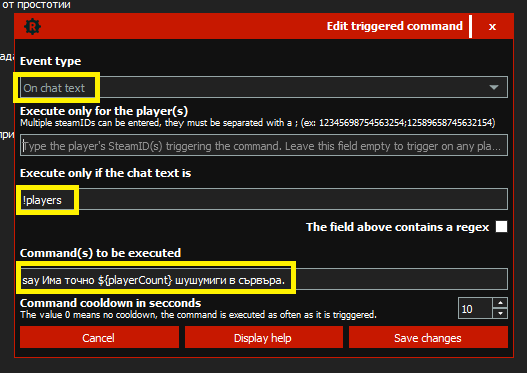
Event type -> On chat text (if keyword/phrase/or whatever you set is typed in chat RustAdmin will auto respond with something)
Execute only if chat text is -> !players is the keyword (can be !pop or @pop or players without ! or asd or whatever you want)
then Command(s) to be executed -> say There are ${playerCount} players online at the moment. (say will make RustAdmin to type stuff in chat and this placeholder will show online players as number and you can customize other text) If you have only say ${playerCount} when someone types !pop will see only the number for example.
There's a similar plugin that already exists
Locked automatically