I am trying to setup a Rust server. I have followed some youtube tutorials.
I have opened my ports
I have forwarded them as well,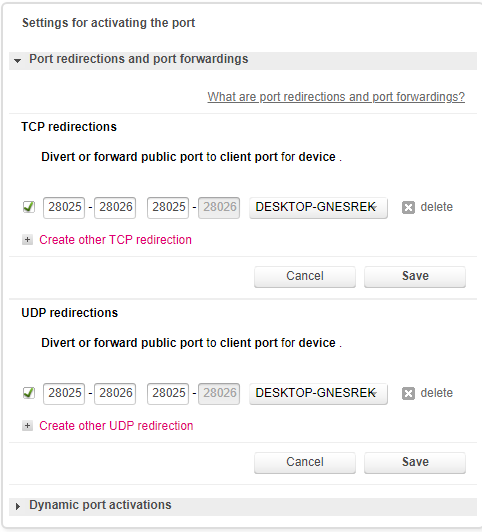
My Batch file looks as follows:
"
echo off
RustDedicated.exe -batchmode +server.ip *.*.*.* +server.port 28025 +rcon.port 28026 +server.level "SavasIsland" +server.maxplayers 5 +server.hostname "Ace's Server" +server.description "Welcome." +server.identity "server1" +rcon.password letmein +rcon.web 1
"
(I have updated the app).
I have checked so many threads. Solutions I tried:
1- I have forwarded only for UDP protocols
2- I have tried with other ports
3- I checked many online tools to check if port is open (canyouseeme.org, southnode.net, ....) some said the port were closed some said was open ?!
4- I have even contacted my ISP to ask if they allowed port forwarding.
5- Deleted the RustServerfolder and created a new one.
When I type client.connect localhost:28015 it works fine. My friends though cannot connect to the server.
Can anyone help me? please, I ran out of ideas.
I cannot connect to my server with my external Ip
Help Please! I still haven't figured it out.
Check to see if your ports are really open using this tool
https://www.yougetsignal.com/tools/open-ports/
you said "When I type client.connect localhost:28015" port 28015 ? yet in your posted config it clearly shows " server.port 28025" it can only be ONE. not both
Hi,
I have same problem. My ISP blocked to connect my own external ip in localhost.
But my friends can use to connect. Just i need connect to my server with localhost address.
First of all u should try use external website check your ports, same as nashslash said
@AceTime
Your port forwarding is a mess. You are trying to forward one port RANGE to another RANGE which is completely wrong, and also you said:
"When I type client.connect localhost:28015 it works fine" - and yet your startup script says 28025
If your startup script is setting 28015/16 then your port forwarding should be:
UDP 28015-28015 > 28015-28015
TCP 28016-28016 > 28016-28016
Hello,
@nashslash, Yeah, you guessed right the tool says that the ports are closed. I do not understand though why, is there any way to open them other then creating the in-/out-bound rules?
@JimDeadlock, I just made a typo in the post here but the ports in the batch file and in the firewall and the forwarded ones are all the same, I made sure of it. And what do you mean by "mess" how should it look like ?
PS: Thanks for the replies