No Oxide directory under RustDedicated_Data/ManagedNot An Issue

I've searched through the forums and internet but haven't found something to help me out.  I'm willing to admit there may be some ignorance at play, this is my first rodeo with oxide.

I have a functioning rust server running on Ubuntu 20.04 64 bit.  I have installed oxide by extracting the contents of the Linux folder to /home/<obfus>/steamcmd/RustDedicated_Data/Managed.

This is my shell script to start the server:

Wec#!/bin/sh
clear while : do
  exec ./RustDedicated -batchmode -nographics \
  -server.ip ... \
  -server.port 28015 \
  -rcon.ip ... \
  -rcon.port 28016 \
  -rcon.password ... \
  -server.maxplayers 75 \
  -server.hostname "..." \
  -server.identity ... \
  -server.level "Procedural Map" \
  -server.seed 1955 \
  -server.worldsize 3150 \
  -server.saveinterval 300 \-server.globalchat true \
  -server.description "...y" \
  -server.headerimage "512x256px JPG/PNG headerimage link here" \
  -server.url "Website Here"
  echo "\nRestarting server...\n" done
​


I am at a bit of a loss here, since I seem to be following every guide and other posts on these forums.  Only two things I can think of is that I can't add oxide to an existing world or that shell script is running steamcmd and I don't notice it.
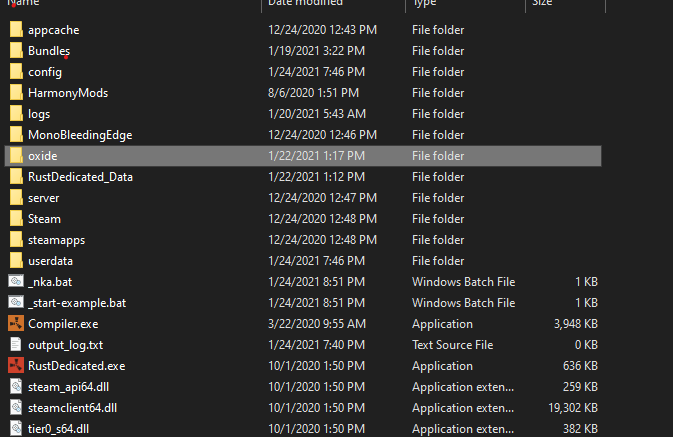
The oxide directory is created when your server starts with Oxide, and is located where RustDedicated is in the root location, not Managed.

I know, I was just including the directory where I extracted the zip files.  There is no RustDedicated_data/oxide/ directory.

What do you mean by "starts with oxide"?  Do you just mean installed or is there something I need to change in my shell script?

There is no RustDedicated_Data/oxide/ directory because that's not where it is created.

"Start with Oxide" means starting your server with Oxide installed.

Ok, let me clarify - the reason I said that is because that is where a lot of guides say it will be.  But no where in the steamcmd directory, not where any site, your walk throughs, youtube videos, third party guides, anything, is there an oxide folder.  Not under my server.  Not in the install directory.  Not anywhere.

I can see that oxide is installed and running, but a search of the directory structure starting at steamcmd shows no oxide directories at all.

Oxide is installed under RustDedicated_Data/Managed; the Oxide directory (oxide/config, oxide/data, oxide/plugins, etc.) is created by default where RustDedicated/RustDedicated.exe is located. It sounds like you may be getting confused between Oxide install location and Oxide directory.

If you are running SteamCMD each server start, you are uninstalling Oxide and you will not see the "oxide" directory and it will only exist when the server has started with Oxide actually installed.

If it is being uninstalled why does oxide.version work?

Merged post

And I posted my startup script, nothing in that is calling steamcmd.

If oxide.version works, then Oxide is installed and running. The directory will exist where the RustDedicated executable is located.


This image is showing you Windows, but the same would apply to Linux installs.

It showed up after I restarted the VM and launched the server again.

Tacokek

It showed up after I restarted the VM and launched the server again.

See post 2

Locked automatically