@pookins The "kits.admin" is a permission not a chat or console command.
"I used the /kits.admin command to check that status."
"I used the /kits.admin command to check that status."
k1lly0u
Feel free to run that update through diffnow.com and see the changes had nothing to do with what you are claiming. Infact if you read those update notes you will see that the permission wasnt being applied to the chat commands and it was only checking if the player had the admin flag, the update added the permission check to the commands. So your claim that everyone had access to everything with out the permission was bullshit.
You didn't know thats how it worked and wanted to create drama like you have been doing throughout this entire thread, now that it come out that you were wrong you try and turn it back around like you know what you are talking about. Anyone can load that previous version and test it themselves to see you were wrong.
Nice tryIs there more to that error? It could be a image is too large to send but can't say for sure without seeing more of the message
That might be a logical answer if i was the only one claiming that all users could use and see all kits , But i am not , if you took the trouble to read all the posts you would know that (including the ones where i informed that that the last patch corrected that "nonexistant bug")
I am still getting the imagelibrary errors spamming my console whenever i reload the plugin but that of course is another of your plugins which of course does not have any errors in it and it is all my imagination.
And how is th "fix" for ProximityAlert going ? that will be coming up for three years pretty soon ,
No one saw all of my kit (exept the admin) and no spam in console from imagelibrary, but if you don't want any mistakes you should make your plugin, post it here, do it for free of course, take time to answer the hundreds of questions while keeping calm when people get poisonous instead of being constructive.
k1lly0u
Fixed in 4.0.7
Works as normal with Botspawn, Guarded crate, Hunter plugins (apologies for mentioning other site plugins)
Aoki
No one saw all of my kit (exept the admin) and no spam in console from imagelibrary, but if you don't want any mistakes you should make your plugin, post it here, do it for free of course, take time to answer the hundreds of questions while keeping calm when people get poisonous instead of being constructive.
I am not being poisonous, I have been using this since it came out and have like everyone else still kept using it through all the changes (of plugin and devs) But if i get errors i point them out , and so does everyone else
https://umod.org/community/rust-kits/32376-image-dose-not-work-after-transfer-from-old?page=1#post-2
https://umod.org/community/rust-kits/32324-players-can-see-all-kits-even-hidden-ones-or-authlevel-2-ones
https://umod.org/community/rust-kits/32366-kit-problem
I did as i stated before encounter an error with the ability to access kit creation menu while not an admin (fixed by update)
I am still getting spamming errors with imagelibrary and Rust icons in GUI instead of clothing icons , All those items are from my inventory and not workshop items, and all those items are still in use.
I still cannot create or edit existing kit with GUI if i have to input text as if text contains "bound" key it will respond to that binding and open that menu.
I cannot use /kit resetdata to reset players kit use before a wipe
I understand that all kits are viewable in GUI but it would be more convenient if all npc kits could be moved to show after all other kits , I have only 30+ NPC kits but for someone with a lot more it would be annoying but that is not that important,
Image failed to download! Error: HTTP/1.1 403 Forbidden - Image Name: pants_10049 - Image URL: http://s3.amazonaws.com/s3.playrust.com/icons/inventory/rust/10049_small.png?3782989640
Image failed to download! Error: HTTP/1.1 403 Forbidden - Image Name: shoes.boots_10023 - Image URL: http://s3.amazonaws.com/s3.playrust.com/icons/inventory/rust/10023_small.png?2806458190
Image failed to download! Error: HTTP/1.1 403 Forbidden - Image Name: jacket_10011 - Image URL: http://s3.amazonaws.com/s3.playrust.com/icons/inventory/rust/10011_small.png?416283552
Image failed to download! Error: HTTP/1.1 403 Forbidden - Image Name: hoodie_14178 - Image URL: http://s3.amazonaws.com/s3.playrust.com/icons/inventory/rust/14178_small.png?3558735103
Image batch (Kits) has been stored successfully
Image failed to download! Error: HTTP/1.1 403 Forbidden - Image Name: pants_10020 - Image URL: http://s3.amazonaws.com/s3.playrust.com/icons/inventory/rust/10020_small.png?2965920361
Image failed to download! Error: HTTP/1.1 403 Forbidden - Image Name: mask.bandana_10062 - Image URL: http://s3.amazonaws.com/s3.playrust.com/icons/inventory/rust/10062_small.png?1622122448
Image failed to download! Error: HTTP/1.1 403 Forbidden - Image Name: tshirt.long_10005 - Image URL: http://s3.amazonaws.com/s3.playrust.com/icons/inventory/rust/10005_small.png?1094645045
Image failed to download! Error: HTTP/1.1 403 Forbidden - Image Name: mask.bandana_10059 - Image URL: http://s3.amazonaws.com/s3.playrust.com/icons/inventory/rust/10059_small.png?1033998325
Image failed to download! Error: HTTP/1.1 403 Forbidden - Image Name: tshirt_14181 - Image URL: http://s3.amazonaws.com/s3.playrust.com/icons/inventory/rust/14181_small.png?1991107141
Image failed to download! Error: HTTP/1.1 403 Forbidden - Image Name: jacket_10012 - Image URL: http://s3.amazonaws.com/s3.playrust.com/icons/inventory/rust/10012_small.png?1487285948
Image failed to download! Error: HTTP/1.1 403 Forbidden - Image Name: jacket_10072 - Image URL: http://s3.amazonaws.com/s3.playrust.com/icons/inventory/rust/10072_small.png?2849220949
Image failed to download! Error: HTTP/1.1 403 Forbidden - Image Name: pants_10078 - Image URL: http://s3.amazonaws.com/s3.playrust.com/icons/inventory/rust/10078_small.png?2327923063
Image failed to download! Error: HTTP/1.1 403 Forbidden - Image Name: tshirt.long_10051 - Image URL: http://s3.amazonaws.com/s3.playrust.com/icons/inventory/rust/10051_small.png?3180740967
Image failed to download! Error: HTTP/1.1 403 Forbidden - Image Name: shoes.boots_10080 - Image URL: http://s3.amazonaws.com/s3.playrust.com/icons/inventory/rust/10080_small.png?1493587668
Image failed to download! Error: HTTP/1.1 403 Forbidden - Image Name: hoodie_14072 - Image URL: http://s3.amazonaws.com/s3.playrust.com/icons/inventory/rust/14072_small.png?3170781343
Image failed to download! Error: HTTP/1.1 403 Forbidden - Image Name: jacket_10014 - Image URL: http://s3.amazonaws.com/s3.playrust.com/icons/inventory/rust/10014_small.png?1668734031
Image failed to download! Error: HTTP/1.1 403 Forbidden - Image Name: tshirt.long_10006 - Image URL: http://s3.amazonaws.com/s3.playrust.com/icons/inventory/rust/10006_small.png?193448658
Image failed to download! Error: HTTP/1.1 403 Forbidden - Image Name: jacket_10010 - Image URL: http://s3.amazonaws.com/s3.playrust.com/icons/inventory/rust/10010_small.png?1024001568
Image failed to download! Error: HTTP/1.1 403 Forbidden - Image Name: shoes.boots_10044 - Image URL: http://s3.amazonaws.com/s3.playrust.com/icons/inventory/rust/10044_small.png?2445850442
Image failed to download! Error: HTTP/1.1 403 Forbidden - Image Name: pants_10021 - Image URL: http://s3.amazonaws.com/s3.playrust.com/icons/inventory/rust/10021_small.png?1814957568
Image failed to download! Error: HTTP/1.1 403 Forbidden - Image Name: jacket_10008 - Image URL: http://s3.amazonaws.com/s3.playrust.com/icons/inventory/rust/10008_small.png?4068447129
Image failed to download! Error: HTTP/1.1 403 Forbidden - Image Name: burlap.gloves_10128 - Image URL: http://s3.amazonaws.com/s3.playrust.com/icons/inventory/rust/10128_small.png?1571036736
Image failed to download! Error: HTTP/1.1 403 Forbidden - Image Name: pants_10049 - Image URL: http://s3.amazonaws.com/s3.playrust.com/icons/inventory/rust/10049_small.png?3782989640
Image failed to download! Error: HTTP/1.1 403 Forbidden - Image Name: shoes.boots_10023 - Image URL: http://s3.amazonaws.com/s3.playrust.com/icons/inventory/rust/10023_small.png?2806458190
Image failed to download! Error: HTTP/1.1 403 Forbidden - Image Name: jacket_10011 - Image URL: http://s3.amazonaws.com/s3.playrust.com/icons/inventory/rust/10011_small.png?416283552
Image failed to download! Error: HTTP/1.1 403 Forbidden - Image Name: hoodie_14178 - Image URL: http://s3.amazonaws.com/s3.playrust.com/icons/inventory/rust/14178_small.png?3558735103
Image failed to download! Error: HTTP/1.1 403 Forbidden - Image Name: shoes.boots_10034 - Image URL: http://s3.amazonaws.com/s3.playrust.com/icons/inventory/rust/10034_small.png?3106176221
Image failed to download! Error: HTTP/1.1 403 Forbidden - Image Name: pants_10019 - Image URL: http://s3.amazonaws.com/s3.playrust.com/icons/inventory/rust/10019_small.png?4229356971
Image failed to download! Error: HTTP/1.1 403 Forbidden - Image Name: jacket_10009 - Image URL: http://s3.amazonaws.com/s3.playrust.com/icons/inventory/rust/10009_small.png?2431933811
Image failed to download! Error: HTTP/1.1 403 Forbidden - Image Name: hoodie_10132 - Image URL: http://s3.amazonaws.com/s3.playrust.com/icons/inventory/rust/10132_small.png?255898137
Image failed to download! Error: HTTP/1.1 403 Forbidden - Image Name: shoes.boots_10088 - Image URL: http://s3.amazonaws.com/s3.playrust.com/icons/inventory/rust/10088_small.png?3011340555
[Image Library] Starting order Kits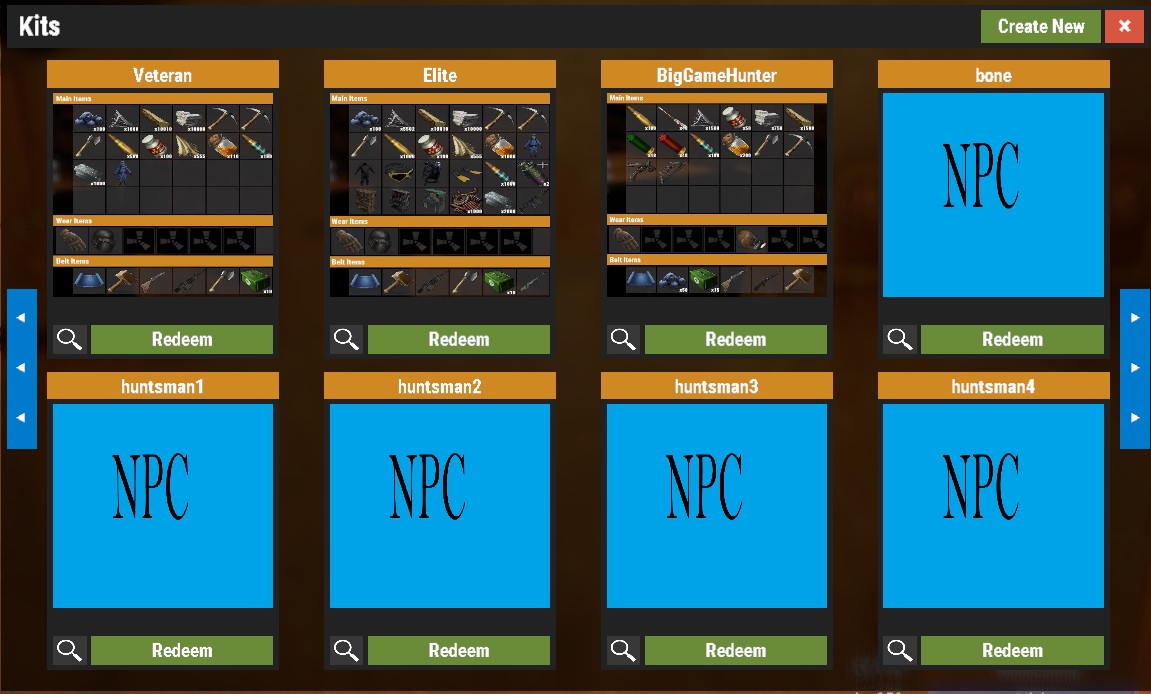
PPlank
@pookins The "kits.admin" is a permission not a chat or console command.
"I used the /kits.admin command to check that status."
What i meant to say was i tried to grant that permission by using
/o.grant user <name> kits.admin and as i was not admin (revoked) got the unknown command reply,
why you dont back to old version and wait a stable one? For me removing my steamid in users.cfg of the server (rebooting it too) and put my Api key in the config of imagelibrary solved all .. i have most of 20 kits and i dont show npckit .. i use another steam account for testing in real situation all of my pluggins (most of 90 plugins)
If i do in console o.grant user Aoki kits.admin i got:
Player 'Aoki (76***********)' granted permission 'kits.admin'
Aoki
why you dont back to old version and wait a stable one? For me removing my steamid in users.cfg of the server (rebooting it too) and put my Api key in the config of imagelibrary solved all .. i have most of 20 kits and i dont show npckit .. i use another steam account for testing in real situation all of my pluggins (most of 90 plugins)
If i do in console o.grant user Aoki kits.admin i got:Player 'Aoki (76***********)' granted permission 'kits.admin'
I used that command to check that i had successfully revoked my admin status and i could still edit/create the kits
I also use another steam account to check plugins in real time , I also have 89 plugins with no conflicts with Kits except now i cannot edit or create kits in GUI as it conflicts with "bound" keys and opens that menu,
I have an API key in imagelibrary and still get the error message, I have 30 kits most of which are npc (for other plugins) and as admin they all show in kit gui,
And why should i revert back to an older version ? There will no longer be any support for it and i would not expect the dev to work on 2 versions of the same plugin .
Love all of the new changes except the loss of the admin being able to bypass kit cooldowns, because of this it also seems like an admin can only /give a kit that isnt on cooldown even when trying to give to himself.
I made the kit and when i try to claim or anyone, it is saying "file dose not exist" . Not sure what is is about but very confused.
Eddiej774I made the kit and when i try to claim or anyone, it is saying "file dose not exist" . Not sure what is is about but very confused.
type /kitlist in chat and see what kits are available , they should already be showing on gui though ?
Because of limitations caused by interferance from bound keys i create a new kit with one letter *m then include inventory/cooldown/max uses , i then unload kits plugin and open data\Kits\kits_data.json file and edit it with the kit name /description/permission/image i want to use then save and reload kits plugin,
it is a roundabout way of doing it but as the old menu system is no longer available and i cannot type in gui (letters) its the only way i can do it , i like the fact that players can see exactly what they can get in any kit and for permission ones they can see what they have to do to get it (mine are based on ranks = hours on server) .
the kit show up in /kit list in gui but still telling me the same thing. File dose not exists in game when i try to claim or anyone as well. inventory is emty and i have validate all files with json lint.
but i will double check again.
Eddiej774the kit show up in /kit list in gui but still telling me the same thing. File dose not exists in game when i try to claim or anyone as well. inventory is emty and i have validate all files with json lint.
but i will double check again.
The usual problem with an empty kit is that the inventory was not added to the kit , when you open the kit gui does it show all the contents of the kit in the gui ?
can you post your config and data kits json ?


