Reposition UI?

Ok, I see several UI settings in the main settings file, but none of them seem to do the trick. 

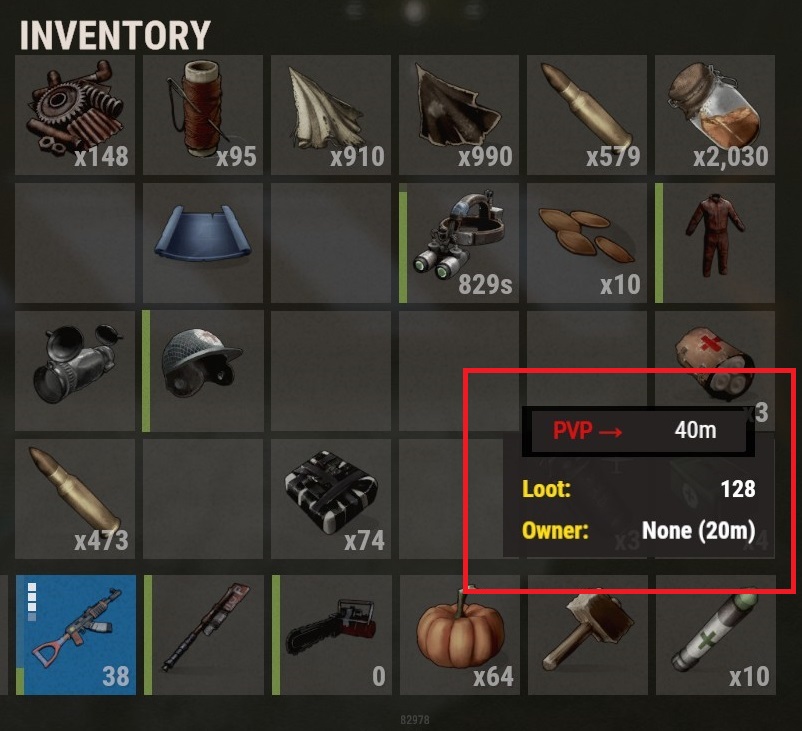
Basically I'm trying to move the UI that is displayed when 'Inside the base sphere' so it is NOT on top of the Players Inventory. 

As you can seein the image provided, the UI is covering the player's inventory making it impossible to access those two slots (the Med Kit in this case) without leaving the PVP ares as it is UNDER the Raidable Base UI :(

Raidable Bases UI Position

Perhaps move it to just above the Player Health stack, or to the left of the hotbar & below the Chat input area?  Or perhaps you can provide a Named List list of screen positions (e.g. Top-Left, Bottom-Right, Middle-Left , etc.)? 

I'm familiar with setting UI Anchor Min/Max values so if you can tell me where I can edit this I think I can handle the adjudtments.  I do own the Premium/Pro version.

ThanX in Advance!

hi, you can click the arrow to move in any of the UI to move them

reload the plugin, open oxide/data/RaidableBasesUI.json datafile and copy your offsets into the config file if you want it applied to everyone.

Ill move it next update but you can easily move it this way instead of waiting for that update.

Ok ... that was initially a bit confusing, but I eventually figures out you meant for me to click on the ARROW on that little form to call up the clickable movement arrows.  Derp!

Merged post

Ok ... also confused on this part of your instructions...

reload the plugin, open oxide/data/RaidableBasesUI.json datafile and copy your offsets into the config file if you want it applied to everyone.

I moved the UI and reloaded the mod (i.e. ran the oxide.relaod RaidableBases command) and saw changes in the config folder's RaidableBases.json file.  Not really clear on what data I need to 'Copy-N-Paste' from that file or what file that data needs to be pasted into so everyone on my server will see the UI where I moved it to. 

I would assume that if these changes are recorded in the  config folder's RaidableBases.json file (as they seem to be) that all players would see the UI in the new position.


Merged post

Something else I'm noticing is every base is flagged as EASY when it is NOT (that is, a nightmare or other higher level base is spawned in).  Note that I started with the FREE verision and then updated to the PAID version.  Not sure how to go about fixing this :(

Here is a link to my current RaidableBases.json

Here is some of the startup log...

Loaded 196 items from RaidableBases\Difficulty_Loot\Easy
Loaded 204 items from RaidableBases\Difficulty_Loot\Medium
Loaded 142 items from RaidableBases\Difficulty_Loot\Hard
Loaded 177 items from RaidableBases\Difficulty_Loot\Expert
Loaded 177 items from RaidableBases\Difficulty_Loot\Nightmare
Loaded 4 items from RaidableBases\Base_Loot\Easy Bases
Loaded 4 items from RaidableBases\Base_Loot\Expert Bases
Loaded 4 items from RaidableBases\Base_Loot\Hard Bases
Loaded 4 items from RaidableBases\Base_Loot\Medium Bases
Loaded 4 items from RaidableBases\Base_Loot\Nightmare Bases
Loaded 4 items from RaidableBases\Base_Loot\RaidBases
(11:08:24) | [RaidableBases] Grid initialization completed in 36 seconds and 39 milliseconds on a 4000 size map with 2429 potential points.
1. Set the position of the UI elements in-game
2. Unload the plugin! o.unload RaidableBases
3. This does not save to the config - it is saved to oxide/data/RaidableBasesUI.json for every player
4. Open this file and find your steam id
5. Copy STATUS offsets for MIN and MAX into the STATUS UI portion near the bottom of the config
6. Save the config
7. Delete the oxide/data/RaidableBasesUI.json (or rename it)
8. Load the plugin

Copy the values only: "436.957 12.056" for example

oxide/data/RaidableBasesUI.json:


config section:


if your bases all spawn as easy then the difficulty setting isn't configured. easy fix!

open each profile and change the first line to the proper difficulty setting of 0,1,2,3 or 4,

oxide/data/RaidableBases/Profiles/

Well, that looks to have cleared up all the problems on my server, as far as your mod is concerned ;)

ThanX again for the fast responses and clear explinations above!!!


Merged post

A suggestion for the next update...  If a base has Turrets and/or SAMs, then the PVP sphere drawn around that base should be the maximum attack range for whichever is threat is greater.  I believe SAMs have a longer range than Turrets (not sure of the values), and that Turret range is dependent on the gun therein so calculating the max Turrets range might be trickier than the max SAM range.  The sphere of course would be centered on the building and the radius wold ahve to be upped to account for offset turrets.