Hello there,
is it possible and how is it possible to buy two commands with one click?
In my example I wanna let my players buy a supply signal and convert it right into an airstrike.
My part of the config:
},
"Airstrike Call": {
"DisplayName": "Airstrike Call",
"Shortname": "airstrike.call",
"EnableBuy": true,
"EnableSell": false,
"Image": "https://assets.umod.org/images/icons/plugin/5b63beb046c3e.jpg",
"SellPrice": 1.0,
"BuyPrice": 150.0,
"BuyCooldown": 0,
"SellCooldown": 0,
"KitName": null,
"Command": [
"inventory.giveto $player.id supply.signal; chat.say /airstrike.signal.squad $player.id"
],
"SkinId": 0
},
I also tried this:
},
"Airstrike Call": {
"DisplayName": "Airstrike Call",
"Shortname": "airstrike.call",
"EnableBuy": true,
"EnableSell": false,
"Image": "https://assets.umod.org/images/icons/plugin/5b63beb046c3e.jpg",
"SellPrice": 1.0,
"BuyPrice": 150.0,
"BuyCooldown": 0,
"SellCooldown": 0,
"KitName": null,
"Command": [
"inventory.giveto $player.id supply.signal",
"chat.say /airstrike.signal.squad $player.id"
],
"SkinId": 0
},
but all it does is to execute the first command and ignore the second.
I hope you can help me.
Thanks Rob
Execute two commandsSolved
I figuered it out by myself.
The correct syntax is:
"Command": [
"inventory.giveto $player.id supply.signal
chat.say /airstrike.signal.squad $player.id"
],
Merged post
Hello,
after the last Update v2.0.13 the syntax is not working anymore. Any suggestions?
? Updated from what version. Multi commands have always been multiple strings in all of my versions.
"Command": [
"inventory.giveto $player.id supply.signal",
"chat.say /airstrike.signal.squad $player.id"
],
There is no limit either, you can set many commands to a single shop item.
Ok thank you. I downloaded my first "version" 14 days ago. Maybe is only a change of the config.
So what is the right syntax for the second command?
The right synta for chat would be "/aistrike signal squad". How do I tell the config to do the right thing?
I didn't find any data table for converting commands into this kind of form.
All commands inside the guishop as a custom shop item must use basically either oxide commands. or plugin console commands
Ok because I didn't find any datatables of possible commands or formats I wanna ask you how the syntax should look to be working.
This does not work:
"Command": [
"inventory.giveto $player.id supply.signal",
"chat.say /airstrike.signal.squad $player.id"
],
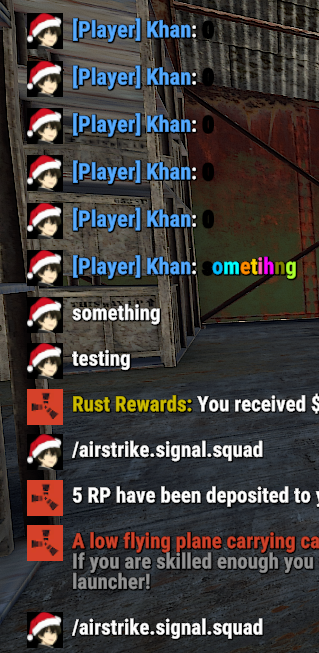
You'll never be able to pass arguments inside a chat message regardless of what you want to do because it'll always escape.
Even if you did chat.add 0 76561############ /airstrike.signal.squad $player.id
or anything else (like that) inside the F1 menu in rust it never works.
By default in rust, you cannot do that in general. "chat.say /airstrike.signal.squad $player.id"
Thank you very much for your help! Sounds legit.
So is there a workaround or anything else to convert chat.say commands from other Plugin f.e. Airstrike to be able to buy an Airstrike from the shop?
Additional: I tried chat.say /airstrike signal squad $player.id without the "." and also failed.
You can already sell console commands from other plugins inside the guishop plugin
Sorry to bump.
Just a question in relation.
So essentially, to make what OP wanted work, we need the plugin author to allow the command be called via console, not as a chat command, then it should work, in theory ?
For example, the OPs question, if the other plugin supported a "console" command opposed to only working via chat > airstrike.signal.squad $player.id
It would accept ? Since chat slash commands can't pass through.
Merged post
Figured this out if anyone wanted to know
Just download Chat Impersonator, and instead of using chat.say /airstrike.signal.squad $player.id"
Sell the command 2nd command as ci $player.id /airstrike.signal.squad
Because CI "does" pass through slash / chat commands on behalf of the player.
Locked automatically