Zombie plugin was updated recently and since it's update Death Notes no longer shows zombie kills as zombie kills. I believe death notes is thinking they are npc's cause it doesn't show any death note msg when killing them.
Support for Zombie Horde plugin NPCsSuggestion
Any idea on a remedy? ZombieHorde is the plugin registering as player kills and not Zombie kills like previous to the recent updates.
Apprecaite your hard work - love your plugin! Thank you
Apprecaite your hard work - love your plugin! Thank you
Sorry for my late reply.
I am not sure how ZombieHorde works exactly and to be honest I can't update Death Notes every time to add support for some specifics from other plugins. I'm trying to make sure all kinds of death possibilities from the vanilla game experience are covered, and that is already quite involved.
I'll be looking for ways for other plugins to help Death Notes support their specific death scenarios in the future but for right now I don't see this as a priority. This is likely something I am going to try to integrate with the large revamp I have in mind for Death Notes.
There are new NPC types that are being created by other plugins like Zombie Horde. Zombies still work aka scarecrow but Zombie Horde does not as you can see here.
other things that might help. Killyou has menchend on how to get this to work and if I find those post I will update them here.
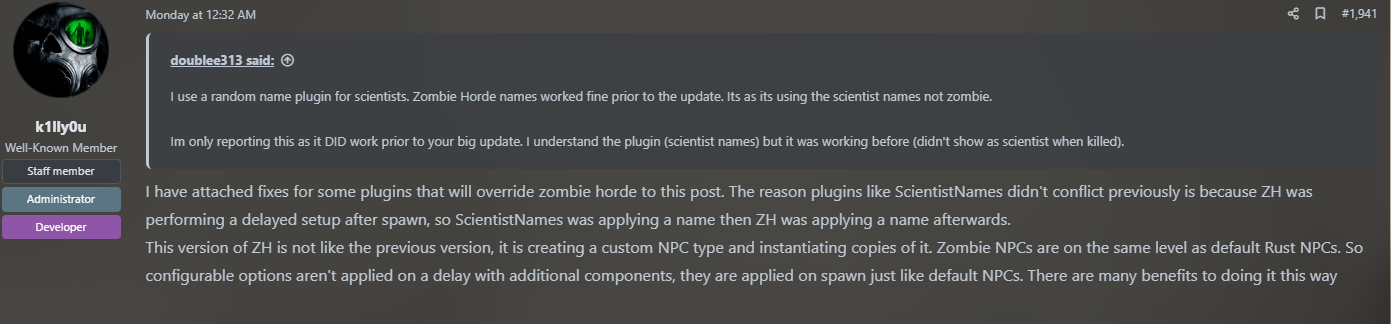
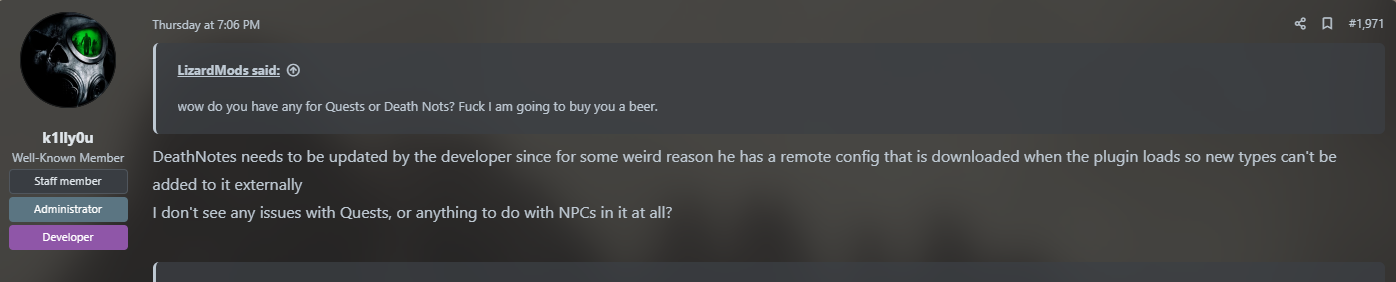
This is all I got I don't know if you need to do this check but if not thin the CombatEntityTypes just need to add ZombieNPC.
                if (entity.GetType().Name == "ZombieNPC")
                {
                    entname = "ZombieNPC";
                }
I would do it my self but the plugin auto-updates with this link
{
  "GunTrap": 6,
  "FlameTurret": 7,
  "AutoTurret": 7,
  "BaseHelicopter": 0,
  "BradleyAPC": 1,
  "BasePlayer": 5,
  "NPCMurderer": 3,
  "CodeLock": 12,
  "Scientist": 4,
  "ScientistNPC": 4,
  "HTNPlayer": 4,
  "NPCAutoTurret": 13,
  "FireBall": 11,
  "scarecrow": 16,
  "ScientistNPCNew": 4,
  "tunneldweller": 17,
  "underwaterdweller": 18,
  "ZombieNPC": 20 //<----???
}
also, I don't know the value of what all the numbers represent.
i too use death notes and would love to having this working again
taco
i too use death notes and would love to having this working again
ya I am using Simple Kill Feed for now. its on Umod and once you kill a zombie it auto detects what it is. from there you just rename it in the config. still love this plugin but what can you do.
Merged post
ok so this is what Killyou has to say
These 2 if statements need to be switched around so it checks type first

ZombieNPC needs to be added to the CombatEntityTypes remote config and the enum in the plugin

A case needs to be added to the GetEntityName function so it will display the zombies name
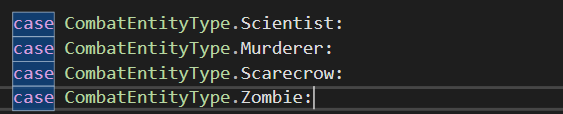
Untested but this will probably work.
I agree, the 2 type and name checks need switched. The ZombieNPC needs added to the CombatEntityType with a value that's not already used on the enum. You also need to add a check in GetCombatEntity function in order to account for this new NPC type. I did the following because it was the fastest way I could patch this but I'm sure someone knows a better method than string comparison (hopefully).
if (entity.GetType().Name.Equals("ZombieNPC"))
return CombatEntityType.ZombieNPC;
JuiceMyOrangesI agree, the 2 type and name checks need switched. The ZombieNPC needs added to the CombatEntityType with a value that's not already used on the enum. You also need to add a check in GetCombatEntity function in order to account for this new NPC type. I did the following because it was the fastest way I could patch this but I'm sure someone knows a better method than string comparison (hopefully).
if (entity.GetType().Name.Equals("ZombieNPC"))
return CombatEntityType.ZombieNPC;
Please download the corrected DeathNotes.cs
Can't figure it out, plugin won't compile
anyone share a fixed DeathNotes.cs ?
upperkinganyone share a fixed DeathNotes.cs ?
No =(
@RustvilleUSA - did you try the fix suggested here?
Luego de varios intentos y observar los cambios realizados en los archivos .json logre encontrar esta solucción.
Paso 1:
Ruta de la carpeta /oxide/data/DeathNotes/CombatEntityTypes.jsonCambiar a mayúscula: "Scarecrow" = 16,
Añadir después "ZombieNPC" = 19
{
"Helicopter" = 0,
"Bradley" = 1,
"Animal" = 2,
"Murderer" = 3,
"Scientist" = 4,
"Player" = 5,
"Trap" = 6,
"Turret" = 7,
"Barricade" = 8,
"ExternalWall" = 9,
"HeatSource" = 10,
"Fire" = 11,
"Lock" = 12,
"Sentry" = 13,
"Other" = 14,
"None" = 15,
"Scarecrow" = 16,
"TunnelDweller" = 17,
"UnderwaterDweller" = 18,
"ZombieNPC" = 19
}
Guardar cambios, después cambiar permisos de escritura a solo lectura de este archivo. servidor linux 664 a 444
Paso 2:
Ruta de la carpeta: /oxide/data/DeathNotes/DefaultMessages.json[
{
"KillerType": "Player",
"VictimType": "Player",
"DamageType": "Bullet",
"Messages": [
"{killer} shot {victim} using their {weapon} over a distance of {distance}."
]
}, ..............
Añadir:
[
{
"KillerType": "Player",
"VictimType": "Player",
"DamageType": "Bullet",
"Messages": [
"{killer} shot {victim} using their {weapon} over a distance of {distance}."
]
},
{
"KillerType": "Player",
"VictimType": "ZombieNPC",
"DamageType": "*",
"Messages": [
"{killer} fought off a {victim}."
]
},
{
"KillerType": "Player",
"VictimType": "Scarecrow",
"DamageType": "*",
"Messages": [
"{killer} fought off a {victim}."
]
},
Guardar cambios, después cambiar permisos de escritura a solo lectura de este archivo. servidor linux 664 a 444
Paso 3:
Ruta de la carpeta: /oxide/config/DeathNotes.json{
"Translations": {
"Death Messages": [
{
"KillerType": "Player",
"VictimType": "Player",
"DamageType": "Bullet",
"Messages": [
"{killer} shot {victim} using their {weapon} over a distance of {distance}."
]
}, .......
Añadir
{
"Translations": {
"Death Messages": [
{
"KillerType": "Player",
"VictimType": "Player",
"DamageType": "Bullet",
"Messages": [
"{killer} shot {victim} using their {weapon} over a distance of {distance}."
]
},
{
"KillerType": "Player",
"VictimType": "ZombieNPC",
"DamageType": "*",
"Messages": [
"{killer} fought off a {victim}."
]
},
{
"KillerType": "Player",
"VictimType": "Scarecrow",
"DamageType": "*",
"Messages": [
"{killer} fought off a {victim}."
]
},
Guardar cambios, los permisos de escritura y lectura permanecen iguales para este archivo. servidor linux 664
Espero les ayude, no deben cambiar nada del código DeathNotes.csesta perfecto el problema son la configuración remota y sus archivos.
https://translate.google.com/
After several attempts and observing the changes made in the .json files, I managed to find this solution.
Step 1:
Folder path /oxide/data/DeathNotes/CombatEntityTypes.json
Change to uppercase: "Scarecrow" = 16,
add after "ZombieNPC" = 19
{
"Helicopter" = 0,
"Bradley" = 1,
"Animal" = 2,
"murderer" = 3,
"Scientists" = 4,
"Player" = 5,
"trap" = 6,
"Turret" = 7,
"Barricade" = 8,
"ExternalWall" = 9,
"HeatSource" = 10,
"Fire" = 11,
"lock" = 12,
"Sentry" = 13,
"Other" = 14,
"None" = 15,
"Scarecrow" = 16,
"TunnelDweller" = 17,
"Underwater Dweller" = 18,
"ZombieNPC" = 19
}
Save changes, then change write permissions to read-only on this file. linux server 664 to 444
Step 2:
Folder Path: /oxide/data/DeathNotes/DefaultMessages.json[
{
"KillerType": "Player",
"VictimType": "Player",
"DamageType": "Bullet",
"Messages": [
"{killer} shot {victim} using their {weapon} over a distance of {distance}."
]
}, ..............
Add:
[
{
"KillerType": "Player",
"VictimType": "Player",
"DamageType": "Bullet",
"Messages": [
"{killer} shot {victim} using their {weapon} over a distance of {distance}."
]
},
{
"KillerType": "Player",
"VictimType": "ZombieNPC",
"DamageType": "*",
"Messages": [
"{killer} fought off a {victim}."
]
},
{
"KillerType": "Player",
"VictimType": "Scarecrow",
"DamageType": "*",
"Messages": [
"{killer} fought off a {victim}."
]
},
Save changes, then change write permissions to read-only on this file. linux server 664 to 444
Step 3:
Folder path: /oxide/config/DeathNotes.json{
"Translations": {
"Death Messages": [
{
"KillerType": "Player",
"VictimType": "Player",
"DamageType": "Bullet",
"Messages": [
"{killer} shot {victim} using their {weapon} over a distance of {distance}."
]
}, .......
Add
{
"Translations": {
"Death Messages": [
{
"KillerType": "Player",
"VictimType": "Player",
"DamageType": "Bullet",
"Messages": [
"{killer} shot {victim} using their {weapon} over a distance of {distance}."
]
},
{
"KillerType": "Player",
"VictimType": "ZombieNPC",
"DamageType": "*",
"Messages": [
"{killer} fought off a {victim}."
]
},
{
"KillerType": "Player",
"VictimType": "Scarecrow",
"DamageType": "*",
"Messages": [
"{killer} fought off a {victim}."
]
},
Save changes, read and write permissions remain the same for this file. linux server 664
I hope it helps you, you shouldn't change anything in the DeathNotes.cs code, it's perfect, the problem is the remote configuration and its files.
so how do I do this in windows?
LizardMods
so how do I do this in windows?
once you finish making all the changes to the .json file, change the permissions to read-only.
https://www.tenforums.com/tutorials/85640-set-unset-read-only-attribute-files-folders-windows-10-a.html
do all the modifications with the plugins deactivated.
- 1
- 2