Hi, I created a fully custom prefab that merges both - outpost and bandit camp. I set up the vending machines to settings we normally use, including some of the custom items. When I restarted the server the vending machines were back to vanilla even though the data file for the map had the correct items in. After reloading the plugin, the config was eventually applied.
At first, I thought it was due to the MonumentFinder not being set up correctly, but it makes no difference with or without the MF. The vending machines are still vanilla after the restart until the plugin reload.
Is there anything I'm missing?
Config for custom monument not applying after server restartSolved
Have you configured in MF that the custom monument should determine position/rotation/bounds using the prevent building volume? If so, you may have multiple overlapping prevent building volumes, and the plugin may be finding a different one on server boot than when reloaded later.
I have tried multiple options. I have only one prevent building volume in this place, which I double-checked but still had the same result. I even tried removing the safe zone volume and zone manager zone from that place. I tried changing the monument marker as it was initially in color with a slash before the name. I thought perhaps it caused issues, but I had no success. If I check the closest monument after the restart, the bounds are okay, but the vending machines are still vanilla until reload. I even made the prevent building volume smaller or checked that the monument topology was in there. I tried to let the marker be the boss, the custom bounds, but nothing in either case.
This sounds like an outlier case so I can't say what the cause or resolution is yet. I suggest we walk through the problem to narrow down potential root causes. I will ask some questions below, and the answers you provide will help me conduct further investigation.
When you reproduce this issue, do the vending machines show both the Edit and Reset button? If neither, that indicates that CVS has not properly initialized. If only the Edit button shows, it means CVS recognizes the VM but for some reason has not found the data for the VM. If both are present but the VM configuration is wrong/vanilla, that indicates CVS found the wrong data entry for the VM, or that CVS failed to correctly apply the data. If both buttons are visible, please click the edit button and share what you see (the data provider text, as well as the customizations you see).
Instead of reloading CVS, try reloading just MF as that should also trigger a reinitialization. Knowing whether this works may help as well.
Only the Edit button appears. Reloading MF doesn't seem to help, only reloading the CVS. I hope this information helps.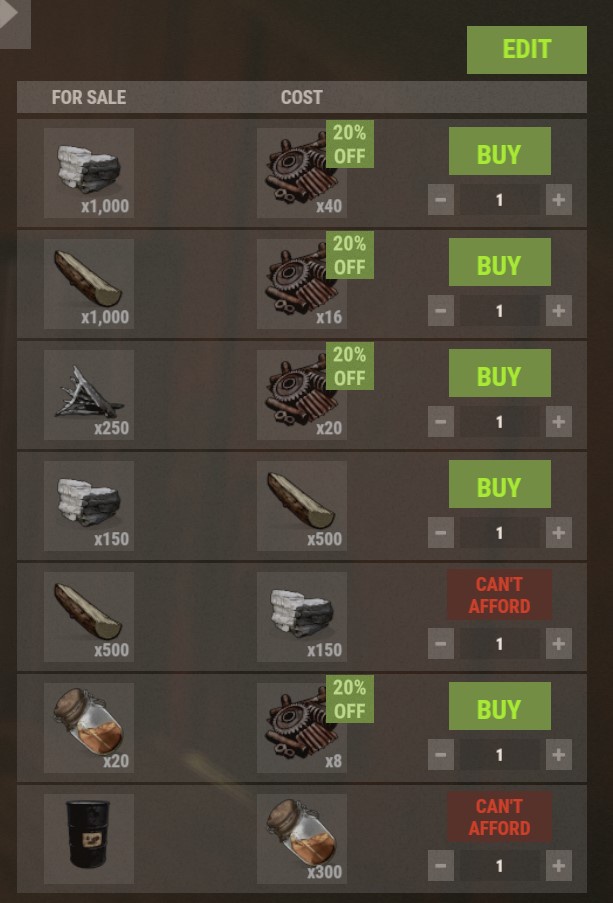
Can you click the edit button and show the data provider text? (When this issue occurs)
It sees it correctly. It is indeed called Town.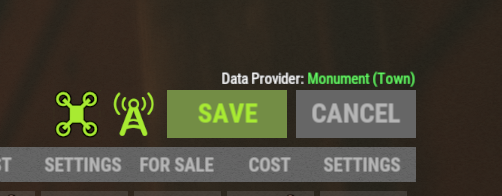
Merged post
It seems like now after the update even the reload doesn't help anymore. I can only see the Edit button even if I reload the CVS
Given the totality of symptoms, I think the most likely hypothesis is similar to what I wrote originally. I'm pretty sure Monument Finder is determining the position of the monument differently on server boot than it is determining when reloaded. One way to test this hypothesis is to edit and save the vending machine when you see it like above. Doing so will add a new entry to the data file. You can figure out which entry already in the data file corresponds to the same vending machine, and you will probably see that those two entries have different coordinates.
Im having a similiar issue. Im not using the monument finder at all though, only CVS to edit a vending machine at my "Town".
It works fine and saves, but on server restart the settings are back to vanilla. Reloading the plugin sets it back to my saved settings.
I think I finally figured it out. It's quite confusing as there is not much information about how to make the plugin work correctly with the custom monuments. The most confusing part is that once you put a custom monument in your map, next to the regular data file in oxide/data you get another file in oxide/data/CustomVendingSetup that contains the data for the map itself. These two don't seem to understand each other in what order they need to be loaded to the server. I erased the data in the main folder and changed the settings of the vending machines with the edit buttons. They now keep the info over the restart. The data file in the main folder now correctly shows the map marker name in the data:
"ShopName": "Tools & Stuff",
"Monument": "Town",
"Position": {
"x": -28.5025024,
"y": 5.15382,
"z": 26.7200012
},
Some information was still lost - for example the refill delay. I removed the CustomVendingSetup data folder, and that fully resolved my problem, as it now correctly uses just the regular data file and holds all information over the server restarts.
I hope this helps you, Juggernaut.
Thanks for your reply! :)
I have tried these steps with monumentfinder installed and set up, but i cant seem to get the dataprovider to show the monument, it only shows the map name. I think ill just add a reload to the plugin after restart for now, since im not really sure what the problem causing it is.
Do you have the monument marker? If so, the /mf closest should show it once you are nearby. /mf closest config should print your monument to the MF config file. I have the prevent building sphere around, so I set the MF to see that one as the bounds:
"Town": {
"Position": {
"Auto determine from monument marker": false,
"Auto determine from prevent building volume": true
},
"Rotation": {
"Auto determine from monument marker": false,
"Auto determine from prevent building volume": true
},
"Bounds": {
"Auto determine from monument marker": false,
"Auto determine from prevent building volume": true,
"Use custom bounds": false,
I also have the monument topology in there as it's just replacement of the bandit camp.
I have the custom monument tied to the monument-marker, and the vending machine placed pretty much in the middle of this zone.
My MonumentFinder Config:
"Sanctuary": {
"Position": {
"Auto determine from monument marker": true,
"Auto determine from prevent building volume": false
},
"Rotation": {
"Auto determine from monument marker": true,
"Auto determine from prevent building volume": false
},
"Bounds": {
"Auto determine from monument marker": false,
"Auto determine from prevent building volume": false,
"Use custom bounds": true,
"Custom bounds": {
"Size": {
"x": 80.0,
"y": 30.0,
"z": 80.0
},
"Center adjustment": {
"x": 0.0,
"y": 10.0,
"z": -30.0
}
However if i totally remove the CVS Datafile, redo the process with editing and saving, i still only get the Map as data-provider.
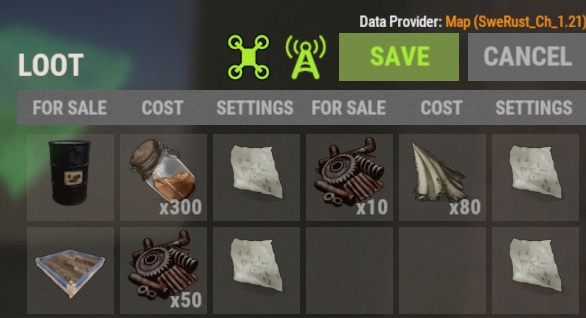
Im guessing that can be my problem?
Not sure if im missing any step in connecting the vending machine to the custom monument?
Thank you again for taking your time to assist me!
Try switching to "auto determine from prevent building volume" at all of them to true (including the bounds if you have the prevent building sphere or cube built in in the rust edit) and set the marker to false. That's my settings are and they seem to work too :)
This did indeed work! Thank you so much for your help! :)
Locked automatically
- 1
- 2