Server is on the latest release of oxide, v2.0.5246, with only crafting controller running for testing purposes. As soon as I craft a skull rock (the new purchasable item) I am kicked from the server with the errors below. Unloading the plugin does nothing to resolve this, nor does restarting the client or the server, the only way I can log back in is if an admin removes the skull rock from my inventory or I wipe the server.
From server console
disconnecting: Assertion failure. Values are not equal. Expected: 0 == 1 at UnityEngine.Assertions.Assert.Fail (System.String message, System.String userMessage) [0x00000] in <00000000000000000000000000000000>:0 at UnityEngine.Assertions.Assert.AreEqual[T] (T expected, T actual, System.String message, System.Collections.Generic.IEqualityComparer`1[T] comparer) [0x00000] in <00000000000000000000000000000000>:0 at UnityEngine.Assertions.Assert.AreEqual[T] (T expected, T actual, System.String message) [0x00000] in <00000000000000000000000000000000>:0 at UnityEngine.Assertions.Assert.AreEqual (System.Int32 expected, System.Int32 actual) [0x00000] in <00000000000000000000000000000000>:0 at MaterialReplacement.ReplaceRecursive (UnityEngine.GameObject obj, UnityEngine.Material[] find, UnityEngine.Material[] replace) [0x00000] in <00000000000000000000000000000000>:0 at Rust.Workshop.Skin.Apply (UnityEngine.GameObject obj, Skinnable skinnable, UnityEngine.Material[] Materials) [0x00000] in <00000000000000000000000000000000>:0 at ItemSkin.ApplySkin (UnityEngine.GameObject obj) [0x00000] in <00000000000000000000000000000000>:0 at BaseEntity.OnSkinChanged (System.UInt64 oldSkinID, System.UInt64 newSkinID) [0x00000] in <00000000000000000000000000000000>:0 at BaseEntity.Load (BaseNetworkable+LoadInfo info) [0x00000] in <00000000000000000000000000000000>:0 at HeldEntity.Load (BaseNetworkable+LoadInfo info) [0x00000] in <00000000000000000000000000000000>:0 at BaseNetworkable.ClientInit (ProtoBuf.Entity info) [0x00000] in <00000000000000000000000000000000>:0 at BaseEntity.ClientInit (ProtoBuf.Entity info) [0x00000] in <00000000000000000000000000000000>:0 at HeldEntity.ClientInit (ProtoBuf.Entity info) [0x00000] in <00000000000000000000000000000000>:0 at BaseNetworkable.ClientSpawn (ProtoBuf.Entity info) [0x00000] in <00000000000000000000000000000000>:0 at Client.CreateOrUpdateEntity (ProtoBuf.Entity info, System.Int64 size) [0x00000] in <00000000000000000000000000000000>:0 at Client
From F1 Console
AssertionException: Assertion failure. Values are not equal.
Expected: 0 == 1
Disconnected (Assertion failure. Values are not equal.
Expected: 0 == 1
at UnityEngine.Assertions.Assert.Fail (System.String message, System.String userMessage) [0x00000] in <00000000000000000000000000000000>:0
at UnityEngine.Assertions.Assert.AreEqual[T] (T expected, T actual, System.String message, System.Collections.Generic.IEqualityComparer`1[T] comparer) [0x00000] in <00000000000000000000000000000000>:0
at UnityEngine.Assertions.Assert.AreEqual[T] (T expected, T actual, System.String message) [0x00000] in <00000000000000000000000000000000>:0
at UnityEngine.Assertions.Assert.AreEqual (System.Int32 expected, System.Int32 actual) [0x00000] in <00000000000000000000000000000000>:0
at MaterialReplacement.ReplaceRecursive (UnityEngine.GameObject obj, UnityEngine.Material[] find, UnityEngine.Material[] replace) [0x00000] in <00000000000000000000000000000000>:0
at Rust.Workshop.Skin.Apply (UnityEngine.GameObject obj, Skinnable skinnable, UnityEngine.Material[] Materials) [0x00000] in <00000000000000000000000000000000>:0
at ItemSkin.ApplySkin (UnityEngine.GameObject obj) [0x00000] in <00000000000000000000000000000000>:0
at BaseEntity.OnSkinChanged (System.UInt64 oldSkinID, System.UInt64 newSkinID) [0x00000] in <00000000000000000000000000000000>:0
at BaseEntity.Load (BaseNetworkable+LoadInfo info) [0x00000] in <00000000000000000000000000000000>:0
at HeldEntity.Load (BaseNetworkable+LoadInfo info) [0x00000] in <00000000000000000000000000000000>:0
at BaseNetworkable.ClientInit (ProtoBuf.Entity info) [0x00000] in <00000000000000000000000000000000>:0
at BaseEntity.ClientInit (ProtoBuf.Entity info) [0x00000] in <00000000000000000000000000000000>:0
at HeldEntity.ClientInit (ProtoBuf.Entity info) [0x00000] in <00000000000000000000000000000000>:0
at BaseNetworkable.ClientSpawn (ProtoBuf.Entity info) [0x00000] in <00000000000000000000000000000000>:0
at Client.CreateOrUpdateEntity (ProtoBuf.Entity info, System.Int64 size) [0x00000] in <00000000000000000000000000000000>:0
at Client.OnEntities (Network.Message packet) [0x00000] in <00000000000000000000000000000000>:0
at Client.OnNetworkMessage (Network.Message packet) [0x00000] in <00000000000000000000000000000000>:0
at Facepunch.Network.Raknet.Client.HandleMessage () [0x00000] in <00000000000000000000000000000000>:0
at Facepunch.Network.Raknet.Client.Cycle () [0x00000] in <00000000000000000000000000000000>:0
at Client.Update () [0x00000] in <00000000000000000000000000000000>:0 ) - returning to main menu
Player kicks caused by crafting Skull RockFixed
It might help to know that this seems to be a new method from FacePunch, the skull rock isn't just a skin its an item in the F1 item menu. But the way you create it is to craft a rock with the skull skin, it then becomes the skull rock item.
Pretty sure this is what is causing the issue.
If unloading the plugin does nothing, it doesn't sound like it is the plugin and appears to be an error with the client. They've issued multiple client updates today to address this I believe.
Hi Wulf, the plugin has experienced the same issue in the past when the Hazmat/spacesuit was introduced, its the same type of error but I think caused by a slightly different issue. I can see what Whispers88 did to try and overcome it by checking if the default skinid was greater than 999999 but I don't think thats working in this instance as the item id may have actually changed after the item was "given" during crafting.
I think the players inventory is being left with an item that unity just can't handle, this is 99% confirmed as when an admin removes my rock from my inv I can log back in. Craft a new one and I'm locked out until its removed again.
Merged post
And I forgot to mention, if the admin takes the rock from my inventory and puts it into theirs they are also kicked with the same error and can't log in until it is removed. The issue is tied to the item that seems to have an invalid set of charecteristics.
I feel stupid for not realising earlier that I can just use the playerkill command from console to relive myslef of the rock and log back in normally, but hey, this might be useful to someone else shortly.
Merged post
I've done some more digging, the item ID's are certainly different and there is no way to handle this in the plugin that I can see, as every other item in the game just has a skinid that changes its appearance, this is a whole new item that is given when you craft it.
I added the following to the start of the InstantBulkCraft void just to see what the game thinks its crafting with returns to stop me getting kicked when it moves to the next if statement. No matter which "skin" you select, even the skull rock, the console reports back that the item id is 963906841.
var tempid = item.itemid;
Puts($"Item ID is {tempid}");
if (tempid == 1312843609)
{
return;
}
if (tempid == 963906841)
{
return;
}Without crafting controller running the player is then given item id 1312843609 to inventory, with it running they are given some hybrid I think with invalid properties.
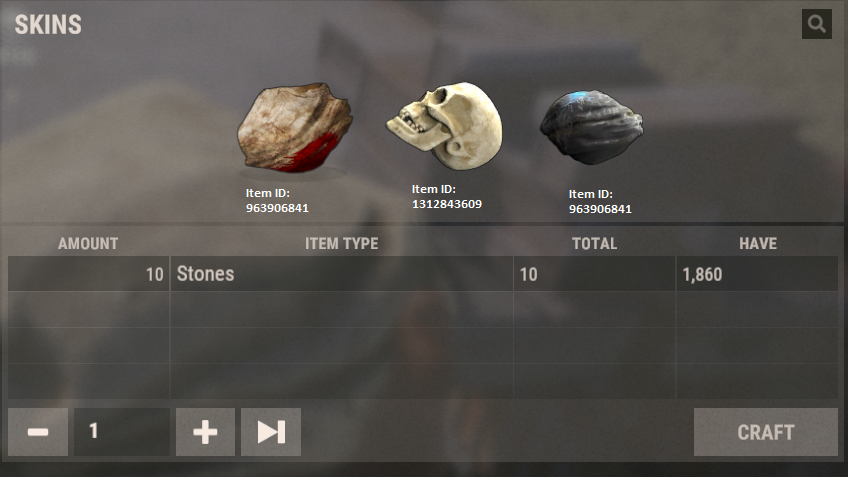
Merged post
Sorry to keep updating but I'm experimenting and it might just be useful. When I comment out the follwoing part of the code in InstantBulkCraft I don't get kicked anymore. The problem is in the first line of the if statement, its mixing the origianl item, the new item and the skin. By adding some extra debug code I managed to find that the game is asking for a rock with skind id 10197, but the rock is switched for a skull that can't have a skin applied. I think thats whats going on.
if (held != null)
{
held.skinID = skin == 0uL ? (ulong)craftSkin : skin;
held.SendNetworkUpdate();
}Thanks Jacko. I have supplied an update to handle all skins that have redirects on them, this should also automatically update for future skins as well. You will need to destroy any items that have the incorrect skin applied to them to avoid further kicks from those items. All future items that are skull skins and such should be fine.
Awesome, thank you Whispers88!
Locked automatically