Not sure if anyone finds this useful, or if it might have adverse affects on things like raid bases. But for some of our build type servers we do allow some players to use copypaste and it can get confusing as to who did what, or the danger of someone overwriting someone else's work etc.
misticos, feel free to completely delete this thread if it is frowned upon, no hard feelings just trying to help the community. Or feel free to implement the code it is super simple.
So I made a permission based system in the code. If the user has the "root" permission, or if the command is issued by a non player (ie. console, other plugin, etc.) then copy paste works literally as is.
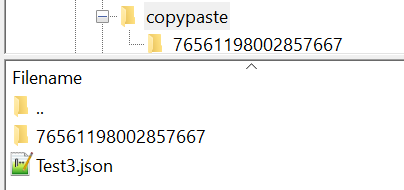
But if the user does NOT have the root permission, it saves anything they copy into a subdirectory named their steamID inside the copypaste directory (picture below). And same with the paste and pasteback, those both pull from their personal directory unless they have the root permission (or are not a player) then it pulls from the normal copy paste directory.
So if someone out there wants to implement this, it is stupid easy to do. There are three places you need to alter (copy, paste, and pasteback) and then a couple of single line additions but those are super easy.
I suggest you use notepad++ because it shows line numbers and I will be using them to guide you as some lines throughout the plugin can be very similar so rather than "find this text" I can just direct you to line numbers for the more complex parts.
First....
Find this line:
private string _copyPermission = "copypaste.copy",And add one line under it so it will look like this:
 private string _copyPermission = "copypaste.copy",
    _rootPermission = "copypaste.root",
Second ...
Find this line:
permission.RegisterPermission(_undoPermission, this);And add a line under it like so:
permission.RegisterPermission(_undoPermission, this);
permission.RegisterPermission(_rootPermission, this);
Third ...
Head on down to about line 518 or so (these line numbers won't bne perfect because my version is already altered but they will be close). There is a very short "if/else" statement there. You are going to make a few line alterations after the "else". Here is how to modify that small part of the code:
            if (checkFrom.Count > 0)
            {
                NextTick(() => CopyLoop(copyData));
            }
            else
            {
                string directoryPath = _subDirectory;

                if (!copyData.Player.HasPermission(_rootPermission) && !string.IsNullOrEmpty(copyData.Player.Id))
                    directoryPath += copyData.Player.Id.ToString() + "/";  // Save to SteamID subdirectory

                var path = directoryPath + copyData.Filename;
                var datafile = Interface.Oxide.DataFileSystem.GetDatafile(path);

                datafile.Clear();
I included more code than necessary so you can see what changes and what does not. You're really only messing with the "string directoryPath = _subDirectory;" part and the few lines under it.
The good news is, the next two steps are pretty much the exact same thing ...
Fourth:
Go to around line 2179 and here is what that area should look like after the changes ...
            var userId = player?.Id;

            string directoryPath = _subDirectory;

            if (!player.HasPermission(_rootPermission) && !string.IsNullOrEmpty(player.Id))
                directoryPath += userId + "/";   // Load from SteamID subdirectory

            var path = directoryPath + filename;

            if (!Interface.Oxide.DataFileSystem.ExistsDatafile(path))
                return new ValueTuple<object, PasteData>(Lang("FILE_NOT_EXISTS", userId), null);
Fifth:
Same thing again, this time around line 2451...
            string directoryPath = _subDirectory;

            if (!player.HasPermission(_rootPermission) && !string.IsNullOrEmpty(player.Id))
                directoryPath += player.Id + "/";   // Load from SteamID subdirectory

            var path = directoryPath + filename;

            if (!Interface.Oxide.DataFileSystem.ExistsDatafile(path))
                return Lang("FILE_NOT_EXISTS", player?.Id);
Anyways, hope someone finds it useful. Hope it is not against the rules to openly post modifications to someone's plugin. I don't know misticos that well so again, if this is not kosher just delete it, no hard feelings I promise. I did test it and now have it running on some of our servers that allow player copying. Here is how it looks on a filte structure ...