Greetings,
The TC UI has a conflict with the plugin Sort Button.
Is there any way we can get an option to move the button elsewhere?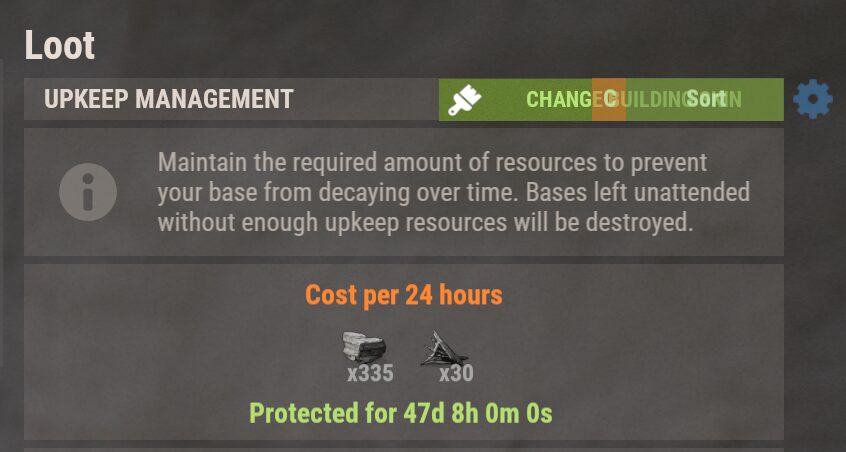
Thanks!
Tool Cupboard UI Conflict with Sort Button Plugin
Probably hard to keep manteinance for all the plugins around, but you can ask for the config to move the Button location anyways you can change the sort button location the plugin does have an option to move it around
"Custom UI Settings": {
"AnchorsMin": "0.5 1.0",
"AnchorsMax": "0.5 1.0",
"OffsetsMin": "192 -137",
"OffsetsMax": "573 0",
"Color": "0.5 0.5 0.5 0.33",
"ButtonsColor": "0.75 0.43 0.18 0.8",
"LootAllColor": "0.41 0.50 0.25 0.8",
"TextColor": "0.77 0.92 0.67 0.8",
"TextSize": 16,
"CategoriesTextSize": 14
}Good call - will look into tweaking that. Thanks!
yacvaguerProbably hard to keep manteinance for all the plugins around, but you can ask for the config to move the Button location anyways you can change the sort button location the plugin does have an option to move it around
"Custom UI Settings": { "AnchorsMin": "0.5 1.0", "AnchorsMax": "0.5 1.0", "OffsetsMin": "192 -137", "OffsetsMax": "573 0", "Color": "0.5 0.5 0.5 0.33", "ButtonsColor": "0.75 0.43 0.18 0.8", "LootAllColor": "0.41 0.50 0.25 0.8", "TextColor": "0.77 0.92 0.67 0.8", "TextSize": 16, "CategoriesTextSize": 14 }
I just realized you mixed up the "Quick Sort" plugin for the "Sort Button" plugin (which is what I'm referencing) - so your method won't work for this unfortunately.
TBH sorting in a TC isn't too important for me at least .. so I have disabled it to clear up that mess you show in your image .. but yeah would be good to have some ability to position ideally in either or both plugins.
Care to share where or how you disabled it?Wibble
TBH sorting in a TC isn't too important for me at least .. so I have disabled it to clear up that mess you show in your image .. but yeah would be good to have some ability to position ideally in either or both plugins.
Replace these lines in the config (you set the value to false from true)
"assets/prefabs/deployable/tool cupboard/cupboard.tool.deployed.prefab": {
"Enabled": false,
"OffsetX": 476.5
},
"assets/prefabs/deployable/tool cupboard/retro/cupboard.tool.retro.deployed.prefab": {
"Enabled": false,
"OffsetX": 476.5
},