Automatic Authorization works with TC and Auto Turrets but not doors, etc...

No error messages in console.

Using default config:

{
"Clear Share Data On Map Wipe": false,
"Chat Settings": {
"Send Authorization Success Message": true,
"Chat Command": "aa",
"Chat UI Command": "aaui",
"Chat Prefix": "<color=#00FFFF>[AutoAuth]</color>: ",
"Chat SteamID Icon": 0
},
"Teams Share Settings": {
"Enabled": true,
"Share Cupboard": true,
"Share Turret": true,
"Key Lock Settings": {
"Enabled": true,
"Share Door": true,
"Share Box": true,
"Share Other Locked Entities": true
},
"Code Lock Settings": {
"Enabled": true,
"Share Door": true,
"Share Box": true,
"Share Other Locked Entities": true
}
},
"Friends Share Settings": {
"Enabled": true,
"Share Cupboard": true,
"Share Turret": true,
"Key Lock Settings": {
"Enabled": true,
"Share Door": true,
"Share Box": true,
"Share Other Locked Entities": true
},
"Code Lock Settings": {
"Enabled": true,
"Share Door": true,
"Share Box": true,
"Share Other Locked Entities": true
}
},
"Clans Share Settings": {
"Enabled": true,
"Share Cupboard": true,
"Share Turret": true,
"Key Lock Settings": {
"Enabled": true,
"Share Door": true,
"Share Box": true,
"Share Other Locked Entities": true
},
"Code Lock Settings": {
"Enabled": true,
"Share Door": true,
"Share Box": true,
"Share Other Locked Entities": true
}
},
"Default Share Settings": {
"Teams": {
"Enabled": true,
"Share Cupboard": true,
"Share Turret": true,
"Key Lock Settings": {
"Enabled": true,
"Share Door": true,
"Share Box": true,
"Share Other Locked Entities": true
},
"Code Lock Settings": {
"Enabled": true,
"Share Door": true,
"Share Box": true,
"Share Other Locked Entities": true
}
},
"Friends": {
"Enabled": true,
"Share Cupboard": true,
"Share Turret": true,
"Key Lock Settings": {
"Enabled": true,
"Share Door": true,
"Share Box": true,
"Share Other Locked Entities": true
},
"Code Lock Settings": {
"Enabled": true,
"Share Door": true,
"Share Box": true,
"Share Other Locked Entities": true
}
},
"Clans": {
"Enabled": true,
"Share Cupboard": true,
"Share Turret": true,
"Key Lock Settings": {
"Enabled": true,
"Share Door": true,
"Share Box": true,
"Share Other Locked Entities": true
},
"Code Lock Settings": {
"Enabled": true,
"Share Door": true,
"Share Box": true,
"Share Other Locked Entities": true
}
}
},
"Version": {
"Major": 1,
"Minor": 3,
"Patch": 0
}
}
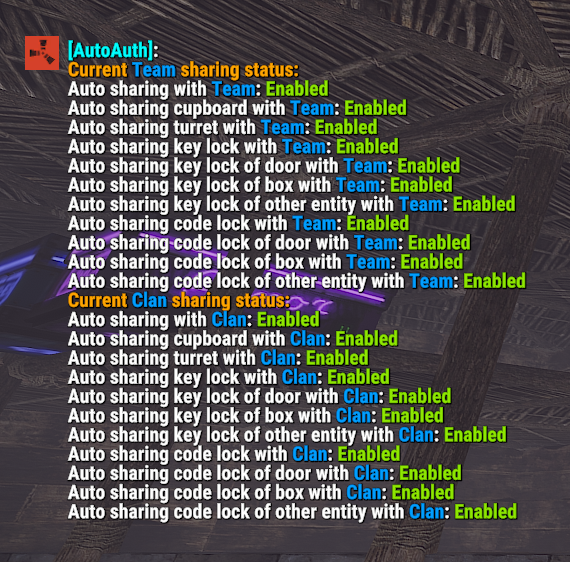

 

Use this command to check if you have them enabled

  • /autoauth - View status of automatic authorization

Doesnt work for me either.. Tc, turret etc work, codelock not and it is on in the settings.
[img]https://i.imgur.com/9t2UDP6.png[/img]

[img]https://i.imgur.com/9t2UDP6.png[/img][img]https://i.imgur.com/9t2UDP6.png[/img]

did you get it to work, im having same problem

Does anyone else have this issue? Can you help me test it?😐

ruIwson9GtxeqdU.jpg Arainrr

Does anyone else have this issue? Can you help me test it?😐

I dont have any problems with doors, auto turrets, locks on furnaces and chests but locks on switches dont transfer authorisation, maybe not compatible with ElectroLock plugin.


BUT if i type /autoauth i get this error in the console

Failed to call hook 'CmdAutoAuth' on plugin 'AutomaticAuthorization v1.3.0' (FormatException: Index (zero based) must be greater than or equal to zero and less than the size of the argument list.)
  at System.Text.StringBuilder.AppendFormatHelper (System.IFormatProvider provider, System.String format, System.ParamsArray args) [0x000ff] in <eae584ce26bc40229c1b1aa476bfa589>:0
  at System.String.FormatHelper (System.IFormatProvider provider, System.String format, System.ParamsArray args) [0x00023] in <eae584ce26bc40229c1b1aa476bfa589>:0
  at System.String.Format (System.String format, System.Object[] args) [0x00020] in <eae584ce26bc40229c1b1aa476bfa589>:0
  at Oxide.Plugins.AutomaticAuthorization.Lang (System.String key, System.String id, System.Object[] args) [0x0000e] in <2f7cc59db09449bf9e4d44a4ec9a91c4>:0
  at Oxide.Plugins.AutomaticAuthorization.HandleStatusCommand (System.Text.StringBuilder stringBuilder, BasePlayer player, Oxide.Plugins.AutomaticAuthorization+StoredData+ShareData shareData, System.Collections.Generic.IEnumerable`1[T] availableTypes) [0x0005b] in <2f7cc59db09449bf9e4d44a4ec9a91c4>:0
  at Oxide.Plugins.AutomaticAuthorization.CmdAutoAuth (BasePlayer player, System.String command, System.String[] args) [0x00094] in <2f7cc59db09449bf9e4d44a4ec9a91c4>:0
  at Oxide.Plugins.AutomaticAuthorization.DirectCallHook (System.String name, System.Object& ret, System.Object[] args) [0x00fc9] in <2f7cc59db09449bf9e4d44a4ec9a91c4>:0
  at Oxide.Plugins.CSharpPlugin.InvokeMethod (Oxide.Core.Plugins.HookMethod method, System.Object[] args) [0x00079] in <e23ba2c0f246426296d81c842cbda3af>:0
  at Oxide.Core.Plugins.CSPlugin.OnCallHook (System.String name, System.Object[] args) [0x000d8] in <50629aa0e75d4126b345d8d9d64da28d>:0
  at Oxide.Core.Plugins.Plugin.CallHook (System.String hook, System.Object[] args) [0x00060] in <50629aa0e75d4126b345d8d9d64da28d>:0

Did you manage to solve it?

MudXA90WWIsfRi4.jpg Birruga

Did you manage to solve it?

Still the same as my previous post but now no console messages,

Try to delete the wrong language file

ruIwson9GtxeqdU.jpg Arainrr

Try to delete the wrong language file

The zh-CN language file? When I delete this and reload the plugin it very quickly comes back