Hi, I'm having a bug with the page buttons being out of alignment. I'm using a screen resolution of 2560 x 1440 See screenshot:
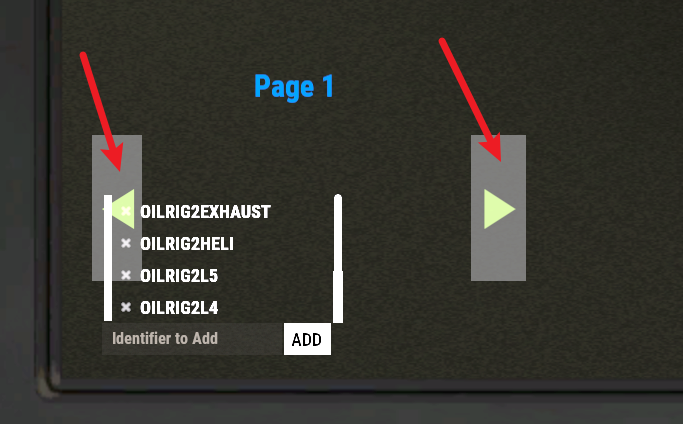
Hi, I'm having a bug with the page buttons being out of alignment. I'm using a screen resolution of 2560 x 1440 See screenshot:
Thanks for reporting this I will try and get to fixing that today /
This will likely be difficult to "fix". The computer station's vanilla UI (the bookmark list) does not scale using the same rules as CUI. CUI positions and sizes elements using a dynamic number of pixels based on the user's resolution. However, the computer station UI is sized relative to the screen edge using a fixed number of pixels regardless of the user's resolution. This means you cannot get any CUI overlay to be consistently positioned relative to the computer station UI, without knowing the user's resolution and factoring that into the calculations.
I see only 3 possible approaches to solve this. Let me know if you can think of other approaches.
So, guys, I have same screen resolution and the same visual problem, whats the solution?
If you wish to add me on discord @Khan#8615 I can code some positions for your screen size if you are willing to help test /
I have submitted a request to FacePunch about the problem so hopefully, they will re-design the UI for computer stations.
I've honestly been trying to come up with a solution that would work for this problem but nothing seems to work.
I only have 1920 by 1080 monitors so I cannot properly code the positions for higher scales, I can for lower resolutions but ya.
Not sure what to do about it.
Setting the offsets has zero effect and is actually worse using because it breaks completely if you adjust the UI scaling in rust vs just using the normal positions. For this particular problem using the computer station UI System
        private CuiLabel _stationDescription = new CuiLabel
        {
            Text =
            {
                Text = "{editorDescription}",
                FontSize = 15,
                Align = TextAnchor.MiddleCenter
            },
            RectTransform =
            {
                AnchorMin = "0.1 0.22",
                AnchorMax = "0.15 0.25",
                /*AnchorMin = "0 0",
                AnchorMax = "0 0",
                OffsetMin = "140 170",
                OffsetMax = "190 190",*/
            }
        };
        private void CreateStationChangePage(ref CuiElementContainer container, int from)
        {
            container.Add(new CuiButton
                {
                    Button =
                    {
                        Command = $"autocctvstations.station.page {(from - 1)}",
                        Color = _config.Colors.ButtonGrey.Rgb //"0 0 0 0.40"
                    },
                    RectTransform =
                    {
                        AnchorMin = "0.046 0.1",
                        AnchorMax = "0.065 0.2",
                        /*AnchorMin = "0 0",
                        AnchorMax = "0 0",*/
                        /*OffsetMin = "55 70",
                        OffsetMax = "85 150",*/
                    },
                    Text =
                    {
                        Text = _config.Text.BackButtonText,
                        Color = _config.Colors.ButtonGreenText.Rgb,
                        FontSize = 25,
                        Align = TextAnchor.MiddleCenter,
                        Font = "robotocondensed-regular.ttf"
                    }
                },
                "Overlay",
                "ButtonBackstation");

            container.Add(new CuiButton
                {
                    Button =
                    {
                        Command = $"autocctvstations.station.page {(from + 1)}",
                        Color = _config.Colors.ButtonGrey.Rgb //"0 0 0 0.40"
                    },
                    RectTransform =
                    {
                        AnchorMin = "0.194 0.1",
                        AnchorMax = "0.215 0.2"
                        /*AnchorMin = "0 0",
                        AnchorMax = "0 0",
                        OffsetMin = "250 70",
                        OffsetMax = "280 150",*/
                    },
                    Text =
                    {
                        Text = _config.Text.ForwardButtonText,
                        Color = _config.Colors.ButtonGreenText.Rgb,
                        FontSize = 25,
                        Align = TextAnchor.MiddleCenter,
                        Font = "robotocondensed-regular.ttf"
                    }
                },
                "Overlay",
                "ButtonForwardstation");
}khan
I only have 1920 by 1080 monitors so I cannot properly code the positions for higher scales, I can for lower resolutions but ya.
Not sure what to do about it
Just switch Rust to windowed mode. From there, you can select any resolution for accuracy. Even better, you can resize the window horizontally or vertically with your mouse to view nearly unlimited resolutions.